
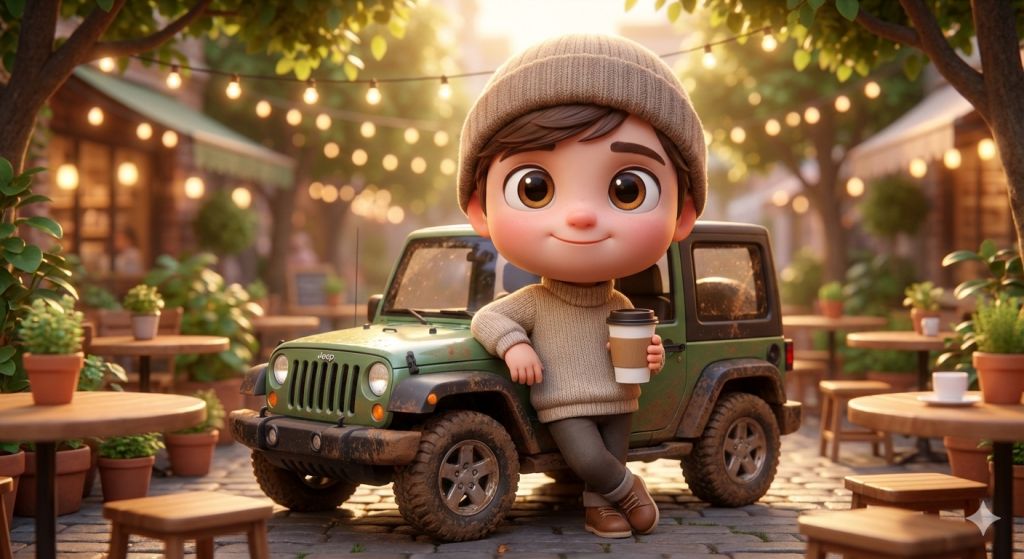
Illustrators, fan artists, and avatar creators reach for Pixar style AI prompts when one character idea needs to branch into portraits, sticker grids, emoji sets, pets, profile-card scenes, and poster remixes without losing warmth or identity. This hub works best as a routing layer, so you can choose the right Pixar-style prompt family before you start iterating on the wrong layout.
Image Example

Pack Overview
This page works best as a routing hub for Pixar-style visual work. The collection spans single-character portraits, expressive sticker grids, emoji packs, social-profile scene builds, child-and-pet portraits, and TV-show poster remixes, so the user can choose the right prompt structure before they start rewriting a generic cartoon brief.
- Prompt 1: Chibi character lifestyle scenes for playful full-body portraits with props and mini environments.
- Prompt 2: Character-and-pet portraits for warm close-up identity work with uploaded references.
- Prompt 3: Emoji expression grids for character-consistent 3×3 avatar sets.
- Prompt 4: Sticker-grid prompts for multi-pose portrait packs and export-ready expression sheets.
- Prompt 5: X profile-card scenes for social-identity mockups with a character breaking out of the UI frame.
- Prompt 6: TV-show poster remixes for animated one-sheet reinterpretations of existing series.
Strategic Deployment Guide
Model fit: ChatGPT image generation is the safest starting point when the prompt needs cleaner layout control, better face consistency, and readable poster hierarchy; Gemini is useful for fast expression or style reruns once the base character system is stable. Pick the output type first, then open the linked standalone article for the deeper prompt logic.
- Target: Creators choosing the right Pixar-style prompt branch before opening a standalone article.
- Input: Character identity, output format, supporting props, whether a reference photo is available, and whether the goal is portraiture, a sticker set, or a poster system.
- Expected output: One clear prompt-route decision with the right standalone article and model direction for the job.
- Quality check: The chosen route should match the asset type first instead of forcing every Pixar-style brief into the same generic portrait prompt.
Prompt 1: 3D Chibi Character Lifestyle Scene
- Target: Character artists and casual-brand creators building cute full-body portraits with props.
- Input: Character identity, outfit, one hero prop or vehicle, pose, and lifestyle mood.
- Model fit: Gemini and Midjourney-style tools for stylized 3D form, props, and color-rich environments.
- Expected output: A chibi full-body render with oversized eyes, soft materials, and one grounded lifestyle scene.
- Quality check: The character should stay cute and readable without the vehicle or prop overwhelming the body proportions.
Ultra-detailed 3D chibi-style character with a big head, expressive eyes, cute proportions, smooth stylized skin, and a friendly smile.

Place the character in a clean lifestyle scene with [outfit], one hero prop such as [vehicle or object], and a soft colorful environment that supports [mood].

Use glossy animated rendering, soft warm light, and a crisp full-body composition. Keep the proportions playful, the materials polished, and the scene clean enough for sticker, avatar, or social-post reuse.
Open the full Prompt 1 article.
Prompt 2: Character and Pet Portrait
- Target: Families, gift creators, and portrait artists turning a reference photo into a warmer Pixar-style character scene.
- Input: Uploaded face reference, child or adult identity details, pet type, expression, and lighting mood.
- Model fit: Upload-friendly models such as ChatGPT, Gemini, or Grok for face preservation and fur detail.
- Expected output: A close-up emotional portrait that keeps the person and pet recognizable while shifting the scene into a glossy animated lane.
- Quality check: The face and the pet should both stay emotionally readable before adding costume, scenery, or extra stylization.
3D Pixar-style portrait of [person] hugging [pet].

Preserve the uploaded face identity, eye shape, smile, and overall age read. Use soft warm lighting, expressive oversized eyes, glossy skin shading, ultra-detailed pet fur, and a wholesome close-up framing.

Keep the scene heartfelt, polished, and family-friendly rather than exaggerated into caricature noise.
Open the full Prompt 2 article.
Prompt 3: Emoji Expression Grid
- Target: Sticker makers, community builders, and creators who need one character repeated across multiple emotions.
- Input: Character identity, 9 target emotions, background cleanliness, and grid format.
- Model fit: Character-consistency-friendly image models that can preserve the same face across a 3×3 sheet.
- Expected output: A Pixar-style emoji grid with stable facial structure and clearly differentiated expressions.
- Quality check: The avatar should read as one consistent person instead of nine slightly different characters.
A cute 3D cartoon avatar emoji set in Pixar-style character design with soft clay-like texture, smooth lighting, and a clean 3x3 expression grid.

Keep the same facial identity across all nine cells while varying [emotion list]. Use a simple clean background, readable spacing, and expression clarity strong enough for sticker or chat-pack use.
Open the full Prompt 3 article.
Prompt 4: Sticker Grid Portrait Pack
- Target: Personal-brand creators and merch designers building expressive sticker sheets from one character identity.
- Input: One subject reference, pose list, expression list, white background requirement, and sticker-pack title.
- Model fit: Image tools that preserve proportions and facial structure across multiple poses in one grid.
- Expected output: A multi-pose sticker sheet with one stable subject rendered in varied gestures and moods.
- Quality check: Each cell should feel like the same character in a new pose, not like a loosely related character family.
Create a Pixar-style 3D character sticker grid based on [subject identity].

Render 9 clean cells on white, each with a different pose or emotion such as [pose set]. Preserve facial structure, hairstyle, color palette, and material finish across every sticker.

Keep the sheet export-friendly, evenly spaced, and readable at small sizes.
Open the full Prompt 4 article.
Prompt 5: X Profile Card Scene
- Target: Social creators and profile-brand designers turning a platform identity into a playful 3D scene.
- Input: Avatar reference, handle details, badge style, one companion prop or pet, and breakout pose.
- Model fit: Grok, ChatGPT, or similar image tools that can preserve UI framing while stylizing the character.
- Expected output: A social-profile-card mockup where the Pixar-style character emerges from the interface frame.
- Quality check: The profile-card shell should remain readable enough to look intentional rather than like a random floating rectangle.
Create a cute ultra-detailed 3D cartoon character in Pixar-style sitting naturally on the lower edge of an X profile card and emerging out of the profile frame.

Preserve [avatar identity], show [username and badge cues], and add one companion element such as [pet or object]. Keep the UI details clean, the breakout pose believable, and the card readable as a profile object.
Open the full Prompt 5 article.
Prompt 6: TV Show Poster Remix
- Target: Fan artists and poster designers reimagining existing shows as animated one-sheet key art.
- Input: TV show title, cast lineup, iconic setting, palette cues, tagline, and poster layout direction.
- Model fit: ChatGPT or Gemini for ensemble grouping, title adaptation, and glossy poster lighting.
- Expected output: A theatrical poster-style composition with a caricature cast, world-matched palette, and animated movie finish.
- Quality check: The show identity should still read immediately even after the cast is translated into a warm 3D animated style.
Pixar-style movie-poster reimagining of the TV show [TV SHOW].

Feature the main cast as charming 3D CGI caricature characters with exaggerated expressive features, big eyes, and warm glossy rendering. Group them in a dynamic hero-poster pose consistent with the show's iconic themes, color palette, and setting.

Add a playful animated-movie title logo, one short tagline, cinematic lighting, and a professional studio-poster composition with high detail and a clean theatrical hierarchy.
Open the full Prompt 6 article.
Selection Logic
Use Prompt 1 when the scene needs a full-body lifestyle setup, Prompt 2 for emotional portraiture with a pet or companion, Prompt 3 when the output is an emoji set, Prompt 4 when the goal is an export-ready sticker sheet, Prompt 5 when the scene needs to interact with a social UI frame, and Prompt 6 when the brief is show-level poster reinterpretation rather than one single character portrait.
Implementation Steps
- Choose the asset type before the style polish: Portraits, sticker sheets, emoji packs, UI scenes, and posters each need different layout logic.
- Lock one identity system first: Define hairstyle, face shape, palette, and signature accessories before you vary pose, emotion, or setting.
- Use reference uploads when likeness matters: Prompt 2, 4, and 5 especially benefit from an uploaded face or avatar source.
- Keep text or UI repair for post-production: Sticker titles, profile handles, and poster microcopy should be cleaned manually after generation.
- Open the linked page after choosing the branch: This hub is the route selector; the full execution details live in the standalone article.
Use Cases
- Creator-brand sticker pack: A streamer uses Prompt 3 and Prompt 4 to build Discord emoji, Telegram stickers, and merch-ready portrait sheets from one avatar identity.
- Family gift portrait: A parent uses Prompt 2 to turn one child and pet photo into a polished birthday print or digital keepsake.
- Social-profile art refresh: A personal brand uses Prompt 5 to turn a normal headshot into a 3D profile-card mockup for banner art and pinned-post visuals.
- Fan-art poster project: A designer uses Prompt 6 to reinterpret a favorite TV show as a warm animated one-sheet without inventing a whole new style language from scratch.
Why These Prompts Work
These prompts work as a collection because they separate the real control points inside Pixar-style generation: single-character identity, emotional expression, multi-pose consistency, UI framing, companion relationships, and poster-level worldbuilding. That separation keeps the user from forcing one generic character prompt to solve every animated output type.
Troubleshooting & Optimization
- The character identity drifts between versions: Re-state face shape, hairstyle, age read, and one signature accessory, then keep the background simpler.
- The output looks like generic cartoon art: Add material cues such as glossy skin shading, soft cinematic lighting, plush textures, or clay-like finish instead of only writing “Pixar style.”
- The grid outputs feel inconsistent: Reduce pose complexity and ask for the same camera distance, same background, and the same character proportions across all cells.
- The poster remix loses the original show: Re-anchor the prompt with the cast hierarchy, signature palette, and one or two setting cues before adding more dramatic effects.
FAQ
- Q: What are Pixar style AI prompts best used for?
A: They work best when the goal is not just “make it cartoon,” but to turn one subject into a warmer 3D animated asset such as a portrait, sticker set, emoji grid, profile-card scene, or poster remix. - Q: Which prompt should I start with if I only have one face photo?
A: Start with Prompt 2 for emotional portrait work or Prompt 4 for a sticker grid. Both routes give you a stronger identity lock than beginning with a poster remix. - Q: Which branch is best for creators building chat or community assets?
A: Prompt 3 and Prompt 4 are the clearest community-asset branches because they are already structured around repeated character consistency across multiple cells. - Q: Can I use the TV-show branch for movies, books, or games too?
A: Yes, but keep the same logic: cast hierarchy, world palette, and title treatment should still be adapted as if you are designing one coherent animated poster rather than a loose fan collage.
Need adjacent prompt systems? Pair this hub with the ChatGPT Design Prompts page when the character art also needs brand-system or campaign-layout follow-through, then browse the Image & Design archive for more visual prompt types.
Use this page as the route selector, then open the linked standalone Pixar-style article that matches the exact output you want to generate.
Explore more? View the Image & Design or Prompt Engineering Guides category.
I hope you found this Pixar-style collection helpful.
Follow me @bigprompt for more.
Like/Repost if you can this prompt.
Internal link:
TV Show Pixar-Style Poster Prompt: Animated One-Sheet Reimagining
ChatGPT Design Prompts That Clarify Brand Systems and UX Work
ChatGPT Marketing Design Prompts That Sharpen Fast Campaign Assets
Juice Advertising Poster Prompt: Pack-Led Fruit Splash Campaigns
Coffee Advertising Poster Prompt for Futuristic Brand Dashboard Campaigns
Big Prompt Hub Review
This page is strongest as a Pixar-style routing layer, not as a replacement for every standalone prompt page in the cluster. Its value is that it helps users quickly choose between portraits, sticker grids, emoji sheets, profile-card scenes, and poster remixes without rewriting the whole brief from scratch. The tradeoff is deliberate compression: once the route is chosen, the user should continue into the linked page for the deeper prompt logic and model-specific nuances.