
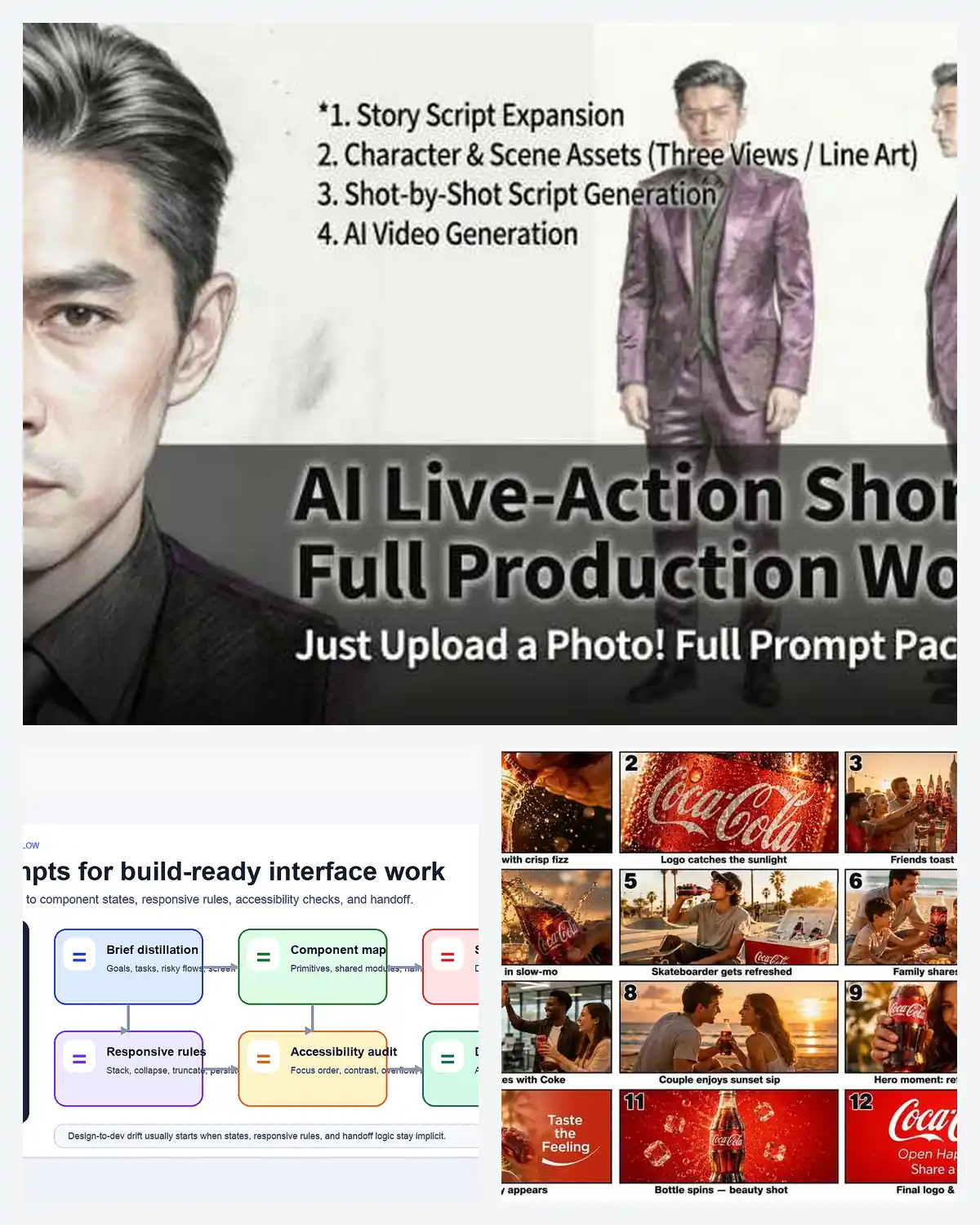
AI workflow prompts work best for operators, product teams, researchers, and creators when the job needs a staged system rather than one clever one-shot instruction. This hub helps users choose the right workflow branch for research briefings, executive planning, frontend handoff, storyboard-to-video production, or short-drama assembly before they start building the wrong process.
AI Workflow Prompts Overview
This page works best as a workflow-selection hub. The collection spans source-to-brief research systems, executive planning frameworks, frontend design-to-dev handoff flows, storyboard-to-video ad production, and AI live-action short-drama assembly, so you can choose the right staged prompt system before you try to force everything into one generic chat session.
- Prompt 1: NotebookLM + Claude workflows for source-grounded briefings, theses, and research decisions.
- Prompt 2: Executive productivity frameworks for planning, decomposition, prioritization, and decision support.
- Prompt 3: Frontend UI workflows for turning product briefs into state maps, accessibility checks, and handoff specs.
- Prompt 4: GPT Image 2 + Seedance workflows for moving storyboard stills into short ad cuts.
- Prompt 5: AI live-action short-drama workflows for moving from premise and beats to casting, stills, and short clips.
Strategic Deployment Guide
Model fit: Use a text model with good reasoning and formatting control for Prompt 1, 2, and 3, then use visual models only when the workflow explicitly reaches stills or video generation. The main win in these AI workflow prompts comes from staged handoffs, not from treating the model as one universal black box.
- Target: Teams and solo operators choosing the right workflow system before they define step inputs and outputs.
- Input: Goal, available source material, collaboration context, required outputs, and whether the job stays in text or expands into visuals and clips.
- Expected output: One clear workflow route with the right standalone page and staged prompt system for the job.
- Quality check: The chosen route should break the work into meaningful stages instead of collapsing planning, generation, review, and delivery into one vague prompt.
Prompt 1: NotebookLM Research Briefing Workflow
- Target: Researchers, analysts, students, and operators turning source libraries into structured outputs.
- Input: PDFs, notes, transcripts, NotebookLM summaries, thesis question, and final briefing goal.
- Model fit: NotebookLM for grounded extraction, then Claude or another strong reasoning model for synthesis and judgment.
- Expected output: A thesis, briefing, source audit, learning plan, or weekly review built from grounded material rather than memory-only drafting.
- Quality check: Every claim in the final output should still trace back to a captured source summary or citation before it becomes a decision input.
STAGE 1 — GROUND THE SOURCE:
Use NotebookLM to summarize [source set], extract key claims, and capture citations relevant to [research goal].

STAGE 2 — SYNTHESIZE:
Send the NotebookLM output into Claude with this role:
"You are a research strategist. Turn these source-grounded notes into a [briefing / thesis / audit / learning plan]. Keep every recommendation tied to the supplied evidence, flag uncertainty, and separate facts from interpretation."

STAGE 3 — DECIDE:
Ask for one final decision structure with [priority ranking / next steps / open questions].
Open the full Prompt 1 article.
Prompt 2: Executive Productivity Framework Workflow
- Target: Founders, managers, consultants, and solo operators planning multi-step work under time pressure.
- Input: Problem statement, constraints, priority horizon, stakeholders, and desired planning output.
- Model fit: A reasoning-focused text model that can decompose goals, compare options, and keep output structured.
- Expected output: A structured execution plan, prioritization map, or decision memo instead of a vague brainstorm.
- Quality check: Each framework response should expose assumptions, tradeoffs, and next actions rather than stopping at generic advice.
ROLE:
Act as an executive operator helping with [problem].

FRAMEWORK:
1. Restate the objective and constraints.
2. Break the work into [decision areas].
3. Rank priorities by impact, urgency, and reversibility.
4. Produce one execution plan with next actions, risks, and review checkpoints.

OUTPUT:
Return a concise executive brief, not a brainstorm dump.
Open the full Prompt 2 article.
Prompt 3: Frontend UI Handoff Workflow
- Target: Product teams, designers, and frontend developers reducing design-to-dev drift.
- Input: Product brief, core screens, component library, edge states, breakpoints, and accessibility requirements.
- Model fit: A structured text model for state mapping, responsive behavior, and explicit handoff output.
- Expected output: A workflow that moves from page intent to states, interaction rules, accessibility checks, and implementation notes.
- Quality check: The workflow should expose hidden states and responsive decisions before code starts, not after QA finds them.
INPUT:
Take this product brief for [screen or flow].

WORKFLOW:
1. Distill the goal, user task, and screen hierarchy.
2. List every component and state: default, hover, focus, loading, empty, error, success.
3. Define responsive behavior across [breakpoints].
4. Add accessibility checks for labels, focus order, contrast, and keyboard use.
5. Return a handoff-ready spec with implementation notes.
Open the full Prompt 3 article.
Prompt 4: Storyboard-to-Video Ad Workflow
- Target: Brand teams and ad creators moving from storyboard stills into short AI-generated clips.
- Input: Product brief, visual storyboard stills, continuity notes, shot order, and final cut length.
- Model fit: GPT Image 2 for consistent storyboard stills, then Seedance or a similar video model for clip generation.
- Expected output: A short ad cut built from staged still generation, continuity checks, and final clip assembly.
- Quality check: Each still should already communicate camera angle, product continuity, and scene intention before it moves into video generation.
STAGE 1 — STORYBOARD:
Generate 3 to 5 stills for [product or campaign], locking camera angle, product continuity, lighting, and sequence order.

STAGE 2 — CLIP PROMPTS:
For each still, write one video instruction covering [motion], [duration], and [transition logic].

STAGE 3 — ASSEMBLY:
Combine the rendered clips into one short sequence and check continuity before adding the final brand end card.
Open the full Prompt 4 article.
Prompt 5: Live-Action Short Drama Workflow
- Target: Short-form video creators turning a premise into episode beats, casting, stills, and short clips.
- Input: Premise, episode count, character roster, casting cues, scene beats, and clip-production goals.
- Model fit: A text model for beat design and casting logic, plus image and video models once the script spine is locked.
- Expected output: A staged live-action short-drama workflow from premise through casting, reference stills, shot planning, and clip assembly.
- Quality check: Character identity and scene continuity should be stabilized before still generation or Seedance-style clip production begins.
STAGE 1 — STORY SPINE:
Turn [premise] into episode beats, conflict progression, and one short-scene list.

STAGE 2 — CASTING AND LOOK:
Define each character's identity, wardrobe, age read, and casting vibe for [cast list].

STAGE 3 — VISUAL PREP:
Generate reference stills and a shot plan for [scene set], then move only the strongest stills into clip-generation prompts.

STAGE 4 — ASSEMBLY:
Review continuity, pacing, and character consistency before cutting the final short-drama sequence.
Open the full Prompt 5 article.
Selection Logic
Use Prompt 1 when the work starts from source materials, Prompt 2 when the problem is planning and prioritization, Prompt 3 when the workflow needs UI states and handoff, Prompt 4 when the pipeline starts with storyboard stills and ends in ad clips, and Prompt 5 when the project is a story-led short-drama production rather than a commercial video sequence.
Implementation Steps
- Prompt 1 workflow: Export NotebookLM source summaries, citations, and briefing notes first, then synthesize them only after the evidence layer is stable.
- Prompt 2 workflow: Write the objective, constraints, and roadmap horizon before asking the model to rank options or commit to one execution plan.
- Prompt 3 workflow: Distill the product brief into UI screens, component states, and responsive breakpoints before you request an accessibility audit or handoff output.
- Prompt 4 workflow: Lock storyboard stills, shot panels, and video sequence order before clip generation begins.
- Prompt 5 workflow: Lock the cast sheet, character identity, and scene beats before still generation or short-video assembly starts.
Use Cases
- Weekly strategy briefing: A founder uses Prompt 1 and Prompt 2 to turn source material into a decision memo and next-week plan instead of juggling notes across tabs.
- Design-to-dev sprint: A product trio uses Prompt 3 to identify component states, empty cases, and accessibility checks before the frontend sprint starts.
- Ad concept production: A brand team uses Prompt 4 to turn one product storyboard into consistent five-second clips and a final short ad.
- Short-drama pre-production: A creator uses Prompt 5 to move from premise to casting, stills, and scene plans without losing continuity between steps.
Why These Prompts Work
These prompts work together because they all solve staged execution problems. Each branch makes the handoff explicit: source to synthesis, objective to plan, brief to UI spec, storyboard to clip, or premise to scene sequence. That is what keeps an AI workflow prompt useful instead of turning it into a long but unfocused mega-prompt.
Troubleshooting & Optimization
- The workflow feels bloated: Cut one stage and ask what output actually needs to exist before the next step begins.
- The model gives polished nonsense: Strengthen the input capture stage with source notes, constraints, or reference stills before asking for synthesis.
- The handoff breaks between stages: End each stage with a required checkpoint such as continuity review, state audit, or citation check.
- The visual stages drift from the plan: Re-anchor the image or video step with the exact storyboard, cast sheet, or component state map that the earlier text stage produced.
FAQ
- Q: What are AI workflow prompts best used for?
A: They are best used when a project needs explicit stages, handoffs, and quality checks rather than one-shot output generation. - Q: Which branch should I start with for productivity rather than content production?
A: Start with Prompt 2 for executive planning or Prompt 1 if your productivity problem begins with too many scattered sources that need synthesis first. - Q: Which prompt is strongest for design and product teams?
A: Prompt 3 is the most direct design-to-dev workflow because it makes states, responsive rules, and accessibility checks explicit before code work begins. - Q: Can the video workflows still help if I am not making ads?
A: Yes. Prompt 4 and Prompt 5 still matter whenever you need staged still generation, shot planning, and continuity control before clips are assembled.
Need adjacent system pages? Pair this hub with the ChatGPT Design Prompts page when a workflow also needs reusable design outputs, then browse the Business & Productivity archive for more planning-oriented prompt systems.
Use this page as the workflow selector, then open the linked standalone article that matches the exact stage sequence you need to run.
Explore more? View the Business & Productivity or Prompt Engineering Guides category.
I hope you found this workflow collection helpful.
Follow me @bigprompt for more.
Like/Repost if you can this prompt.
Internal link:
Pixar Style AI Prompts That Keep Character Identity Intact
Travel Poster Prompts That Turn Destinations into Collectible Art
AI Food Prompts That Cover Photography, Ads, Graphics, and Video
World Cup Prompts for Tournament Campaign Art
Coffee Advertising Poster Prompt for Futuristic Brand Dashboard Campaigns
Big Prompt Hub Review
This page is strongest as a workflow-routing layer, not as a replacement for every standalone process page in the cluster. Its value is that it helps users quickly choose between research, planning, interface, ad-video, and drama-production workflows without turning “prompt workflow” into an empty buzzword. The tradeoff is deliberate compression: once the route is chosen, the user should continue into the linked page for the deeper step logic and model-specific edge cases.
AI Short Drama
Choose the full workflow for planning an episode; use the continuity workflow when character or shot details drift between scenes.