
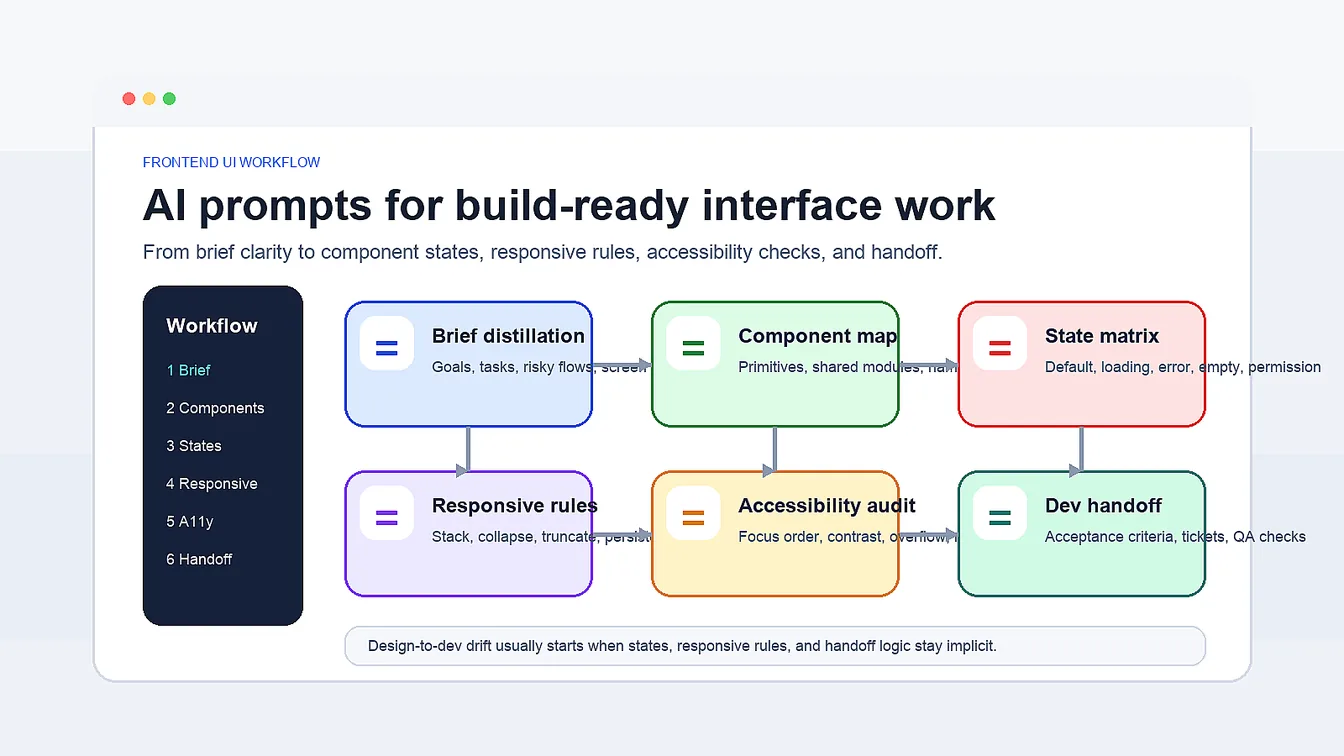
Product designers and frontend engineers can use this frontend UI workflow with AI prompts to carry one approved direction through six connected delivery steps. Founders and agencies can use the same chain to keep component planning, state logic, responsive behavior, accessibility checks, and developer-ready handoff notes tied back to the original brief instead of drifting across separate reviews.
Workflow Overview
This workflow is for the moment after the site map and layout direction make sense, but before the UI gets lost between Figma, reviews, and code. The chain below turns one vague interface brief into component rules, state coverage, responsive logic, accessibility checks, and handoff notes that engineering can actually build.
- Prompt 1: Distill the product brief into interface priorities, user tasks, and screen risks.
- Prompt 2: Map the component system before screens multiply into one-off blocks.
- Prompt 3: Build a state matrix so defaults, errors, empty states, and loading states are explicit.
- Prompt 4: Define responsive behavior before breakpoints become cleanup work.
- Prompt 5: Audit accessibility and edge cases with severity-based repair notes.
- Prompt 6: Turn the UI into a developer handoff checklist with acceptance criteria.
Within this cluster, move up to AI Design Skills Guide for broader design judgment and revisit AI Web Design Skills Prompt Pack for site structure, navigation, and landing-page sequencing. This workflow picks up when the work becomes component-level, state-aware, and build constrained.
Prompt 1: UI Brief Distillation
Start here when the product brief sounds persuasive, but the interface implications are still muddy. The goal is to convert goals, user journeys, and business pressure into a practical UI brief before anyone argues about visual style.
- Target: Product designers, founders, and frontend leads translating a feature or product brief into UI decisions.
- Input: Product brief, target audience, main user task, success metric, and platform context.
- Model fit: ChatGPT or Claude for clarification, prioritization, and structured output.
- Expected output: A UI brief with user goals, must-support tasks, risky flows, interface zones, and unresolved assumptions.
- Quality check: The output should describe what the interface must enable, not just repeat marketing copy from the original brief.
ROLE:
Act as a senior product design translator.

TASK:
Turn [product brief] into a UI brief for [platform context].

CONTEXT:
- audience: [target audience]
- main user task: [main user task]
- success metric: [success metric]

RETURN:
1. primary user goal
2. secondary goals
3. must-support flows
4. risky or ambiguous flows
5. interface zones that matter most
6. open assumptions that need validation

RULE:
Do not jump to colors, trends, or stylistic adjectives until the interface priorities are explicit.
Prompt 2: Component Map
Once the UI brief is clear, define the system that the screens will reuse. This prompt prevents teams from designing every frame as a separate poster and then discovering too late that the UI has no shared primitives.
- Target: Designers and frontend engineers who need one component inventory before detailed screens branch out.
- Input: UI brief, key screens, required actions, data types, and brand/UI constraints.
- Model fit: ChatGPT, Claude, or Gemini for system mapping and naming consistency.
- Expected output: A reusable component inventory, primitive-to-composite hierarchy, and a list of one-off components that should be challenged.
- Quality check: The map should reduce duplication and explain which components should stay shared across screens.
ROLE:
Act as a frontend design systems planner.

TASK:
Create a component map for [product or feature].

INPUTS:
- key screens: [key screens]
- main actions: [main actions]
- data types: [data types]
- constraints: [brand or UI constraints]

RETURN:
1. core primitives
2. shared components
3. screen-specific composites
4. repeated interaction patterns
5. components that should not be custom unless justified
6. naming suggestions for design and code alignment

RULE:
Favor reusable parts over decorative one-off modules.
Prompt 3: State Matrix
This is where many pretty screens fail in real product work. A UI that looks complete in default view can still break the moment loading, error, permission, or empty states arrive. Use this prompt to make the hidden UI visible before engineering has to improvise it.
- Target: Product teams preparing components and flows for real data, real feedback, and real failure modes.
- Input: Component map, user flows, data dependencies, validation rules, and platform conventions.
- Model fit: ChatGPT or Claude for systematic state coverage and structured matrices.
- Expected output: A table listing default, hover, focus, selected, loading, success, empty, error, and permission states by component or screen.
- Quality check: Every critical component should have explicit failure and edge states, not only happy-path states.
ROLE:
Act as a UI state auditor.

TASK:
Build a state matrix for [component set or screen set].

USE:
- main flow: [main flow]
- data dependencies: [data dependencies]
- validation rules: [validation rules]

RETURN A TABLE WITH:
1. component or screen
2. default state
3. interactive states
4. loading state
5. empty state
6. error state
7. permission or account state
8. notes for copy, icon, or motion changes

RULE:
Assume the UI must survive incomplete data, failures, retries, and constrained permissions.
Prompt 4: Responsive Behavior Rules
Responsive quality is not just shrinking the frame. Good frontend work decides what stacks, what scrolls, what collapses, what becomes tabs, and what should disappear entirely at smaller widths. This prompt turns vague responsive intent into practical rules.
- Target: Teams translating desktop-first frames into mobile, tablet, and narrow-laptop behavior.
- Input: Screen set, component map, content density, device priorities, and breakpoint assumptions.
- Model fit: ChatGPT or Claude for layout rule articulation and breakpoint logic.
- Expected output: Breakpoint-by-breakpoint rules for stacking, reflow, truncation, sticky behavior, and progressive disclosure.
- Quality check: The output should explain why a layout changes, not just say make it mobile friendly.
ROLE:
Act as a responsive UI strategist.

TASK:
Define responsive behavior rules for [screen set].

CONTEXT:
- primary devices: [primary devices]
- content density: [content density]
- critical actions: [critical actions]
- breakpoint assumptions: [breakpoint assumptions]

RETURN:
1. layout changes by breakpoint
2. components that stack, scroll, collapse, or convert
3. minimum and maximum width risks
4. content that should shorten or hide
5. sticky or persistent action rules
6. QA checks for crowded states

RULE:
Protect task completion and readability before visual symmetry.
Prompt 5: Accessibility & Edge-Case Audit
Once the responsive rules are set, run a harsher audit. This prompt is meant to expose weak contrast, missing keyboard paths, unclear error recovery, motion issues, truncated copy, and layout failures that usually appear during QA instead of during design.
- Target: Designers and frontend teams who want actionable accessibility and edge-case repair notes before build or before release.
- Input: Screens or prototypes, component map, state matrix, responsive rules, and WCAG or internal quality standards.
- Model fit: ChatGPT, Claude, or Gemini for review frameworks and severity ranking.
- Expected output: A fail-by-fail audit with issue severity, affected users, recommended fix, and test priority.
- Quality check: The audit should point to specific interface failures instead of generic reminders to improve accessibility.
ROLE:
Act as an accessibility and edge-case reviewer.

TASK:
Audit [screen set or prototype] using the attached state matrix and responsive rules.

CHECK FOR:
1. contrast and text readability
2. keyboard and focus behavior
3. screen-reader clarity
4. reduced-motion concerns
5. error recovery and validation clarity
6. empty, loading, and retry states
7. overflow, truncation, and localization issues

RETURN:
- issue
- severity
- affected flow
- who is affected
- recommended fix
- test note

RULE:
Be direct. Call out failures, not just opportunities.
Implementation Steps
- Lock the brief before styling debates: Run Prompt 1 first and share the UI brief with design and engineering so everyone aligns on user tasks, risky flows, and interface zones before polishing the wrong thing.
- Build the system before the screens sprawl: Use Prompt 2 and Prompt 3 together so components and states are defined as one contract instead of as separate documents that drift apart.
- Stress the layout before code freeze: Use Prompt 4 and Prompt 5 to force breakpoint decisions, keyboard paths, copy overflow, empty states, and error states into the design review while changes are still cheap.
- Package the work for build: After the audit, use the final handoff prompt to turn UI decisions into tickets, acceptance criteria, prop notes, and QA checks that engineering can implement without reverse engineering the mockups.
Prompt 6: Developer Handoff Checklist
The last prompt converts design logic into build logic. Instead of handing over a silent file and hoping the UI survives translation, use this step to package component intent, state rules, edge cases, and acceptance criteria into something developers can estimate, build, and verify.
- Target: Product designers, design engineers, and frontend leads preparing a handoff that engineering can execute with fewer interpretation gaps.
- Input: UI brief, component map, state matrix, responsive rules, audit findings, and chosen stack.
- Model fit: ChatGPT or Claude for handoff structure, acceptance criteria, and implementation sequencing.
- Expected output: A developer handoff checklist with component notes, state coverage, prop expectations, acceptance criteria, and QA risks.
- Quality check: Engineering should be able to tell what needs to be built, tested, and manually reviewed without guessing the missing states.
ROLE:
Act as a design-to-development handoff lead.

TASK:
Turn this UI package into a frontend build checklist for [chosen stack].

INCLUDE:
- UI brief: [UI brief summary]
- component map: [component map summary]
- state matrix: [state matrix summary]
- responsive rules: [responsive rules summary]
- audit findings: [audit findings]

RETURN:
1. implementation order
2. component-level acceptance criteria
3. prop or content dependencies
4. state and accessibility checks
5. QA risks
6. unresolved questions that require human review

RULE:
Write the output so it can be pasted into tickets, PR checklists, or sprint planning notes.
Workflow Use Cases
- SaaS dashboard teams: Tables, filters, empty states, and mobile collapse rules before React build.
- Product marketing squads: Landing pages that feed into logged-in UI patterns and shared components.
- Agency delivery teams: Figma handoffs with acceptance criteria, accessibility notes, and state coverage for client builds.
- Startup sprint teams: Tickets, QA checklists, and component rules for weekly web-app releases.
Troubleshooting & Optimization
- Outputs stay too abstract: Append return tables, acceptance criteria, and named states rather than high-level advice.
- Component sprawl keeps growing: Append challenge any component that cannot justify why it is not a shared primitive.
- Responsive notes feel generic: Append explain what changes at each breakpoint and why that protects the core task.
- Accessibility feedback sounds soft: Append rank every issue by severity and describe who fails, where, and how to repair it.
UI Delivery FAQ
- Q: What is a frontend UI workflow with AI prompts used for?
A: It is used to move interface work from a vague brief into build-ready decisions around components, states, responsive rules, accessibility, and handoff. That makes it useful for teams who already know what they are building, but need the UI logic to survive design review and implementation. - Q: How is a frontend UI workflow different from generic AI web design prompts?
A: A web design prompt pack usually focuses on structure, landing-page flow, navigation, or trust-building sections. This workflow starts later, when the problem is component logic, state coverage, breakpoint behavior, accessibility failure points, and design-to-dev translation. - Q: What is the best frontend UI skill when using AI prompts?
A: The best frontend design skill is system thinking that connects visual intent to states, responsiveness, accessibility, and implementation constraints. AI can speed up reasoning, but human judgment still decides which components should stay shared, which states matter most, and what quality bar is acceptable in code. - Q: Can this workflow work with Figma and code handoff?
A: Yes. It works best when you feed it Figma frames, component notes, state lists, and engineering constraints, then use the output to create handoff docs, tickets, QA checklists, and implementation reviews instead of treating the prompts as design-only brainstorming.
Use this prompt to generate your version? Share in the comments or on Twitter!
Explore more? View the Coding & Development or Image & Design category.
I hope you found this frontend UI workflow helpful.
Follow me @bigprompt for more.
Like/Repost if you can this prompt.
Internal link:
Build AI Web Design Skills with a Practical Prompt Pack
Build AI Design Skills with a Practical Prompt Guide
Create TV Show Miniature Diorama Prompt Scenes
Build Stock Scanner Prompts for Market Research Workflows
Create Paper Cut Collage Prompt Scenes with Childlike Crayon Style
Big Prompt Hub Review
This workflow is useful because it turns fuzzy interface work into a repeatable build sequence: clarify the brief, map the components, expose the states, define responsive rules, audit failures, and package the handoff. Its main limitation is that AI can organize the reasoning, but humans still need to judge product priorities, visual taste, exact motion, and which implementation tradeoffs are acceptable once real constraints appear.