
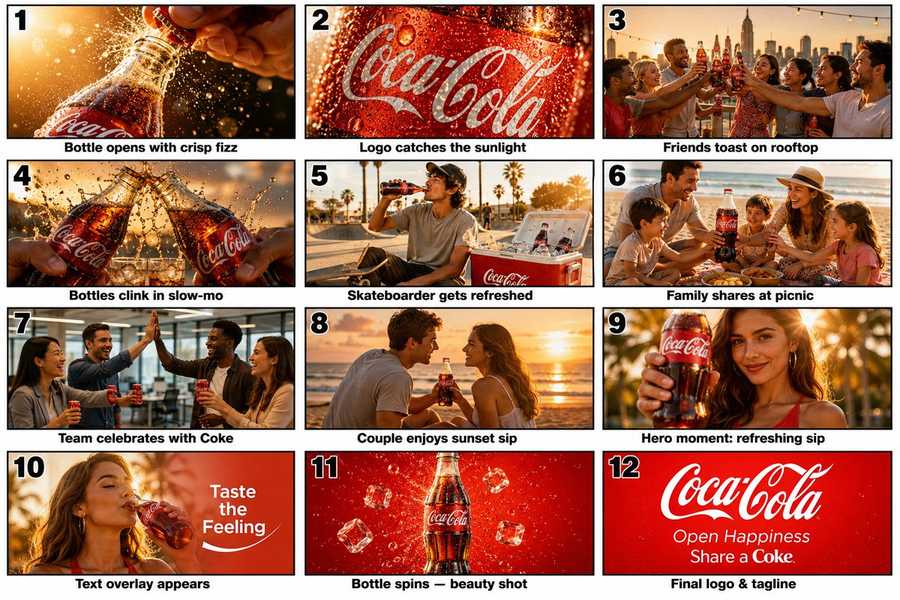
Brand marketers and creative directors can use the GPT Image 2 Seedance workflow to separate visual anchors from motion instructions before a storyboard starts drifting across tools. Social teams can then plan three linked five-second clips, preserve product and character details across cuts, and finish with a CTA-ready video whose stills, transitions, and timing all trace back to one approved storyboard.
Image Example

Workflow Overview
This workflow works best when you compress the ad into three beats instead of trying to animate twelve isolated micro-scenes at once. Use one planning pass, one still-image pass, one continuity pass, three short Seedance clips, and one final assembly brief.
- Prompt 1: Turn the long storyboard into three commercial beats with fixed product and cast rules.
- Prompt 2: Generate 4-6 GPT Image 2 reference frames for the strongest beats.
- Prompt 3: Build a continuity sheet so bottle shape, label placement, light, and cast stay stable.
- Prompt 4: Use Seedance to generate three 5-second video clips from the selected stills.
- Prompt 5: Create the final edit brief for text, music cue timing, and end-card handling.
Prompt 1: Storyboard Compression
Use this first when the original prompt is a branded storyboard with too many one-second cuts. The goal is to reduce the script into hook, lifestyle, and hero/end-card beats that can survive image generation and short-form video generation without collapsing into visual noise.
- Target: Ad creators translating a long storyboard into a practical AI production plan.
- Input: Brand, product, target audience, master storyboard, required logo moments, and CTA line.
- Model fit: ChatGPT or Claude for shot compression and beat planning.
- Expected output: A three-beat ad structure with shot priorities, repeated product rules, and continuity anchors.
- Quality check: The output should preserve the hero product, cast tone, lighting direction, and end-card goal across all three beats.
Storyboard Compression Prompt Code
ROLE: Act as a global commercial creative director.
CORE TASK: compress one long storyboard into three ad beats for image-to-video production.
IDENTITY LOCK: keep the same product geometry, logo treatment, lighting style, and cast mood across every beat.
OUTPUT FORMAT: return one practical three-beat structure for vertical commercial generation.

Compress this brand video idea for [brand name] and [hero product] into three ad beats for a [total duration] vertical commercial.

Input storyboard:
[master storyboard prompt]

Return:
1. Beat 1: hook and product tension
2. Beat 2: lifestyle and social proof
3. Beat 3: hero product and end card
4. Repeated visual anchors for [logo treatment], [bottle or pack shape], [lighting style], and [cast mood]
5. Which micro-scenes should be removed or merged

Keep it practical for image-to-video generation, not for live-action filming.
Prompt 2: GPT Image 2 Keyframes
Run this after the beat structure is stable. The goal is not to make final poster art. It is to create 4-6 still-image anchors that define product appearance, label position, cast styling, golden-hour color, and the strongest commercial compositions before motion gets added.
- Target: Creators who need stable reference stills before animation.
- Input: Beat structure, product details, cast direction, scene list, camera style, and aspect ratio.
- Model fit: GPT Image 2 for commercial stills and readable product hierarchy.
- Expected output: Four to six stills covering product macro, social scene, hero character, beauty shot, and end-card mood.
- Quality check: Product geometry, label orientation, color palette, and cast styling should stay consistent across the still set.
GPT Image 2 Keyframes Prompt Code
CORE TASK: create 4-6 still-image anchors for a brand video workflow.
VISUAL SYSTEM: use one fixed product shape, label placement, palette, and lighting logic.
SCENE COVERAGE: include macro product, lifestyle, hero close-up, and end-card mood.
NEGATIVE PROMPT: avoid extra products, warped labels, broken fingers, duplicate cast, messy typography, or random color shifts.
OUTPUT FORMAT: deliver a still set that can guide a later video model.

Create a set of 4-6 ultra-realistic commercial keyframes for [brand name] and [hero product].

Use these beats:
[beat 1]
[beat 2]
[beat 3]

Requirements:
1. Match one fixed [product shape] and [label placement]
2. Keep [brand color palette] stable
3. Use [lighting style] and [camera style]
4. Cover product macro, social/lifestyle, hero close-up, and beauty-shot compositions
5. Reserve one frame for [end card mood]

Avoid final text rendering except for large graphic placeholders. Prioritize stills that can guide a later video model.
Prompt 3: Continuity Lock
This step keeps the workflow from drifting when the video model takes over. Feed your selected stills to a vision-capable model and ask for a continuity sheet that spells out what must stay fixed and what may change from shot to shot.
- Target: Editors and prompt builders who need consistent product and cast details across clips.
- Input: The 4-6 selected stills, shot order, and any must-keep brand rules.
- Model fit: ChatGPT or Gemini with image understanding for continuity review.
- Expected output: A continuity sheet listing fixed product details, cast styling, light direction, scene constraints, and banned drift.
- Quality check: The continuity sheet should make it obvious what Seedance may animate and what it must not reinterpret.
Continuity Lock Prompt Code
ROLE: Review these selected commercial stills for [brand name].
IDENTITY LOCK: define what cannot change across clips.
DRIFT CONTROL: call out the exact logo, bottle, cast, and lighting failures that the next prompt must prevent.
OUTPUT FORMAT: return a continuity sheet that can be pasted into every video prompt.

Create a continuity sheet with:
1. Fixed product geometry
2. Fixed logo or label placement
3. Fixed color palette
4. Fixed wardrobe and cast attributes
5. Fixed lighting direction
6. Allowed motion changes by shot
7. Banned drift or failure points
8. A short "must stay the same" summary for video prompting

Use the stills as reference images. Be precise about what should remain constant across all generated clips.
Implementation Steps
- Lock the still set: Pick 4-6 reference frames, then run one identity anchoring pass so bottle shape, label angle, cast styling, and light direction become fixed rules before motion starts.
- Build segment prompts: Split the edit into three 5-second clips and paste the continuity sheet into each Seedance request instead of asking one render to handle every beat.
- Repair the text layer after render: Treat slogans and logos as placeholders, then use post-render layout repair or vector typography in Figma for the final end card.
- Review the cut as an ad system: Check whether the first clip hooks fast, the middle clip carries social proof, and the last clip holds the CTA without palette alteration or brand drift.
Prompt 4: Seedance Video Segments
This is the motion step. Do not ask Seedance to solve the full 15-second ad in one pass. Generate three 5-second clips instead: hook, lifestyle, and hero/end-card. That gives you cleaner pacing, fewer continuity breaks, and easier reruns when one segment fails.
- Target: Creators turning still references into short commercial clips.
- Input: One selected still per segment, the continuity sheet, clip goal, and motion direction.
- Model fit: Seedance for short, image-guided commercial video generation.
- Expected output: Three short clips that cover hook, lifestyle, and hero/end-card beats with stable product identity.
- Quality check: Each clip should preserve product shape, avoid logo drift, and keep the motion matched to one beat only.
Seedance Video Segments Prompt Code
CORE TASK: generate one short commercial segment only.
REFERENCE LOCK: preserve the attached still as the identity anchor.
MOTION RULES: define camera movement, subject movement, and environment motion separately.
NEGATIVE PROMPT: avoid logo drift, shape warping, camera jumps, duplicate props, extra hands, or unreadable end-card text.
OUTPUT FORMAT: return one usable clip for one beat, not the full commercial.

Create a [clip duration] commercial clip in Seedance using the attached reference image for [segment goal].

Use this continuity sheet:
[continuity summary]

Motion direction:
[camera movement]
[subject movement]
[environment movement]

Style goals:
[commercial lighting]
[color grade]
[brand palette]

Do not create the full commercial in one pass. Generate only this segment and preserve the attached reference image as the identity anchor.
Prompt 5: Final Assembly Brief
The last step is not another render. It is the edit brief. Use it to decide clip order, music peak, text-safe timing, and whether the end card should be rebuilt manually instead of relying on model-generated typography.
- Target: Editors and marketers assembling short AI-generated commercial clips into one ad.
- Input: Three short clips, target runtime, CTA line, and the desired ending hierarchy.
- Model fit: ChatGPT or Claude for edit logic and copy-safe timing notes.
- Expected output: Clip order, transition logic, text timing, sound cue notes, and manual rebuild advice for the final card.
- Quality check: The brief should clearly separate model-generated footage from manually rebuilt text and logo moments.
Final Assembly Brief Prompt Code
ROLE: Act as a commercial editor.
CORE TASK: turn three generated segments into one short ad assembly plan.
TEXT SAFETY: decide which slogans, logos, and end-card text should be rebuilt manually.
OUTPUT FORMAT: provide clip order, timing, transitions, and final-card notes.

I have three generated clips for [brand name]:
1. [clip 1 summary]
2. [clip 2 summary]
3. [clip 3 summary]

Create a final edit brief for a [target runtime] ad.

Include:
1. Clip order
2. Approximate time allocation
3. Transition suggestions
4. Where text should appear
5. Which text should be rebuilt manually
6. Music peak timing
7. Final end-card guidance

Keep the output practical for short-form commercial assembly.
Workflow Use Cases
- Consumer beverage ads: Product-first short spots built from still references and quick motion reruns.
- DTC product teasers: Social ads where the product needs stable geometry across beauty shots and lifestyle clips.
- Agency pitch films: Fast concept commercials before a team invests in full video production.
- Seasonal promo campaigns: Repeatable short-form workflows where only product, cast, palette, and tagline need to change.
Troubleshooting & Optimization
- Too many micro-scenes: Append compress this into hook, lifestyle, and hero/end-card only.
- Logo drift: Append preserve the same bottle shape, label angle, and palette from the reference image.
- Text fails in the end card: Replace slogans manually, or add treat all text as placeholder only.
- Video files get heavy: Remove MP4 uploads and host finished clips externally.
Image-to-Video Workflow FAQ
- Q: What is a GPT Image 2 Seedance workflow used for?
A: It is used to turn storyboard ideas into short commercial video segments by separating still-frame generation, continuity control, motion prompting, and final assembly. That makes branded ad generation more stable than trying to force one model to invent every shot and transition at once. - Q: Why use 3×5-second clips instead of one 15-second render?
A: Shorter segments are easier to rerun, easier to keep consistent, and better at protecting product identity, lighting, and pacing. They also make it easier to replace one weak shot without rebuilding the entire commercial. - Q: Can this method be reused beyond Coca-Cola-style ads?
A: Yes. Replace the brand, product, cast mood, scene list, palette, and CTA, then keep the same workflow logic: compress the storyboard, generate still anchors, lock continuity, animate short segments, and rebuild critical text manually. - Q: Should I upload the final MP4 to WordPress for this workflow article?
A: Usually no. For Big Prompt Hub, the stronger move is to publish the still-image method, keep one storyboard example or a few result frames in the post, and host heavier finished clips externally if you actually need playback.
Use this prompt to generate your version? Share in the comments or on Twitter!
Explore more? View the Video & Music or Marketing & Growth category.
I hope you found this image-to-video commercial AI workflow helpful.
Follow me @bigprompt for more.
Like/Repost if you can this prompt.
Internal link:
Create Scrapbook Travel Poster Prompt Layouts for Cities
Create Travel Poster Prompt Assets with Boarding Pass Scenes
Create Logistics Ad Poster Prompt Assets for Courier Campaigns
Build Apps from Idea to Launch with Claude Mobile App Prompts
Create World Cup Poster Prompt Infographics for Match-Day Campaigns
Big Prompt Hub Review
This GPT Image 2 Seedance workflow is useful because it turns a flashy storyboard into a repeatable production method: plan the beats, generate still anchors, lock continuity, animate short segments, and rebuild the final card with human control. Its main limitation is that branded text, exact logos, and platform-specific export quality still need manual review before anything client-facing goes live.