
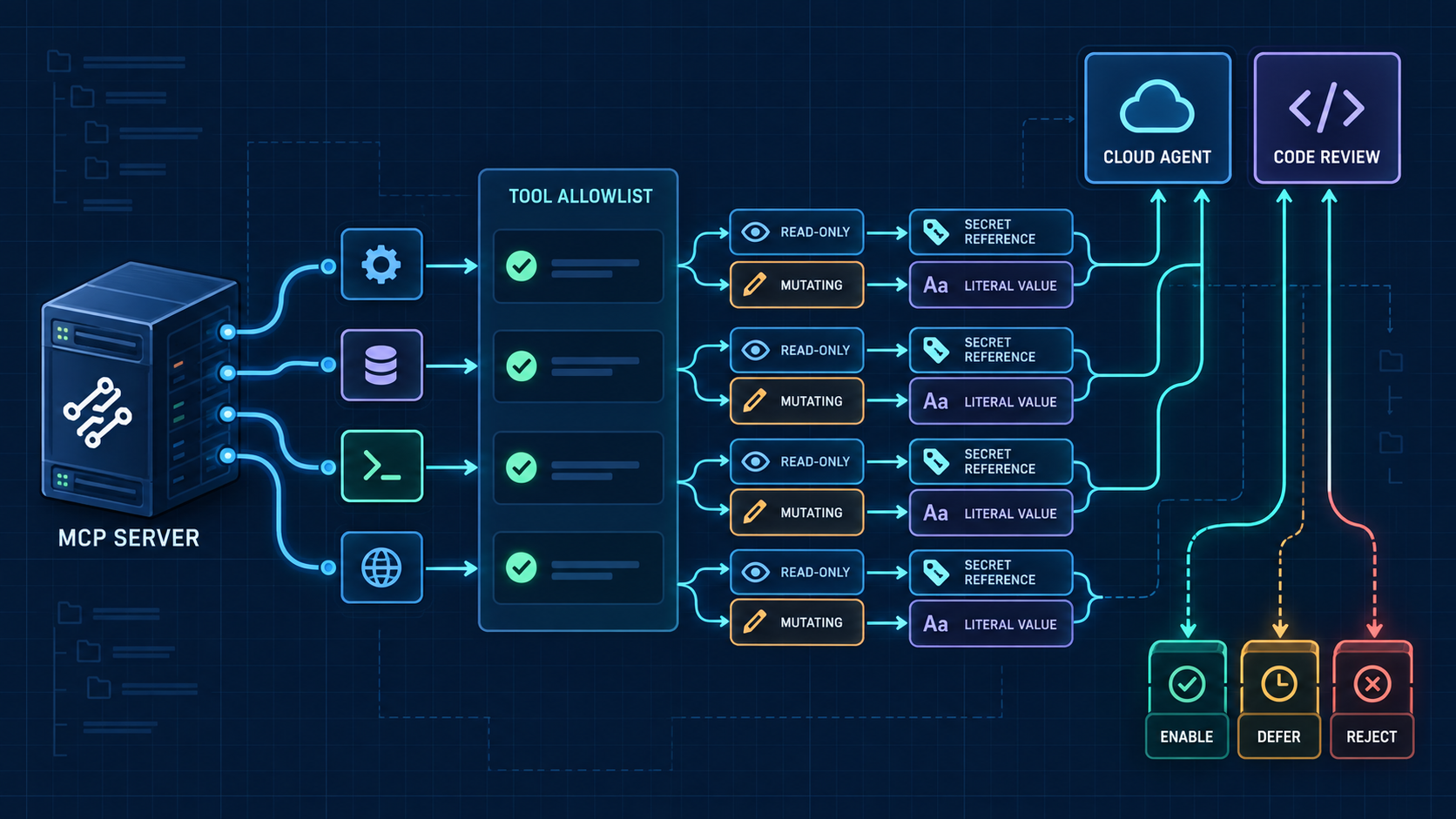
Developers and repository administrators need a GitHub Copilot MCP permission review before an enabled tool can enter an agent task. This workflow turns a proposed server and tool list into a least-privilege record: every tool needs a task, a behavior boundary, a credential decision, and a named owner.
The output is an enable, defer, or reject decision—not a server installation or security certification. Use only synthetic examples in the review, keep real secrets and private endpoints out of the worksheet, and move unresolved implementation questions to an isolated technical review.
Workflow Overview
Begin with the exact Copilot surface and assigned task. Repository MCP settings can make declared tools available to Copilot cloud agent and code review, and those tools may be used without a per-use approval prompt. Copilot CLI has its own configuration and trust boundaries, so record it as a separate surface rather than copying a repository decision across clients.
- Input: proposed server type, declared tool names, intended surface, task-level necessity, and known credential or data facts.
- Output: a per-tool allowlist plus a server-level enable, defer, or reject decision with an owner and re-review trigger.
- Stop condition: defer when a tool’s behavior, transport, credential handling, data scope, or task necessity cannot be established from current evidence.
Setup / Working Method
1. Name the surface and the task
Write one bounded task, such as “find public API documentation relevant to an issue.” Then name the intended surface: repository-configured cloud agent, Copilot code review, or Copilot CLI. Do not use “Copilot” as a catch-all because tool availability, trust, and approval boundaries differ by surface.
2. Record the server and execution boundary
For repository settings, distinguish a local or stdio server that starts a process from an HTTP or SSE server reached over a network route. For CLI, record its own local or remote transport and workspace-trust context. The review does not run either route; it only states what would execute or connect if later enabled.
Synthetic server: docs-catalog
Declared surface: repository-configured cloud agent
Transport under review: remote HTTP
Review boundary: no connection, command, or endpoint is tested.
3. Build a per-tool necessity ledger
List tools individually. A wildcard is not a review result. For each name, record the task it supports, whether its documented behavior is read-only or mutating, the data it can reach, and the evidence that supports the classification.
search_public_docs — enable candidate
Necessary for the bounded documentation task. Keep it only if the server documentation establishes read-only behavior and limits the searchable data to the intended public catalogue.
list_document_titles — defer candidate
The name sounds read-only, but a name is not evidence. Defer until the returned dataset, pagination behavior, and access boundary are documented.
create_review_note — reject candidate
This mutating action is unnecessary for the search task. Exclude it unless a later task explicitly requires note creation and receives a separate review.
4. Review credentials and data separately
Record labels, not values. The synthetic review may name COPILOT_MCP_DOCS_SCOPE and COPILOT_MCP_DOCS_TOKEN_REF, but it must never contain a token or a private endpoint. Separate four questions: where a value originates, whether it is a reference or literal, what the server receives, and which data the resulting identity can reach.
- Secret or variable reference: record the reference label and expected scope, never the value.
- Literal value: allow only a non-sensitive setting with an explicit reason; a literal credential is a rejection.
- Remote header: record the header purpose and data boundary without reproducing its content.
- Unknown handling: defer instead of guessing whether the client, runner, server, or intermediary can expose the value.
5. Issue one bounded decision
Enable only the named tools whose necessity and boundaries are supported. Defer when evidence is incomplete but can be obtained. Reject tools or server routes that are unnecessary, mutating without a justified task, credential-bearing without an acceptable reference boundary, or able to reach data outside the approved scope.
Enable: exact tool names, task, surface, evidence, owner, and review date are complete.
Defer: the evidence gap and person responsible for closing it are named.
Reject: the task does not need the tool, or the execution, credential, or data boundary is unacceptable.
Implementation Steps
- Copy only the proposed server type, declared tool names, and non-sensitive reference labels into the review ledger.
- Name one Copilot surface and one agent task; split multiple surfaces or tasks into separate decisions.
- Classify each tool as read-only, mutating, or unknown from documented behavior rather than its name.
- Map each credential reference and data set to the narrowest required scope, leaving every unknown visible.
- Remove wildcard access and keep only tools supported by the stated task and evidence.
- Record enable, defer, or reject, then assign an owner, evidence gap, expiry, and re-review trigger.
Workflow Use Cases
- Cloud-agent documentation task: allowlist a public-search tool while excluding unrelated write or private-record tools.
- Code-review extension: confirm that every proposed tool meets the review surface’s read-only requirements before it can participate in a review.
- CLI project setup: assess workspace trust, configuration precedence, and organization allowlist policy as CLI-specific boundaries rather than reusing a repository-settings verdict.
- Re-review after a server update: reopen the decision when tool names, transport, credential handling, data scope, or task ownership changes.
Troubleshooting & Optimization
- A tool name looks harmless but behavior is undocumented: mark it unknown and defer; naming is not proof of read-only behavior.
- The task seems to need every tool: split the task into smaller outcomes and justify each tool separately instead of accepting a wildcard.
- A credential label appears in the worksheet: keep only the synthetic reference name and delete any literal value, endpoint, account, or customer detail.
- Repository and CLI decisions disagree: preserve both records because the surfaces have separate configuration, trust, and policy boundaries.
- The server changed after approval: expire the prior decision and repeat the tool, credential, and data review before reuse.
FAQ
- Q: What does a GitHub Copilot MCP permission review decide?
A: It decides which named tools are necessary for one task and surface, which evidence supports them, and whether the server should be enabled, deferred, or rejected. - Q: Is an MCP tool allowlist a security certification?
A: No. It is a least-privilege decision record and does not replace source review, threat modeling, code review, or isolated testing. - Q: Can a review include a real token for completeness?
A: No. Record a synthetic or approved reference label and the required scope, never a credential value, private endpoint, or customer record. - Q: Does one decision apply to cloud agent, code review, CLI, and other clients?
A: No. Keep the decision surface-specific and verify current documentation for each client and configuration route.
Explore Coding & Development and follow @bigprompt. Use this guide to prepare a bounded MCP permission decision, then leave configuration changes, credentials, server execution, and final approval with the administrators who own the repository and its data.
Continue with Related Agent Reviews
When the input is an installable capability rather than an MCP tool list, use Agent Skills Evaluation Workflow: Evidence Before Installation. For a separate comparison of scanner boundaries and execution risk, see Agent Skills Security Scanners: What Each Tool Checks Before You Install.
Big Prompt Hub Review
This workflow is valuable because it makes autonomy reviewable before enablement: a declared tool must earn its place through a specific task, known behavior, bounded credentials, and limited data access. Its limit is equally important—only the repository owner can judge the actual server implementation, threat model, and acceptable residual risk.
Leave a Reply
You must be logged in to post a comment.