
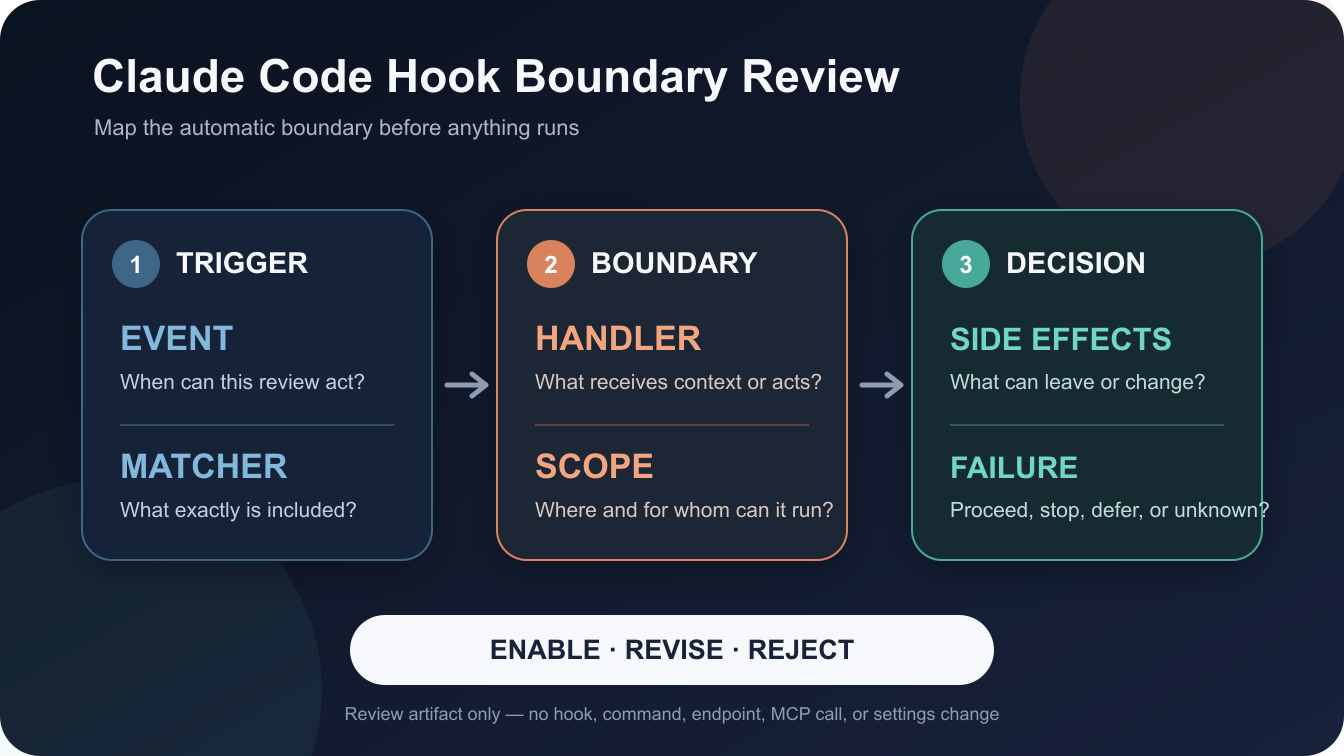
For repository developers, a Claude Code hook boundary review is a decision document that traces when automation may run, what receives it, where it applies, and how failure behaves. It records the lifecycle event, matcher, handler, settings scope, side effects, and an enable, revise, or reject decision. It is source-backed but is not a security certification or a hook configuration tutorial.
Workflow Overview
Claude Code hooks are user-defined actions that run at lifecycle points. The Hooks reference describes command, HTTP, MCP tool, prompt, and agent handlers; an event identifies when a hook group can run, while its matcher narrows the situations that select that group. A useful review follows the chain rather than judging a hook by its name alone:
- Event: Which documented lifecycle event can trigger it?
- Matcher: What value is matched, and which cases are included or excluded?
- Handler: What kind of handler receives the event, and what can it read or do?
- Scope: Which settings source supplies it, and who or which projects inherit that source?
- Effects and failure: What can change outside the review, and what does this event do if the handler rejects, errors, or times out?
The outcome is a short review record with unresolved facts visible. It does not prove a hook is safe; it helps a maintainer see what must be understood before opting in.
Setup / Working Method
Review the proposed hook as text and documentation only. Do not run it to discover what it does. Start with the exact settings source and the event definition, then follow references to the handler type and its documented input/output behavior. If a field, external destination, or failure policy is not documented, mark it unknown and ask its owner instead of inferring behavior from a label.
Keep a one-row-per-hook-group worksheet with these columns: event; matcher and expected matches; handler type; settings file and scope; data passed to the handler; possible writes, network calls, or other side effects; timeout and event-specific failure behavior; owner; evidence link; unresolved questions; decision. Separate documented product behavior from the reviewer’s risk judgment.
Implementation Steps
- Freeze the review target: identify the proposed hook group and the exact settings source under review. Do not merge user, project, local, and managed configuration into one imagined file.
- Trace the trigger: find the event in the official Hooks reference. Write down when it fires and whether it supports a matcher; do not assume every event has the same matching rules.
- Resolve the matcher: record the documented match field and the values or pattern used. Ask what important cases the matcher deliberately leaves out.
- Identify the handler boundary: classify the handler as command, HTTP, MCP tool, prompt, or agent. Note the input it receives and the authority or destination it can reach, based on the proposal and documentation.
- Resolve scope and precedence: use the Settings reference to identify the applicable settings source and any managed policy. Record uncertainty where multiple sources or exceptions affect the effective value.
- Review outcomes before enablement: document side effects, timeout, and failure semantics for this event. Choose enable only when the owner and consequences are understood; otherwise revise the proposal or reject it.
Keep the record review-only. It should contain no secrets, repository contents, executable hook body, endpoint, or copied production configuration. A team can attach approved evidence references separately through its normal change process.
Workflow Use Cases
- Repository onboarding: compare a proposed project-level hook with the repository’s intended workflow and identify which contributors it affects.
- Tool-permission review: inspect whether an event can intercept or follow a tool action, then assess its specific decision behavior rather than treating all hooks as equivalent.
- Managed environment review: identify when organization-managed settings apply and which documented precedence exception, if any, matters to the proposed hook.
Hook review is distinct from choosing instructions or installing reusable agent capabilities, but maintainers may need all three views when onboarding a coding agent.
Troubleshooting & Optimization
- The hook’s name sounds harmless: ignore the label and trace event, matcher, handler, scope, and effects independently.
- Two settings sources disagree: consult the current Settings precedence rules, including managed settings and documented exceptions; do not infer a universal merge order.
- A failure looks like a simple allow or block: check the event-specific section. Exit codes, timeout behavior, and control outputs do not have one universal meaning across events and handler types.
- The handler’s effect is unclear: leave the decision at revise or reject until its owner documents inputs, destinations, writes, and recovery behavior. Do not enable it just to test the uncertainty.
Hook Review FAQ
- Q: What does a Claude Code hook boundary review check?
A: It traces the proposed event, matcher, handler, settings scope, side effects, and event-specific failure behavior before enablement. - Q: Does a hook review prove that a hook is safe?
A: No. It is a scoped review aid. It cannot certify handler code, destinations, every runtime condition, or the whole Claude Code security boundary. - Q: Should I run a hook to find out what it does?
A: Not as part of this review. Verify the documented behavior and ask the owner for missing evidence; use a separately approved test process if needed. - Q: Why check settings scope?
A: User, project, local, and managed settings apply to different audiences and can have precedence rules or exceptions. The effective source changes who receives the hook.
Use this review record as a decision aid, not an approval stamp. A defensible enable decision names the owner, the evidence reviewed, the expected side effects, and the event-specific failure behavior; unknowns stay visible rather than being converted into assurances.
Follow @bigprompt for more practical AI workflow reviews and guides.
Related Guides for coding-agent setup
For installation context, see Install Agent Skills in Codex, Claude Code, Cursor, and Gemini CLI; for a separate instruction-file scope decision, see GitHub Copilot Instruction Files: Choose Scope Before an Agent Runs. Neither page replaces this Claude Code hook review.
Big Prompt Hub Review
This page is most useful when a maintainer needs a consistent pre-enable question set across different hook proposals. Its limit is deliberate: the worksheet organizes source-backed questions but does not inspect or execute the handler, establish that an implementation is trustworthy, or replace an organization’s change-control process.
Leave a Reply
You must be logged in to post a comment.