
It looks like everyone’s got a need for AI-powered PPT creation these days.
I’ve rounded up and tested a bunch of AI tools for making slides, and I’m also sharing some tips from my experience using AI for PPTs.
Using the prompt “Introduce ChatGPT,” here’s how four AI PPT tools performed:
1. Zhipu Qingyan chatglm.cn
- Recommendation: ⭐️⭐️⭐️⭐️
- Overall, it’s images plus text in a clean, minimalist style with decent visuals. See Figure 1 for the result.
2. ppt.ai
- Recommendation: ⭐️⭐️⭐️
- Feels like it’s just going through the motions—pasted images and inserted text. Check Figure 2.
3. aippt.cn
- Recommendation: ⭐️
- You pick a template, and it generates text. I chose a cooking template, but it didn’t change the images at all—ended up with cooking visuals and ChatGPT text.
4. felo.ai
- Recommendation: ⭐️⭐️⭐️⭐️⭐️
- Recommended by folks in the comments. I tried it—it’s non-immersive interaction, giving you multiple schemes to choose from manually. Clean minimalist style, but more polished. See Figure 4.
5. Nano Banana Pro
- The basic idea is to use Nano Banana Pro to generate SVG icons and paste them onto PPT templates.
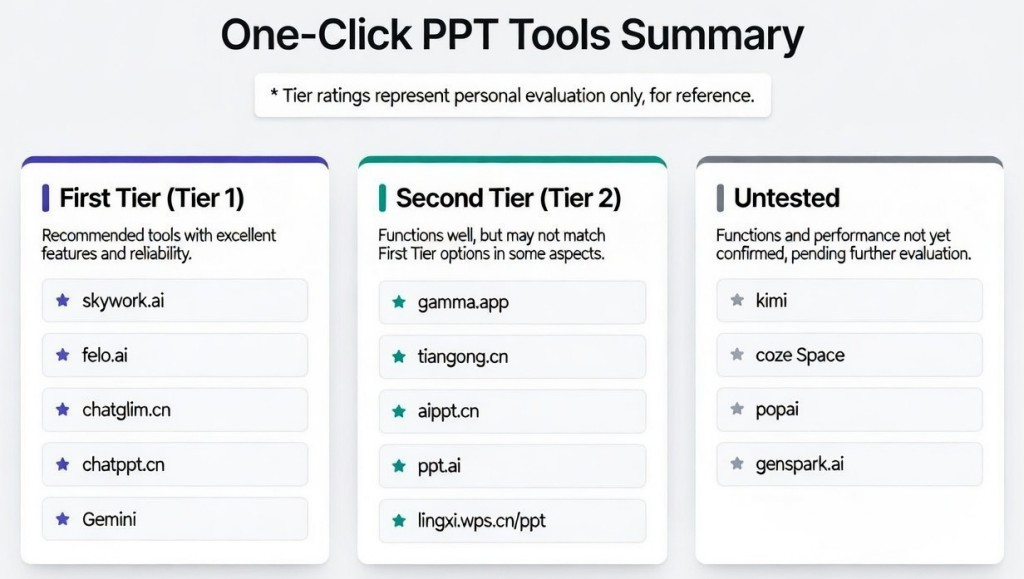
And here’s the big summary of one-click PPT AI tools:
AI PPT Tools First Tier
- skywork.ai
- felo.ai
- chatglm.cn
- chatppt.cn
- Gemini
AI PPT Tools Second Tier
Else
- kimi
- coze space
- PopAi
- genspark.ai
The tier rankings are just my personal take based on feel.
Internal link:
Packaging Mockup Prompt: Product-Shaped Box with Character Window
Manga Pop-Up Book Prompt: 3D Character Visuals
Isometric 3D Landmark Prompt: Architectural Visualization Render
Kid-Style Crayon Drawing Prompt: Hand-Drawn Notebook Paper Artwork