
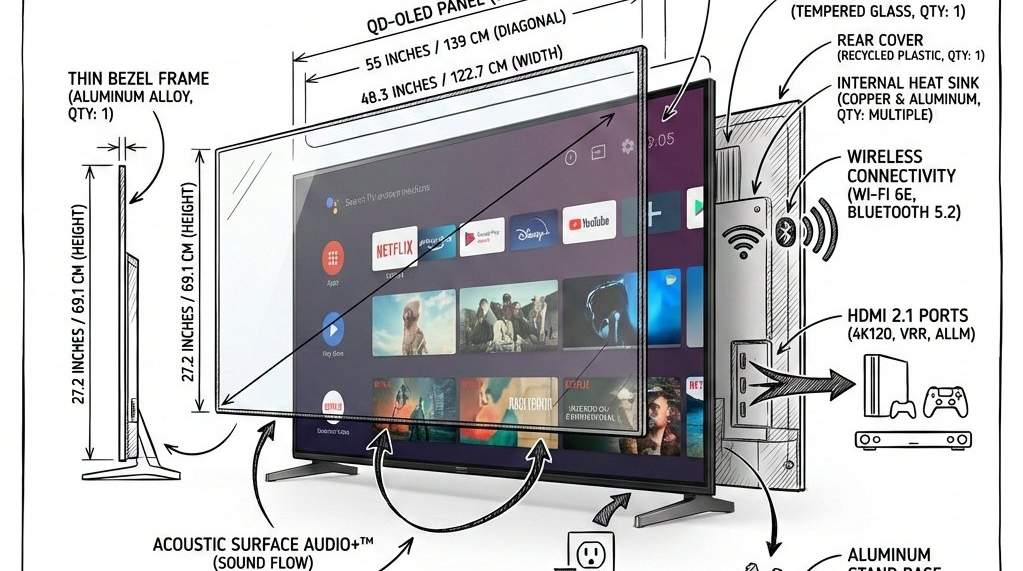
I built the AI infographic prompt to address a specific frustration: AI-generated infographics often end up as a chaotic mix of hallucinated icons. This version compels the model to adhere to a clean, architectural logic, placing technical pen sketches directly over realistic renders. It’s the most reliable method I’ve found to achieve that “engineering manual” look for social feeds or presentations without needing to dive into Photoshop.
AI Infographic Prompt
Replace [OBJECT] in the prompt below with your specific item. This structure is built for high-performance models like Gemini 3 Flash (Nano Banana), Midjourney, or DALL-E 3.
Create an infographic image of [OBJECT], combining a realistic photograph or photoreal render of the object with technical annotation overlays placed directly on top.

Use black ink–style line drawings and text (technical pen / architectural sketch look) on a pure white studio background, including:
•Key component labels
•Internal cutaway or exploded-view outlines
•Measurements, dimensions, and scale markers
•Material callouts and quantities
•Arrows indicating function, force, or flow (air, sound, power, pressure)
•Simple schematic or sectional diagrams where relevant

Place the title [OBJECT] inside a hand-drawn technical annotation box in one corner.

Style & layout rules:
•The real object remains clearly visible beneath the annotations
•Annotations feel sketched, technical, and architectural
•Clean composition with balanced negative space
•Educational, museum-exhibit / engineering-manual vibe

Visual style:
Minimal technical illustration aesthetic, black linework over realistic imagery, precise but slightly hand-drawn feel.

Color palette:
White background, black annotation lines and text only. No colors.

Output:
1080×1080, ultra-crisp, social-feed optimized, no watermark.
How to Use
The prompt locks the background to white and the annotations to black ink to prevent unnecessary visual noise. It’s designed as a plug-and-play asset: once the [OBJECT] is defined, the structural instructions handle the analytical layering and composition automatically.
When to Use
- Product Anatomy: Visualizing the internal mechanics of hardware or consumer electronics.
- Technical Authority: Creating clean, high-signal visuals for professional feeds or educational posts.
Example
Picture

Use this prompt to generate your version? Share in the comments or on Twitter!
Explore more? View the Image & Design category or Nano Banana series.
I hope you’ve found this Gemini Nano Banana Pro AI Prompt helpful.
Follow me @bigprompt for more.
Like/Repost if you can this prompt.
Internal link:
Surreal Rocket Launch Inside a Glass Lightbulb
Soft UI Illustration Style: Rounded Shapes and Gentle Gradients
The Pixar-Style Avatar: Crafting Expressive 3D Characters from Photos
Fluffy 3D App Icon Prompt: Your Guide to High-End Tactile Renders