
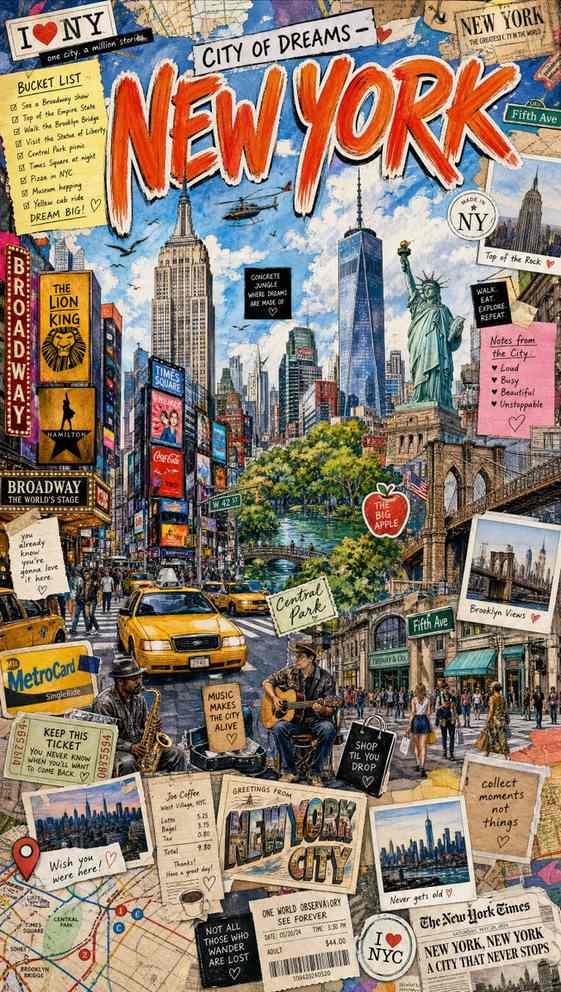
City-collage travel art stays more coherent when a scrapbook travel poster prompt gives designers, travel creators, and tourism marketers one fixed title block, one landmark bundle, and one ephemera ring to swap by destination. The format works best when that visual spine stays stable while the city-specific landmarks, tickets, maps, and food cues change.
Image Examples


Strategic Deployment Guide
Model fit: ChatGPT/GPT Image 2 for dense collage control and title treatment; Gemini for fast city variations. Keep one giant painted city title, one verified landmark bundle, and one scrapbook ephemera ring fixed, then swap the city, native script, foods, tickets, and local objects.
Scrapbook Travel Poster Prompt Code
CORE POSTER CONCEPT:
Create a colorful hand-drawn scrapbook travel poster for [city name]. Keep the source structure fixed: one giant painted city title at the top, one verified landmark bundle, native-script accents, and one ring of tickets, maps, food cues, and diary scraps around the scene.

NATIVE LANGUAGE SYSTEM:
Use the city's native writing system wherever appropriate. Show [native city title] and [one short local phrase] in the correct script for [city name]. Keep large display text readable and treat tiny handwritten notes as decorative if exact spelling becomes unstable.

CITY IDENTITY CONTROL:
Lock the destination identity with authentic [landmarks], [street life], [transit cues], and [local foods or souvenirs]. Do not mix another city's skyline, script, transit system, or cultural objects.

SCRAPBOOK EPHEMERA:
Surround the main city scene with [tickets or passes], [maps or receipts], [stickers or stamps], [instant photos], and [paper scraps with tape]. Make the collage feel packed and personal rather than clean and minimal.

SCENE DENSITY AND MICRO-ELEMENTS:
Keep the layout busy but still legible, with the main title and city landmarks clearly dominant. Add only the small doodles, stamps, and note fragments that reinforce the same destination story.

STYLE DIRECTION:
Use whimsical hand-drawn city journal aesthetics, vibrant watercolor, black ink outlines, playful sketchbook energy, cheerful travel-diary mood, layered paper textures, cinematic lighting, and high detail. The final image should feel adventurous, scrapbooked, and collectible instead of polished corporate vector art.

PRODUCTION FORMAT:
Generate a high-resolution vertical 9:16 poster for tourism campaigns, city guides, creator covers, destination moodboards, travel merch concepts, and social storytelling graphics. Preserve clean title and subtitle zones for post-render typography repair in Figma, Photoshop, or Illustrator.

NEGATIVE PROMPT:
Avoid empty background space, flat vector graphics, weak city identity, mixed landmarks from other cities, unreadable giant title text, random foreign scripts, sterile brochure layout, low-detail paper scraps, generic stock icons, muddy watercolor texture, broken perspective, clutter that hides landmarks, duplicated stickers, distorted food objects, and messy microcopy in critical title zones.
Why This Framework Functions
The framework works by separating city identity, title hierarchy, and scrapbook clutter into different control layers. The model gets one dominant city title, one verified landmark bundle, and one ephemera layer instead of a vague request for a busy travel collage. That structure keeps the poster dense and expressive while reducing city drift, script errors, and random sticker noise.
Implementation Steps
- Lock the city first: List landmarks, transport, foods, and street details from one city only.
- Define native text zones: Reserve the main title, local script subtitle, and one small note area.
- Control collage density: Add stickers, tickets, photos, and maps as layers around the core skyline.
- Protect headline readability: Keep the giant city title large, high-contrast, and separate from tiny notes.
- Repair in Figma: Rebuild native-script text, ticket copy, menus, and receipts after rendering.
Application Scenarios
- Tourism campaign posters: City promotion visuals with a more personal scrapbook tone than standard travel ads.
- Travel creator covers: Vertical hero art for reels, carousels, newsletters, and city guide series.
- Destination merch concepts: Souvenir print, postcard, sticker-pack, or journal-cover mockups.
- Agency moodboards: Fast city-identity concepts for hospitality, airline, event, or tourism-board clients.
Why This Prompt Works
This scrapbook travel poster prompt works because it uses constraint control: one dominant headline, one city-identity bundle, and one scrapbook ephemera ring. The title block, landmarks, local script, and paper scraps each get a defined role, which helps the model keep readable hierarchy, reduce drift, and still produce a dense, lively, reusable city journal poster.
Troubleshooting & Optimization
- City looks generic: Replace vague skyline wording with verified landmarks, transit, foods, and local script.
- Title text breaks: Append: giant readable painted city title with high contrast and clear sky placement.
- Collage feels empty: Add: postcards, ticket stubs, notes, taped scraps, stamps, and instant photos.
- Too much visual noise: Remove duplicate stickers and keep one dominant skyline plus one ephemera ring.
Common Questions
- Q: What is a scrapbook travel poster prompt used for?
A: It creates illustrated city posters that combine landmarks, local script, tickets, stickers, notes, and diary-style paper layers. The format works for tourism campaigns, travel creator covers, souvenir concepts, and city moodboards. - Q: Can it use native city writing systems?
A: Yes, and it should. Use the local script for the city title, subtitle, or selected notes, then manually correct spelling and typography after generation if the model distorts small characters. - Q: Which model fits this format best?
A: ChatGPT/GPT Image 2 is a strong fit for dense collage control and large painted headline treatment. Gemini is useful for alternate city variations, but both still need manual cleanup for tiny notes, tickets, and menus.
Use this prompt to generate your version? Share in the comments or on Twitter!
Explore more? View the Image & Design or Marketing & Growth category.
I hope you found this scrapbook travel poster generation AI prompt helpful.
Follow me @bigprompt for more.
Like/Repost if you can this prompt.
Internal link:
Create Travel Poster Prompt Assets with Boarding Pass Scenes
Create Logistics Ad Poster Prompt Assets for Courier Campaigns
Build Apps from Idea to Launch with Claude Mobile App Prompts
Create World Cup Poster Prompt Infographics for Match-Day Campaigns
Create Food Advertising Poster Prompt Layouts for Restaurants
Big Prompt Hub Review
This scrapbook travel poster prompt is useful because it turns one city into a repeatable visual diary system with headline art, local script, landmarks, food, and layered paper ephemera. It is strong for concept art, tourism campaign direction, creator covers, merch exploration, and early client moodboards, but native-language text and tiny labels still need human repair before public posting or print use.