
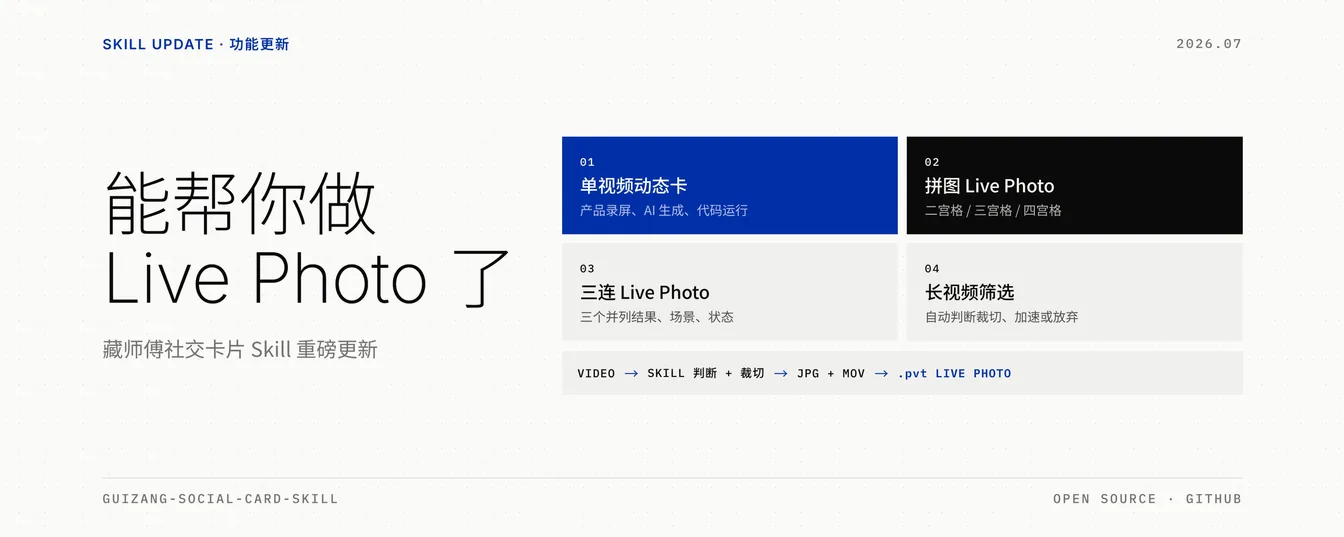
Guizang Social Card Skill gives content teams, creators, and product builders an installable agent workflow for turning articles, screenshots, photos, notes, or short videos into social image packages. The skill is most useful when a post needs polished Rednote carousel cards, a WeChat cover pair, or one Live Photo card without rebuilding the layout system from scratch.
Image Examples


Skill Summary
Guizang Social Card Skill is an open-source agent skill for Claude Code, Codex, and similar coding agents. It packages a visual production workflow for Xiaohongshu / Rednote 3:4 carousels, WeChat Official Account 21:9 plus 1:1 cover pairs, and short Live Photo motion cards. Its core value is not just layout templates; it gives the agent intake rules, style systems, image sourcing guidance, video information-budget checks, rendering steps, and QA guardrails.
Who It Helps
- Content creators: Turn long posts, travel notes, product reviews, or tutorials into multi-card social packages.
- Product and DevRel teams: Convert release notes, screenshots, demos, and tool updates into Swiss-style visual explainers.
- Design-minded operators: Generate consistent Rednote cards and WeChat cover pairs without opening a full design tool for every post.
- Agents with filesystem access: Use a repeatable HTML-to-PNG workflow instead of loosely describing a poster in chat.
Access / Install Links
The main source is the public GitHub repository: op7418/guizang-social-card-skill. The author article introducing the Live Photo update is here: op7418 on X.
npx skills add https://github.com/op7418/guizang-social-card-skill --skill guizang-social-card-skillManual install is also possible by cloning the repository into a local agent skill directory and checking that SKILL.md, assets/, and references/ are present.
Setup Steps
- Install the skill: Use the
npx skills addcommand or clone the repo into the agent’s skill folder. - Confirm the runtime: The agent needs filesystem access, shell execution, and a browser or Playwright path for rendering HTML to PNG.
- Provide source material: Give the agent an article, script, screenshot set, product note, photo set, or short video.
- Choose the surface: Ask for Rednote carousel cards, a WeChat cover pair, a Live Photo card, or a platform-specific package.
- Review the rendered assets: Inspect the output images first; run the validator when layout overflow, footer collision, or tiny text risk matters.
Example Inputs
- Article to carousel: “Make a Swiss-style Rednote carousel from this product review, five cards, IKB blue.”
- WeChat covers: “Turn this article into a WeChat 21:9 hero plus 1:1 share cover, with the same visual system.”
- Screenshot explainer: “Use these app screenshots to make a tutorial-style social card set.”
- Live Photo card: “Turn this short product recording into a five-second Rednote Live Photo card with one quiet headline.”
Expected Outputs
- Static social cards: PNG exports for Rednote / Xiaohongshu, usually in 1080 x 1440 portrait format.
- WeChat cover pair: A 21:9 main cover and a 1:1 share card composed as a consistent visual pair.
- Live Photo package: A still JPG plus MOV package path for mobile testing, with duration logic separated for Rednote and WeChat.
- Local task folder: HTML, source assets, rendered output, and optional source-credit notes kept outside the skill root.
Use Cases
- AI tool launches: Turn a release note and product screenshots into Swiss-style cards with strong hierarchy.
- Travel or lifestyle posts: Use editorial layouts, image-led covers, and restrained text placement for narrative posts.
- Product demos: Use a Live Photo card when motion proves a result better than one static screenshot.
- WeChat publishing: Generate a cover pair for the same article instead of cropping one image into two incompatible ratios.
Common Mistakes & Fixes
- Treating it like a poster generator: Start with the source article and page plan, then let the skill choose layouts instead of asking for one generic cover.
- Skipping evidence assets: Provide screenshots, photos, or short clips when the post explains a product, workflow, or result.
- Forcing long motion: Use Live Photo only for one small proof point; keep longer tutorials as static carousel pages.
Limitations
- Not a full video editor: The Live Photo branch is for short motion cards, not long-form editing or complex narrative video.
- Requires local execution: A plain chatbot without file access, shell commands, and rendering support will not reproduce the workflow reliably.
- Visual scope is opinionated: The skill intentionally focuses on Editorial and Swiss systems, not every social media aesthetic.
- Licensing needs review: The repository is AGPL-3.0 and includes commercial licensing notes, so redistribution and commercial use should be checked by the implementer.
Related Tools / Prompts
The closest companion is guizang-ppt-skill, which handles horizontal presentation-style decks while this skill handles social feed images and cover pairs. It also pairs naturally with local browser automation, Playwright rendering, screenshot treatment workflows, and agent systems that can manage source files.
FAQ
- Q: What is Guizang Social Card Skill?
A: It is an installable agent skill that helps Claude Code, Codex, or another local coding agent produce Rednote cards, WeChat cover pairs, and Live Photo motion-card assets from existing content. - Q: Does it replace a designer?
A: No. It gives the agent a structured production workflow and strong layout defaults, but brand-sensitive posts still need human review for copy, rights, screenshots, and visual judgment. - Q: When should I use the Live Photo branch?
A: Use it when a small motion proves something: a product result appears, a button changes state, food opens or pours, or a game action succeeds. - Q: Can it run inside any chat app?
A: It works best inside coding-agent environments with filesystem, shell, and browser-rendering access. Without those pieces, the skill loses the repeatable HTML-to-PNG workflow.
Use this skill to generate your version? Share in the comments or on Twitter!
Explore more? View the AI Tools or Image & Design category.
I hope you found this Guizang Social Card Skill AI guide helpful.
Follow me @bigprompt for more.
Like/Repost if you can this prompt.
Internal link:
Prompt Hubs for AI Skills, Visual Systems, and Workflows
Football Editorial Hero Poster Prompt: Sliced World Cup Portraits
Football Caricature Poster Prompt: Urban World Cup Characters
Aztec Footballer Poster Prompt for World Cup Star Warriors
Branding Flat Lay Mockup Prompt for Overhead Identity Scenes
Big Prompt Hub Review
Big Prompt Hub views this skill as a practical production layer for creators who already have material but need a repeatable visual packaging system. Its strongest value is the combination of opinionated aesthetics, page planning, rendering, and motion-card boundaries. The main caveat is operational: teams should verify the local runtime, asset rights, and license terms before making it part of a commercial publishing pipeline.