
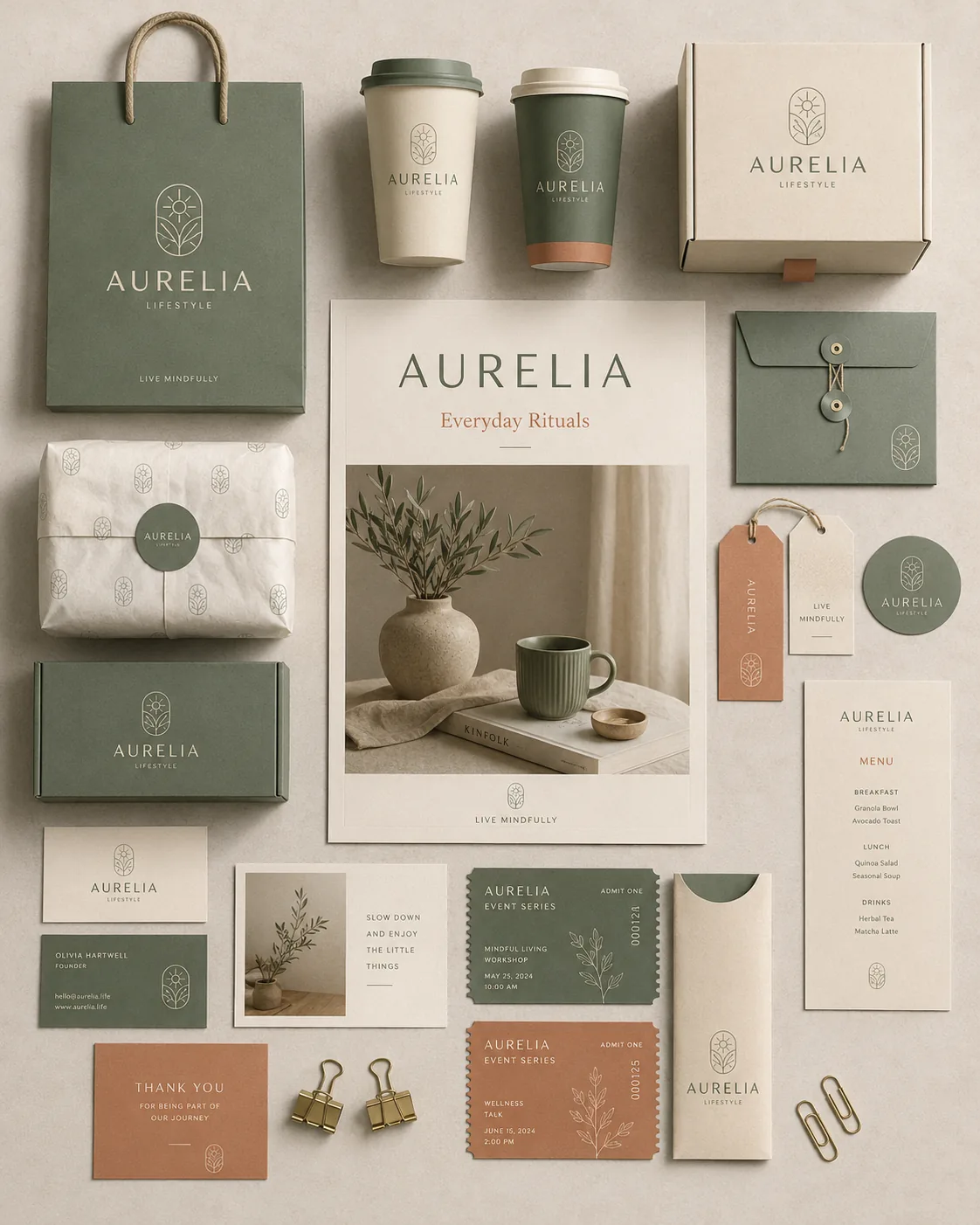
Brand designers using a branding flat lay mockup prompt need one overhead scene that makes packaging, stationery, cards, cups, tags, and campaign print feel like a finished identity system instead of scattered desk props. This template keeps the source’s premium flat-lay logic intact while turning the example brand names, color systems, and collateral mix into variables for lifestyle, retail, cafe, beauty, wellness, and boutique product brands.
Image Examples


Strategic Deployment Guide
Model fit: ChatGPT is the better first pass when you need a tight premium board with a controlled hero poster, readable object hierarchy, and more restrained spacing. Gemini is useful when you want a wider tabletop composition, broader collateral spread, or quick horizontal variants for presentation decks. In both models, keep the overhead camera and asset list fixed before changing brand colors or props.
Branding Flat Lay Mockup Prompt Code
CORE TASK:
Create a premium flat-lay, top-down branding and packaging mockup for [BRAND NAME], showcasing a complete visual identity collection with a clean, modern, minimalist aesthetic.

CAMERA AND SURFACE:
Capture the scene from a perfectly overhead perspective on [SURFACE MATERIAL]. Use soft natural lighting, realistic shadows, subtle paper texture, and photorealistic detail suitable for a professional brand identity presentation.

CENTRAL HERO:
Place one central hero poster as the visual anchor. The poster should feature [CAMPAIGN TITLE], refined lifestyle imagery, and the clearest expression of the brand's mood.

BRAND COLLATERAL:
Arrange coordinated packaging, stationery, marketing materials, and promotional items around the central poster. Include:
- product bags
- boxes
- takeaway cups
- business cards
- postcards
- tags
- stickers
- menu cards
- tickets
- branded inserts

COLOR SYSTEM:
Use a cohesive color palette of [PRIMARY COLOR], [SECONDARY COLOR], and [ACCENT COLOR]. Keep the palette consistent across all packaging, cards, labels, and paper objects.

IDENTITY DETAILS:
Use elegant sans-serif typography, a simple geometric or line-art logo, refined spacing, and small repeated brand marks. Add subtle props such as binder clips, paper clips, twine, folded paper, fabric texture, or small stationery tools only when they support the composition.

LAYOUT CONTROL:
Keep every object aligned to a curated editorial flat-lay system. Leave clean negative space between objects. Do not let the packaging, cups, tags, and small cards collide with the central poster. The scene should feel arranged by a brand designer, not randomly scattered.

STYLE TARGET:
Premium brand identity presentation, minimalist packaging mockup, editorial flat lay, realistic paper texture, soft daylight, balanced spacing, professional commercial mockup photography, high-resolution detail.

OUTPUT FORMAT AND RESOLUTION:
Generate a high-resolution commercial product mockup suitable for a portfolio case-study cover, pitch deck slide, or social preview crop. Use [ASPECT RATIO] when needed, such as 4:5 vertical for social posts, 3:2 vertical for portfolio boards, or 16:9 horizontal for presentation decks. Preserve sharp paper edges, realistic product mockup depth, readable typography zones, margin control, and clean export framing.

NEGATIVE PROMPT:
No cluttered desk mess, no tilted camera, no weak logo text, no unreadable brand names, no inconsistent shadows, no oversaturated colors, no mismatched collateral styles, no random objects unrelated to the brand system, no plastic-looking paper, no generic stock-photo layout.
Why This Framework Functions
The prompt works because it treats the flat lay as a presentation system, not a pile of branded objects. The central poster gives the image one clear anchor, while the surrounding cards, cups, boxes, tickets, tags, and inserts prove how the identity extends across real touchpoints. That structure also makes the variables easier to control: swap the brand, palette, surface, and collateral mix without changing the underlying composition.
Implementation Steps
- Choose the brand category first: cafe, wellness, beauty, boutique retail, stationery, hospitality, event brand, or packaged product line.
- Lock three colors before generation. If the palette is vague, the mockup usually becomes beige filler or scattered accent noise.
- Write the campaign title and brand mood separately so the central poster does not become a generic logo sheet.
- Limit the collateral list to the 8-10 items that matter most for the brand. More objects can make the flat lay feel crowded.
- Run one vertical version for social or portfolio presentation, then one horizontal version for decks, case studies, or website hero crops.
- After generation, run a post-processing layout repair pass for margin control, object collisions, label alignment, duplicate mockups, and any crowded zones before manually correcting logos, URLs, ticket numbers, and brand claims.
Application Scenarios
- Brand concept presentations: designers showing how one identity could live across bags, cups, tags, cards, stickers, and campaign print.
- Packaging direction boards: founders and agencies testing whether a new palette can carry a full product and collateral family.
- Portfolio case-study covers: freelancers building a polished Behance, Dribbble, or website image that communicates the whole visual system quickly.
- Cafe, wellness, and boutique retail launches: teams previewing menus, tags, thank-you cards, takeaway packaging, and small promotional inserts before production design begins.
- Client mood alignment: creative leads using one flat-lay scene to compare refined, playful, organic, luxury, or modern-minimal brand directions.
Why This Prompt Works
The prompt is effective because it combines strict camera control with specific collateral categories. A top-down view removes perspective confusion, the central poster establishes hierarchy, and the required object list prevents the model from creating a beautiful but empty tabletop. The color variables also keep the identity coherent across paper, packaging, cups, and small labels.
Troubleshooting & Optimization
- The image looks cluttered: Append the phrase clear negative space, editorial spacing, no overlapping small objects, fewer collateral pieces.
- The central poster disappears: Append the phrase central hero poster is the largest printed asset and remains the composition anchor.
- The brand palette drifts: Replace the color line with all items use only the chosen primary, secondary, and accent colors as one controlled identity palette.
- Small text becomes broken: keep generated text minimal, then rebuild exact menu copy, URLs, legal notes, and tag details manually.
- The camera becomes angled: Append the phrase perfectly overhead 90-degree top-down camera, no perspective tilt, no side view.
FAQ
- Q: What is a branding flat lay mockup prompt used for?
A: It is used to create an overhead brand presentation scene where packaging, stationery, cups, tags, cards, and campaign print all share one coordinated visual identity. - Q: Is this different from a brand guideline board prompt?
A: Yes. A guideline board usually explains systems in labeled modules. This prompt is more photographic and editorial: it stages the identity as a realistic tabletop mockup. - Q: Should I use ChatGPT or Gemini for this flat-lay mockup?
A: Use ChatGPT first for a tighter vertical brand presentation and Gemini when you want broader horizontal layouts or deck-friendly tabletop spreads. - Q: Can the output be used as final brand collateral?
A: Treat it as concept art or presentation mockup. Exact logos, typography, menu copy, URLs, and legal details still need manual design cleanup.
Use this prompt to generate your version? Share in the comments or on Twitter!
Explore more? View the Image & Design category.
I hope you found this branding flat lay mockup prompt helpful.
Follow me @bigprompt for more.
Like/Repost if this prompt is useful.
World Cup Player Poster Prompt: Layered Editorial Portrait System
AI Workflow Prompts That Connect Briefs, Interfaces, and Video
Travel Poster Prompts That Turn Destinations into Collectible Art
Brand Identity Guideline Board Prompt: Premium Brand Board Layout
Juice Advertising Poster Prompt: Pack-Led Fruit Splash Campaigns
Big Prompt Hub Review
This prompt is strongest when you need a premium identity scene rather than a formal guideline sheet. The overhead camera, central poster, collateral list, and three-color palette give the model enough structure to build a realistic brand presentation with commercial polish. Its main limitation is text fidelity, so use the output for concept direction, portfolio covers, and client mood alignment, then rebuild exact logos and production copy by hand.