
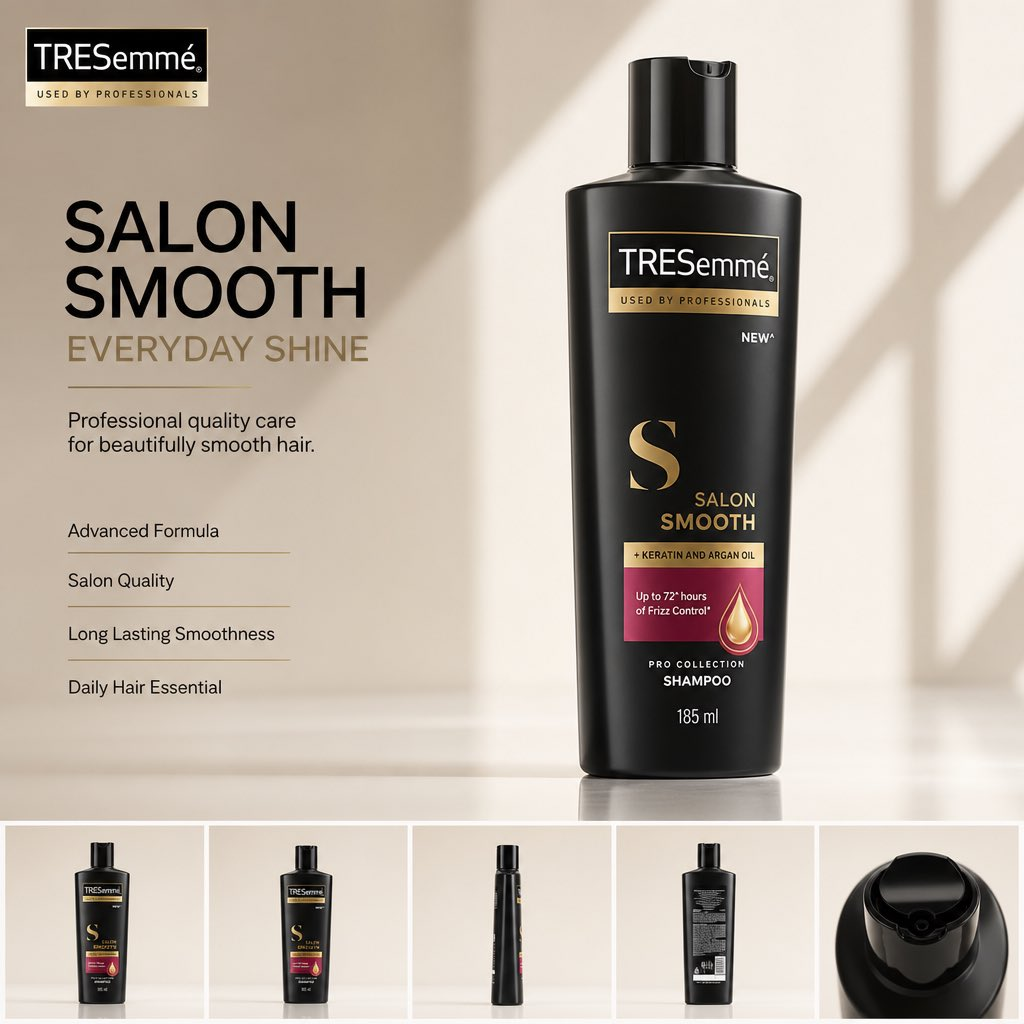
Brand designers refining a beauty product ad prompt often need the model to improve the campaign layout without redesigning the actual packaging. This template keeps the uploaded product image as the protected hero object, then builds a premium FMCG advertisement around exact package preservation, clean copy hierarchy, and a reusable product-angle strip.
Image Example


Strategic Deployment Guide
Model fit: Upload one clean, high-resolution product image or packshot before generation; use it as the locked reference for package shape, logo, label, colors, cap, materials, and proportions. Use GPT Image 2 first because the source names it and because the prompt depends on product-image interpretation, packaging preservation, and clean ad layout. Keep all claims, ingredients, SPF values, prices, and feature bullets as editable copy until a brand or legal reviewer verifies them.
Beauty product ad prompt Code
LAYOUT STRUCTURE AND COMPOSITION CONTROLS:
Create a premium 4:5 FMCG hero advertisement from the uploaded [product image]. Build the ad around one protected beauty or personal-care product as the main hero, occupying about 70% of the layout.

PRODUCT IDENTITY CONTROL:
Preserve the product exactly. Do not change the shape, packaging, branding, logo, colors, labels, proportions, material finish, cap, bottle, tube, jar, print texture, or any visible product details. Automatically extract the original brand logo from the packaging and place it cleanly in the top-left if a brand logo is visible and permitted.

COPY AND INFORMATION HIERARCHY:
Generate a premium headline for [product benefit], a concise 1–2 line subheading, and four text-only feature bullets on the left. Keep every feature as short editable copy, and use placeholder wording when factual claims are not verified.

HERO PRODUCT SCENE:
Display the product with realistic contact shadows, soft reflections, premium studio depth, and luxury composition. Add a bottom strip with 4–5 consistent product angles: front, 45-degree view, side, back, and top or close-up detail.

SCENE LOGIC:
Keep the sequence readable as one product-ad scene: brand/logo in the top-left, benefit copy on the left, protected hero product on the right or center, and product-angle strip along the bottom.

STYLE DIRECTION:
Use an Apple-inspired minimal studio with a soft gradient background derived from the product's brand colors, natural window light, HDR global illumination, subtle reflections, elegant negative space, and Swiss typography in an SF Pro Display, Helvetica Neue, or Inter style.

PRODUCTION FORMAT:
Shot on ARRI Alexa Mini LF with an 85mm product lens. Render in ultra-photorealistic V-Ray, Octane, or Unreal Engine 5 quality with ray tracing, 8K clarity, and a magazine, catalog, billboard, Amazon listing, and luxury brand campaign standard.

NEGATIVE PROMPT:
No humans, icons, decorative graphics, clutter, redesigned packaging, changed labels, altered logo, fake claims, wrong product color, distorted cap, extra products, messy text, unreadable feature bullets, watermark, or visual elements that compete with the product. The product remains the absolute hero.
Why This Framework Functions
The framework works because it separates product fidelity from campaign polish. The model is asked to protect packaging identity first, then add controlled advertising layers around it: logo placement, headline hierarchy, benefit bullets, hero lighting, and a product-angle strip. That order reduces the common failure where an image model makes the ad prettier by accidentally changing the bottle, logo, label, or product material.
Implementation Steps
- Upload a clean product image: Provide a high-resolution bottle, jar, tube, box, or packshot with readable branding and minimal background clutter before pasting the prompt.
- Replace factual copy manually: Let the model draft headline structure, but verify ingredient claims, SPF values, clinical claims, prices, and retailer wording before publishing.
- Check packaging preservation first: Reject any output that changes the logo, cap, label, bottle shape, color, or material finish, even if the layout looks good.
- Repair typography after generation: Rebuild small feature bullets and ecommerce copy in Figma, Photoshop, Illustrator, or Canva for final brand use.
- Create channel variants: Crop or rebuild the 4:5 master into marketplace tiles, catalog pages, paid social ads, and PDP hero modules after the core layout is approved.
Application Scenarios
- Beauty brand designers: Turn one approved packshot into a premium launch visual while keeping packaging untouched.
- Ecommerce teams: Create Amazon, Shopify, and marketplace hero images with product angles and benefit copy zones.
- Social media marketers: Build paid social variations where the product remains central and small text can be edited later.
- Packaging studios: Mock up how a shampoo, sunscreen, serum, moisturizer, or cream could appear in campaign-grade lighting.
Why This Prompt Works
This prompt works because it makes product preservation a hard requirement instead of a vague preference. It also gives the model a complete ad system: protected hero product, logo position, copy hierarchy, angle strip, studio lighting, color derivation from packaging, and a strict avoid list. The result is more likely to feel like a controlled FMCG campaign layout than a random product-photo remix.
Troubleshooting & Optimization
- The packaging changes: Add pixel-faithful packaging preservation, same logo, same label layout, same cap shape, no redesign.
- The text becomes messy: Replace small copy with placeholders and append large readable headline only, editable feature bullets, no tiny generated text.
- The product is too small: Append product occupies 70% of the layout, hero product dominates, generous negative space around copy.
- The angle strip is inconsistent: Ask for same product, same packaging, consistent lighting, front / 45-degree / side / back / top detail views.
- The ad feels generic: Derive the background gradient and accent colors from the actual product packaging instead of using a stock beauty palette.
Common Questions
- Q: What is a beauty product ad prompt?
A: It is an image prompt that turns a product photo into a polished beauty or FMCG advertisement while controlling packaging accuracy, copy hierarchy, lighting, and ecommerce-ready layout. - Q: Can the model create real product claims?
A: No. Treat feature bullets, ingredient statements, SPF values, and performance claims as placeholders until a brand or legal reviewer verifies them. - Q: Should I use the generated text as final ad copy?
A: Usually not. Use the generated layout for direction, then rebuild final typography and claims in a design tool.
Use this prompt to generate your product ad direction? Share your result in the comments or on Twitter.
Explore more visual prompt systems in the Image & Design category.
I hope you found this beauty product ad prompt helpful.
Follow me @bigprompt for more.
Like/Repost if you can use this prompt.
Internal link:
Matchday Football Poster Prompts Built Around Match Atmosphere
Modern House Miniature Infographic Prompt for Blueprint Panels
3D Cartoon Sticker Pack Prompt for Expressive Character Sheets
Guizang Social Card Skill:小红书图文、公众号封面与 Live Photo 卡片技能
Guizang Social Card Skill for Social Images and Live Photos
Big Prompt Hub Review
This prompt is useful for product teams because it puts packaging fidelity before visual decoration. Its biggest risk is over-trusting generated text or altered brand details. Use the output as a premium layout draft, then verify claims, rebuild typography, and review brand permissions before using it in commercial beauty, FMCG, or ecommerce campaigns.