
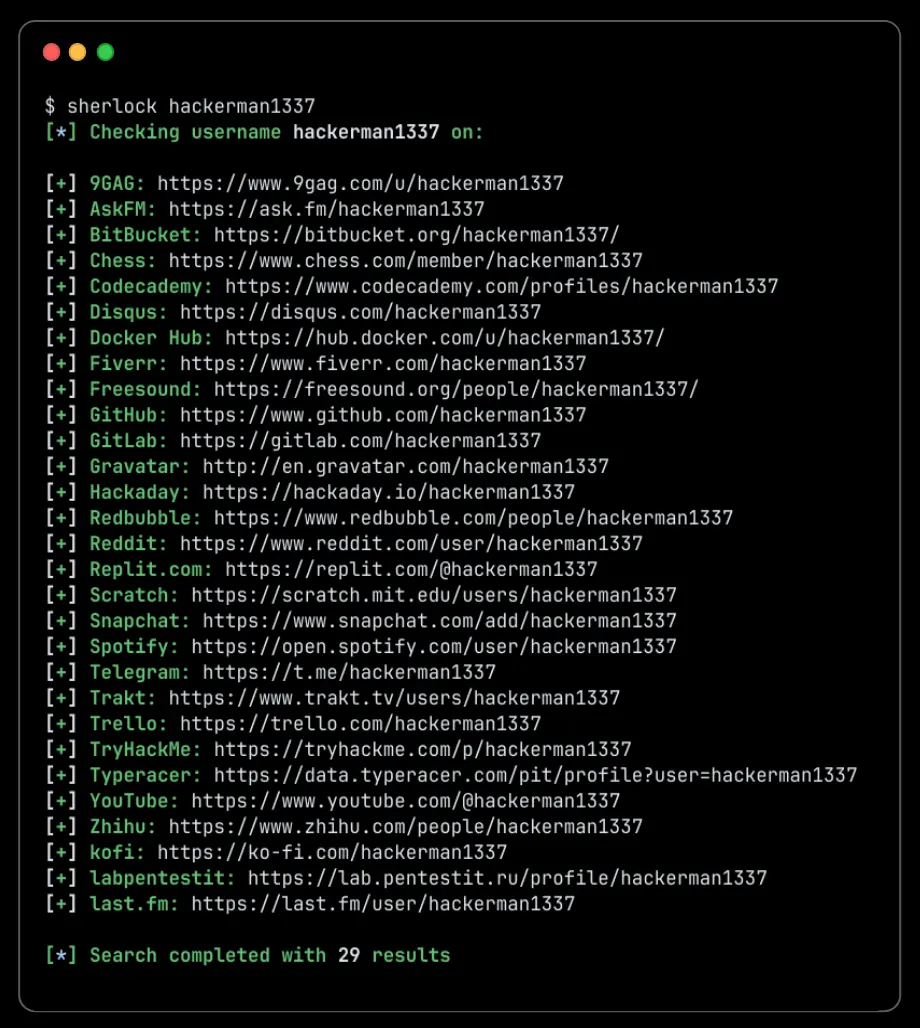
OSINT researchers facing a reused handle often need Sherlock username search to produce a reviewable list of public profile URLs without checking every site by hand. The CLI is useful for authorized reconnaissance and self-audits, but each match still needs human verification before it supports an identity claim.
Skill Summary
Sherlock is an open-source Python command-line capability that checks a supplied username across 400+ supported social networks and websites. At the reviewed repository commit, the package version is 0.16.1 and the project supports single or multiple usernames, site filters, proxy settings, browser opening, and text, CSV, or XLSX output.
This page treats Sherlock as a reusable skill because it can be installed, configured, and called repeatedly inside a research workflow. It is not an autonomous AI agent, a face-search service, or proof that accounts with the same handle belong to the same person.
Where This Skill Fits
Sherlock fits near the beginning of a public-source investigation. It turns one known handle into a candidate account list that an analyst can verify with profile details, dates, links, writing style, and other lawful evidence. That makes it a practical bridge between a search lead and a documented verification workflow.
Use it before deeper correlation, not after a conclusion has already been made. A good operating pattern is to record the exact input, limit sites when the task is narrow, export the result, and mark every candidate as confirmed, rejected, or unresolved.
Who It Helps
- OSINT researchers: need a repeatable first-pass check for a known public username.
- Security and trust teams: review impersonation, account conflicts, or exposed organizational handles with authorization.
- Journalists and fact-checkers: collect candidate public profiles before performing independent verification.
- Developers: need a scriptable username-checking component with filters and structured exports.
- Individuals: want to audit where their own username appears across public sites.
Access / Install Links
- Official repository: sherlock-project/sherlock.
- Fixed README: review the installation and CLI overview used for this guide.
- Installation reference: check the project’s current installation options before choosing pipx, pip, uv, Docker, or a community package.
- Usage reference: use the official usage documentation for current flags and examples.
- License: Sherlock is released under the MIT License.
The reviewed pyproject.toml requires Python 3.9 or newer. The README warns that some third-party ParrotOS and Ubuntu 24.04 packages may be broken, so affected users should follow the project’s documented pipx, pip, uv, or Docker route instead of assuming a distribution package is current.
Setup Steps
- Confirm that the research purpose is lawful, proportionate, and limited to public information you are authorized to review.
- Choose an installation path from the official documentation. For an isolated Python CLI install, the README recommends
pipx install sherlock-project. - Run
sherlock --helpand confirm the available flags in the installed version before building a repeatable command. - Start with your own handle or an approved test username, then narrow the site list if the task concerns only specific platforms.
- Save or export the results and verify each candidate profile manually before making any identity, risk, or ownership conclusion.
Example Inputs
Replace each bracketed value with an authorized username. These examples use documented Sherlock flags and keep every command in a native Gutenberg code block for one-click copying.
01 · Run a broad username check
Use when: You need an initial candidate list across the project’s default supported sites.
sherlock [username]Expected output: Terminal results and a username-named text file containing candidate public profile URLs.
02 · Limit the check to named sites
Use when: The task only concerns a small set of relevant platforms and a broad scan would add noise.
sherlock --site GitHub --site Reddit [username]Expected output: Candidate results limited to GitHub and Reddit for a faster, easier-to-review check.
03 · Export a reviewable CSV
Use when: An analyst needs structured results for triage, annotation, or a controlled evidence handoff.
sherlock --csv [username]Expected output: A CSV export that can be reviewed alongside the terminal output and annotated with verification status.
Expected Outputs

A normal run produces found or not-found status messages and saves results for the supplied username. Optional flags can show every checked site, print only found profiles, open candidates in a browser, restrict the scan to selected sites, or export CSV and XLSX files. Treat the output as a lead list rather than an identity graph.
A reviewable handoff should add the query time, Sherlock version, selected flags, authorization note, and a human verification status for each candidate. That context matters because supported sites, response behavior, exclusions, and profile availability can change.
Use Cases
- Personal footprint audit: check where your own long-used handle appears and identify accounts that need review or closure.
- Impersonation triage: help a security or trust team collect candidate public profiles that reuse an approved brand or employee handle.
- Journalistic verification: create a starting list of public accounts before corroborating ownership through independent evidence.
- Developer workflow: export a bounded username check for a lawful research pipeline, case file, or internal review tool.
Limitations
- A shared username is not proof of a shared identity. Common handles can belong to unrelated people.
- Site templates, rate limits, network errors, blocking, and changed response behavior can create false positives or false negatives.
- Sherlock checks supported public username patterns; it is not a face search, email-account discovery service, or private-data access tool.
- The default project list and exclusion rules evolve, so coverage numbers and individual site support should be checked against the installed version.
- Legal and ethical obligations depend on purpose, jurisdiction, authorization, data handling, and what an analyst does with the results.
Common Mistakes & Fixes
- Equating a handle match with identity: label it as a candidate and corroborate it with lawful, independent evidence.
- Running every site for a narrow question: use repeated
--siteflags to reduce noise and speed up review. - Ignoring tool version and query time: save both with the output so another reviewer can understand the evidence boundary.
- Using results for harassment or surveillance: stop the workflow; Sherlock should only support lawful, proportionate, authorized public-source work.
Related Tools / Prompts
Pair Sherlock with a documented verification workflow, not an automatic identity-merge step. An analyst may use a research prompt to structure hypotheses, conflicts, and follow-up questions, but the prompt should never promote candidate URLs into confirmed ownership without evidence. Browse AI Skills for adjacent reusable capabilities and Coding & Development for implementation-focused workflows.
FAQ
- Q: What does Sherlock username search do?
A: It checks a supplied username across supported public websites and returns candidate profile URLs that still require human verification. - Q: Is Sherlock an autonomous AI agent?
A: No. Sherlock is an open-source Python CLI. It functions as a reusable installed capability and can support AI-assisted research workflows, but its checks are rule-based site requests rather than autonomous identity reasoning. - Q: Can a matching username prove that two profiles belong to one person?
A: No. Treat every result as a candidate and verify ownership using lawful, independent evidence. - Q: Can Sherlock search by face, real name, or email address?
A: The core Sherlock workflow starts from one or more usernames. Face, real-name, and email searches are different capabilities with different privacy and evidence risks.
Before installing another public-source capability, use Find Agent Skills Before Installing to confirm the source, permissions, and maintenance signals you need to review.
For a repeatable accept-or-reject process after discovery, continue with the Agent Skills Evaluation Workflow and record sandbox evidence before adopting a skill.
Big Prompt Hub Review
Sherlock is a strong first-pass capability when an analyst already has a username and needs a fast, exportable candidate list. Its boundary is just as important as its reach: a URL match is not identity proof, site checks can drift, and responsible use requires authorization, verification, and a clear record of uncertainty.