
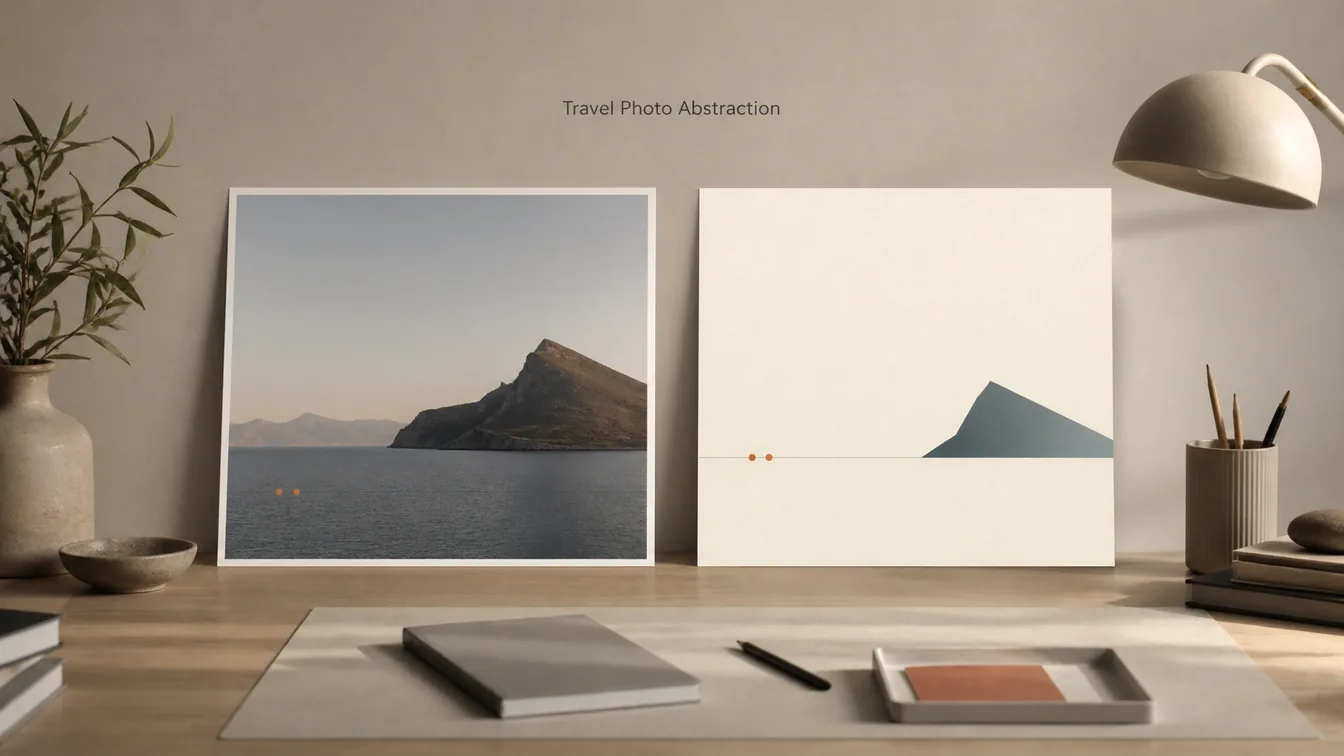
Editorial designers and creative studios need a travel photo abstraction skill that can preserve what makes a picture distinctive without reducing it to a generic filter. This Codex capability analyzes visible structure, generates a separate sparse abstraction, and composes both into an editorial artwork while keeping the uploaded photograph unchanged.
Skill Summary
For readers searching photo abstract editorial, the output is a separate sparse editorial panel paired with the unchanged photograph rather than a filter applied to the photo.
Travel Photo Abstraction is a source-available Codex skill for converting observable relationships in a photograph into a restrained visual study. It records dominant masses, axes, counts, spacing, direction, depth, color roles, asymmetry, and negative space before generation. Those facts become minimal marks in a new lower panel rather than a miniature redraw of the scene.
The final artifact uses an upper-and-lower composition: the untouched user photograph remains above, and a newly generated abstract panel appears below. A deterministic finalizer adds the archive number, date, and short phrase, then checks that the photograph still matches the original pixels before releasing the file.
Where This Skill Fits
This skill belongs between visual analysis and finished editorial art. It is useful when a standard photo filter would erase composition decisions, but a literal illustration would preserve too much surface detail. The method keeps relational identity—such as a horizon, clustered boats, a dominant silhouette, or uneven intervals—while allowing the abstract panel to become its own nonliteral composition.
Use it after selecting a photograph with clear visual evidence and before preparing a poster, travel essay, exhibition study, or portfolio sequence. Pair it with image-generation prompting when you need the abstract panel, and with layout or publishing workflows when the verified composite needs to become a wider campaign asset.
Who It Helps
- Travel photographers: turn one frame into a gallery-style visual study without regenerating or retouching the original photograph.
- Editorial designers: extract a restrained motif for features, portfolios, and cultural storytelling while retaining the source composition as evidence.
- Creative directors: build a repeatable art direction system around shape, spacing, color roles, and negative space instead of applying a one-click effect.
- Codex users: test a fail-closed visual workflow that combines image generation with deterministic composition and validation.
Access / Install Links
- Official repository: Evianis/travel-photo-abstraction on GitHub.
- Required environment: Codex with skill support and access to the built-in image-generation capability.
- Recommended local dependency: Python with Pillow for deterministic composition and objective output checks; visual review is still required.
- License boundary: install and use an unmodified copy. The source-available license prohibits modification, translation, redistribution, republication, sublicensing, and resale.
Setup Steps
- Install the untouched folder: clone the official repository and copy the
travel-photo-abstractiondirectory into your Codex skills directory. - Start a new Codex task: skill discovery happens when the new task loads the installed skills inventory.
- Verify the bundled library: run the installation checker before using the skill. It expects the complete reference set and support scripts.
- Provide a rights-cleared photograph: upload the exact image you want analyzed. The workflow locks that path and stops instead of silently substituting another file.
- Review before delivery: confirm that every important abstract mark maps to visible evidence and that the upper photograph remains unchanged.
Example Inputs
01 · Clone the official repository
Use when: You want a local, unmodified copy from the canonical project URL.
git clone https://github.com/Evianis/travel-photo-abstraction.gitExpected output: A repository directory containing the skill folder, scripts, references, and bundled structural library.
02 · Verify the installed skill
Use when: You have copied the folder and need to confirm that the required references and scripts are present.
python travel-photo-abstraction/scripts/check_installation.py travel-photo-abstractionExpected output: A completed installation check. If required files are missing, the workflow should stop before generation.
03 · Finalize and validate an artwork
Use when: A separate abstract panel has already been generated and you are ready to compose it with the locked original photograph.
python travel-photo-abstraction/scripts/finalize_artwork.py [original photo] [abstract panel] [final artwork] --number "NO. 001" --date "[DD MON YYYY]" --phrase "[short phrase]"Expected output: One composite file only after the finalizer reports a delivery pass and verifies the original-photo region.
A natural-language run request can be simple: ask Codex to use $travel-photo-abstraction on the photograph you just uploaded, map its most distinctive observable facts to minimal marks, and create the verified photo-plus-abstraction study.
Expected Outputs
- Visual analysis: a record of the dominant evidence, spatial relationships, color roles, depth, intervals, and details intentionally removed.
- Temporary generated panel: a sparse, nonliteral reconstruction on a clean neutral-ivory field. This intermediate is not the deliverable.
- Verified composite: the original photograph above the abstract panel, plus one archive number, one factual date, and one short image-derived phrase.
- Run log: a record of the locked input path, selected references, actual tool, generated panel, finalization command, and validation result.
The most important acceptance test is structural, not decorative. Each retained mark should correspond to an observable source fact, while the final lower panel should feel like an abstract memory of that specific photograph rather than a generic travel icon.
Use Cases
- Travel essay opener: pair a documentary frame with a quiet abstraction that echoes its horizon, focal mass, and color accents.
- Architecture portfolio: distill a facade, roofline, or repeated window rhythm without tracing the building as a miniature illustration.
- Landscape series: use negative space, directional lines, and restrained color roles to connect several photographs through one editorial system.
- Exhibition studies: create numbered visual artifacts whose dates and short phrases remain consistent across a controlled series.
- Creative review: reveal which shapes, counts, positions, and gaps actually make a photograph recognizable before a wider campaign is designed.
Limitations
- Built-in generation is mandatory: the skill deliberately stops if the image-generation capability is unavailable or fails.
- Input rights remain your responsibility: use a photograph you own or have permission to process. Generated-output rights also depend on the applicable tool and platform terms.
- It is not a filter: requests for watercolor, posterization, vector tracing, or a stylized miniature conflict with the skill’s deconstruct–distill–reconstruct method.
- Visual review cannot be skipped: objective pixel checks protect the original photograph, but a human still needs to reject invented marks, weak abstraction, poor hierarchy, or decorative filler.
- The repository is not open source: use the skill unchanged under its source-available license. Do not modify, translate, mirror, repackage, or republish its files.
Common Mistakes & Fixes
- Treating abstraction as style transfer: return to observable shape, count, position, direction, overlap, and spacing; remove marks that only decorate the panel.
- Using the wrong file as the photograph: lock the current upload path before analysis and pass that same path to the finalizer. Stop if it disappears.
- Letting the motif fill the panel: reduce the reconstructed marks as one coherent group and protect the large intentional field of negative space.
- Returning the temporary panel: deliver only the final composite after the finalizer verifies the untouched photograph and reports a pass.
Related Tools / Prompts
The skill depends on Codex’s built-in image-generation capability for the abstract panel and on Python/Pillow for deterministic composition and checks. It complements prompt assets that develop travel posters, architectural studies, and editorial layouts, but it should remain the source-of-truth layer when the untouched photograph and its structural evidence matter.
For a more literal destination graphic, use a dedicated travel poster or postcard prompt. For a faithful photo-plus-abstraction artifact, keep this skill’s separation clear: the uploaded photograph supplies content, selected references supply only abstraction grammar, and the generated lower panel stays separate until validation.
Installation and Validation FAQ
- Q: What does the travel photo abstraction skill preserve?
A: It preserves observable relationships such as dominance, position, direction, count groups, intervals, overlap, depth, asymmetry, color roles, and negative-space distribution. It does not preserve every texture or literal outline. - Q: Does it edit the uploaded photograph?
A: No. The intended workflow keeps the original photograph at its native dimensions and pixel values, generates a separate lower panel, and verifies the photograph during final composition. - Q: Can I replace the bundled references with my own?
A: Not under the published license. The repository allows use of an unmodified copy and prohibits modification or derivative versions of the skill and documentation. - Q: What happens when validation fails?
A: The workflow is designed to return no artwork from the failed path. Regenerate the lower panel from the locked original analysis, then run the finalizer again instead of recursively editing the rejected composite.
Install or adapt this skill to your workflow? Use only an unmodified copy under its license, and share the visual problem you are exploring in the comments.
Explore more reusable capabilities in AI Skills, or browse visual systems in Image & Design.
I hope this skill guide helps you distinguish faithful visual abstraction from a generic photo filter and plan a safer first run.
Follow @bigprompt for more installable skills, workflows, and prompt systems.
Related Big Prompt Hub pages:
Install and run Sherlock username search across public sites
Build detailed scientific botanical illustration study plates
Create layered travel scenes as pop-up postcard dioramas
Design bilingual English reading infographics with fixed layouts
Rebuild interface motion with the Video to Superprompt skill
Big Prompt Hub Review
This skill is strongest when a photograph has distinctive structure and the final artifact needs visible editorial restraint. Its evidence-first analysis, untouched-photo rule, and fail-closed finalizer provide a more disciplined route than a one-click abstraction filter. The trade-off is deliberate: installation is source-available rather than open source, the built-in image tool is mandatory, and every result still needs a careful human visual review.