
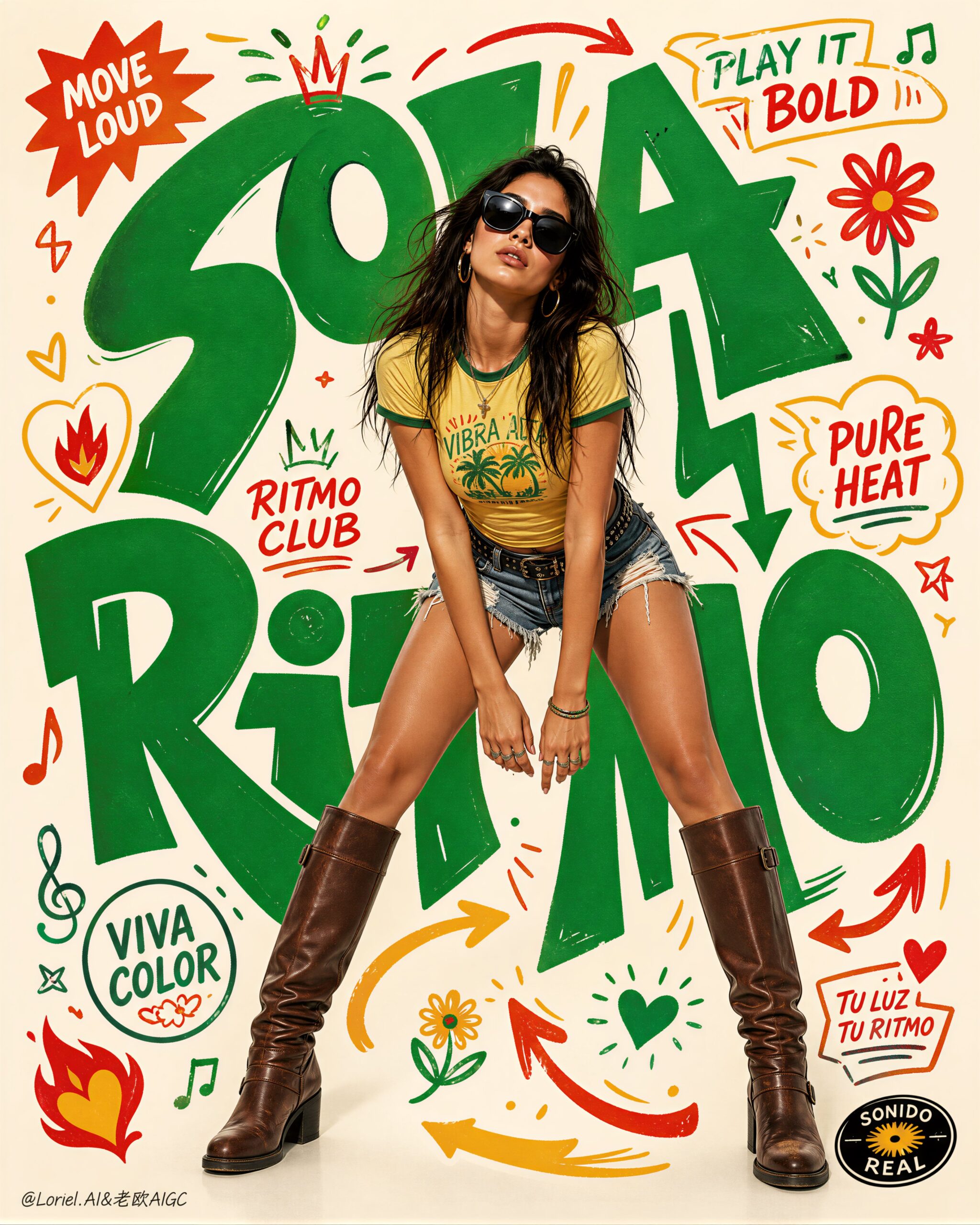
Fashion Typography Poster Prompt for Editorial Campaigns
This fashion typography poster prompt is for fashion designers, art directors, and social teams who need a repeatable campaign visual: one confident full-body subject, expressive hand-drawn lettering, and small graphic marks held together in a clear vertical composition. It turns a loose visual idea into a controllable poster brief that can be adapted to different brands, subjects, words, and palettes.
Image Examples


Strategic Deployment Guide
Model fit: Start with ChatGPT when you need a tightly art-directed poster with a stable central subject, controlled spacing, and a clear vertical read. Use a second image model only for a deliberate alternate typography treatment. Keep the subject, phrase, palette, and aspect ratio fixed while comparing outputs so the visual differences come from the model rather than a changing brief.
Fashion Typography Poster Prompt Code
CORE ART DIRECTION:
Create a premium fashion campaign poster for [BRAND NAME]. Feature [MODEL SUBJECT] in a confident full-body [POSE]. Keep the subject centered and clearly separated from the background.

TYPOGRAPHY AND GRAPHIC SYSTEM:
Wrap large hand-drawn display words reading [MAIN WORDS] around the figure without covering the face, hands, or clothing details. Add a restrained set of [ICON SET] as small editorial marks that guide the eye around the subject.

COLOR AND SPACE:
Use [COLOR PALETTE] consistently across the lettering, icons, and background accents. Preserve clean negative space, a warm neutral studio field, and a clear subject-text-background hierarchy.

OUTPUT CONTROL:
Create a tall vertical campaign poster in [ASPECT RATIO]. Use a hybrid photo-and-vector editorial treatment, controlled margins, readable sparse lettering, crisp edges, and one polished finished frame.

NEGATIVE PROMPT:
No warped anatomy, extra fingers, covered face, tangled lettering, random logos, unrelated icons, unreadable text, crowded margins, inconsistent shadows, watermark, or decorative marks that overpower the subject.
Implementation Steps
- Choose the brand name, subject, pose, main words, icon set, palette, and aspect ratio before generating.
- Generate the centered subject first, then inspect whether the face, hands, clothing, and silhouette remain readable.
- Place the main words around the silhouette and reduce their size or density if they cover important subject details.
- Use the icon set as a visual rhythm, not as a second subject; remove any mark that does not guide attention.
- Compare the final frame against the negative prompt, then run a post-processing layout repair for anatomy, lettering, spacing, margins, and exact brand copy in a design tool.
Application Scenarios
- Fashion brands can test a launch key visual before adapting it to social covers, lookbooks, or campaign boards.
- Art directors can compare centered poses, lettering systems, and palettes while keeping one visual brief consistent.
- Independent designers can create a strong editorial poster concept without starting from an empty layout.
- Social teams can turn a seasonal phrase, product name, or collection theme into a vertical campaign frame.
- Creative teams can use the output as a direction board before rebuilding exact typography and production details by hand.
Why This Prompt Works
The centered subject establishes a visual anchor before the lettering is introduced. The typography instruction then gives the model a path for movement around that anchor, while the icon limit and negative-space requirement reduce competing focal points. Separating brand, subject, pose, words, palette, and format also makes each revision traceable: a designer can change one control and see whether the hierarchy improves instead of rewriting the whole brief.
Troubleshooting & Optimization
- The poster feels crowded: append “fewer icons, wider negative space, generous outer margins, lettering stays outside the silhouette.”
- The face or clothes are covered: append “protect the face, hands, and garment details; place display words beside the subject, not over important features.”
- The lettering becomes tangled: replace the typography line with “one readable main phrase, separated letterforms, simple hand-drawn strokes, no overlapping characters.”
- The subject drifts off center: append “symmetrical vertical framing, centered full-body subject, equal breathing room on both sides.”
- The palette loses consistency: replace the color variable with three named colors and append “use only this palette for text, icons, and accents.”
- Exact words are misspelled: keep generated lettering minimal and rebuild the final brand name, slogan, URLs, and legal copy manually after generation.
FAQ
- Q: How do I adapt a fashion typography poster prompt?
A: Replace the brand, subject, pose, main words, icon set, palette, and aspect ratio while keeping the centered subject and hierarchy controls unchanged. - Q: How can I keep typography readable in a fashion poster?
A: Use one short main phrase, separate the letterforms, protect the face and clothing, and leave clear negative space around the subject. - Q: Which image model should I try first for this poster?
A: Start with ChatGPT for a tightly controlled vertical composition, then compare another model only when you want a purposeful alternate treatment. - Q: Can the generated fashion poster be used as final commercial artwork?
A: Treat it as a concept or direction board until anatomy, exact lettering, logos, product claims, and legal copy have been checked and rebuilt where necessary.
Follow @bigprompt for more practical prompt systems.
Explore Image & Design, Prompt Engineering Guides, AI Skills, AI Tools, Business & Productivity, Marketing & Growth, and Coding & Development.
Browse the Image & Design collection for more visual prompt patterns.
For a connected production path, continue with AI workflow prompts for turning a visual brief into repeatable production steps.
Big Prompt Hub Review
This is a useful starting point when a campaign needs one recognizable subject, one expressive phrase, and a disciplined graphic frame. Its strongest control is the separation between subject placement and typography movement. The main limitation is text fidelity, so use the generated frame for concept direction and finish exact lettering, logos, and production copy manually before commercial delivery.