
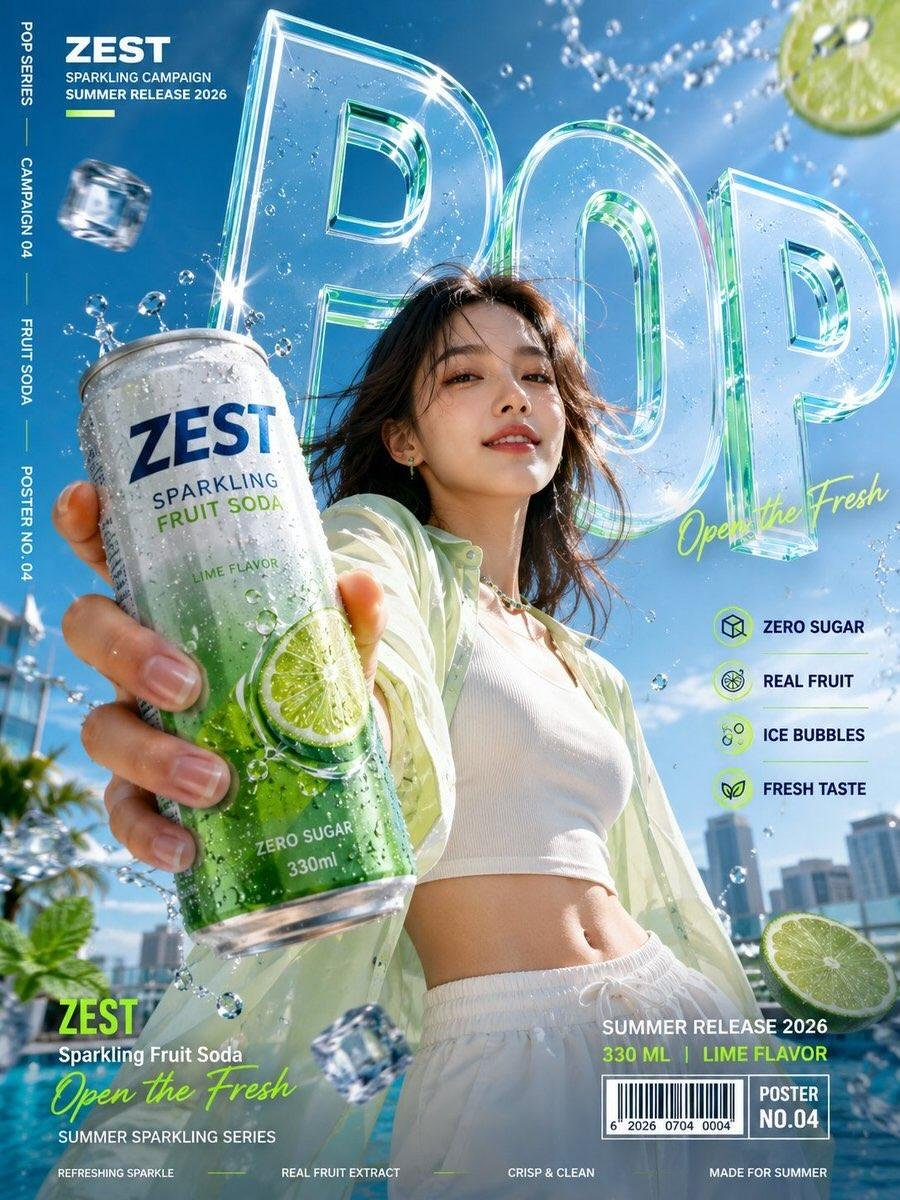
Brand designers and art directors use a commercial campaign poster framework to turn a product brief into a vertical hero ad with a close foreground product, a central model, and readable spatial typography. It keeps the product, model, headline, and campaign details in a deliberate near-to-far hierarchy, so creative teams can make an energetic draft without losing the brand or the offer.
Image Examples


Strategic Deployment Guide
Model fit: Use the model or tool named in the source when one is specified; otherwise choose the primary model that best follows the source constraints. Replace the variables, preserve the source composition logic, and review the output before publishing client work.
commercial campaign poster Prompt Code
Create a vertical 3:4 commercial campaign poster for a fictional [Product Category] brand.

Brand: [Brand Name]
Product: [Product Name]
Main word: [Main Word]
Tagline: [Tagline]
Color palette: [Color Palette]
Model: [Model]
Key features: [Feature 1], [Feature 2], [Feature 3], [Feature 4]

Use oversized bold typography with a strong one-point or diagonal perspective. The main word must feel integrated into the scene as a giant wall, corridor, street, stage, or spatial structure, with clear depth and readable letterforms.

Place the character near the center of the composition. The character must hold the product and extend that hand toward the camera, creating an exaggerated foreground and a strong 3D wide-angle effect. The product should be the closest, largest, and sharpest element, followed by the character in the midground and the giant typography in the background.

Keep the product shape accurate, realistic, and clearly branded. Add appropriate details such as condensation, ice, bubbles, fruit, sauce, steam, or packaging elements, but keep them controlled and secondary.

Include a complete campaign layout with brand name, feature icons, vertical side text, campaign number, release date, product details, barcode, and micro typography. Avoid a thick footer bar that covers the character; distribute the information across the lower corners and side margins.

High-resolution commercial photography, realistic skin and materials, strong perspective, dynamic pose, polished brand design, high visual impact.
Implementation Steps
- Set poster inputs: Replace the product category, brand name, product name, main word, tagline, palette, model, and feature fields before generating the poster.
- Lock poster layout: Keep the product closest and sharpest, the model in the midground, and the oversized word as the deep spatial structure; rerun if the product does not lead.
- Finish poster production: Correct tiny campaign copy, logos, barcode details, and feature icons in Photoshop or Illustrator before sending the poster to paid social, retail, or out-of-home production.
Application Scenarios
- Instagram product ads: Brand teams can adapt the vertical poster for product-launch ads on Instagram Stories, Reels covers, and TikTok campaign placements.
- Retail campaign decks: Art directors can prepare product poster directions for beverage, snack, beauty, or food presentation decks.
- Print key-visual handoff: Designers can use the poster output as a composition reference while rebuilding final typography and regulated packaging copy for print or digital display.
Why This Prompt Works
The composition works because it assigns a clear job to each depth layer: the extended product hand creates the closest visual anchor, the model gives the scene a human scale, and the giant word becomes an architectural backdrop. The variable fields let teams change the brand and product while the fixed hierarchy protects the campaign-readability logic. Keeping texture details secondary prevents ice, bubbles, ingredients, or packaging accents from competing with the product.
Troubleshooting & Optimization
- If the product looks too small: append “product fills the nearest foreground, larger and sharper than the model” and reduce competing props.
- If the headline becomes flat: replace the type direction with “build [Main Word] as a readable giant corridor or stage in one-point perspective.”
- If campaign information crowds the model: append “place microcopy, barcode, icons, and release details in lower corners and side margins; no thick footer bar.”
Campaign Poster FAQ
- Q: What is a commercial campaign poster?
A: It is a vertical product-ad composition that makes the product the nearest visual anchor, places a model behind it, and turns a headline into a readable spatial structure. - Q: Which parts should I edit first?
A: Start with the variables that control the subject, audience, input material, and output format, then adjust style details. - Q: How should I check the result?
A: Compare the output against the source prompt, source media, and the quality checks recorded in the production brief.
Use this prompt to generate your version? Share the result in the comments.
Explore more? View Image & Design or Prompt Engineering Guides.
I hope you found this commercial product campaign AI prompt helpful.
Follow @bigprompt for more prompts and workflow systems.
More image-design prompt guides:
Browse image and design prompts for related visual directions
Read prompt engineering guides for reusable prompt structure
Explore the latest Big Prompt Hub creative assets
Find additional commercial image concepts in Image & Design
Compare implementation advice in Prompt Engineering Guides
Big Prompt Hub Review
Big Prompt Hub should publish this prompt only after the scaffold copy is replaced with a source-specific review. Explain the asset’s real value, its main limitation, and the human judgment needed before reuse.