
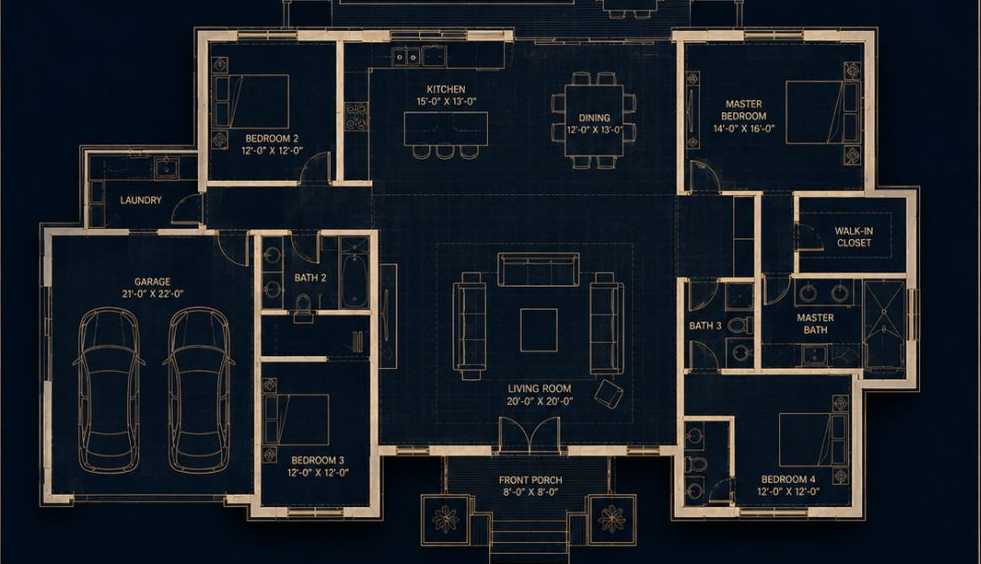
Achieving production-grade architectural aesthetics becomes systematic through the blueprint to render prompt, which synchronizes blueprint-to-render spatial coordinates within a multi-panel framework to eliminate conceptual ambiguity. This protocol formulates silhouette-integrity logic to stabilize production-ready authenticity for professional digital architects and urban planners.
Image Examples
ChatGPT (GPT Image 2) vs Gemini (Nano Banana 2)
1. Generate using ChatGPT (GPT Image 2)

2. Generate using Gemini (Nano Banana 2)

Strategic Deployment Guide
Model fit: ChatGPT, Gemini, Midjourney and similar models.
Operation: Copy the code below. Replace the bracketed variables to customize layout and materials, ensuring the blueprint remains the primary source of truth.
Blueprint to Render Prompt Code
Create a [Aspect_Ratio: "3:4"] split-screen architectural visualization.

Top Half: A precise, true top-down orthographic architectural blueprint.
- Style: [Blueprint_Style: "Dark luxury aesthetic with deep navy background and glowing beige lines"].
- Walls: [Wall_Style: "Clean, precise, slightly extruded"].
- Labels: [Label_Style: "Minimalist sans-serif"].
- Layout Content: [Spatial_Configuration: "Exact outer footprint: garage on left, central living room, kitchen at rear, master bedroom on right"].
- Exterior: [Exterior_Elements: "Include a backyard pool and deck"].

Bottom Half: A photorealistic render that MUST MATCH BLUEPRINT EXACTLY — ZERO DEVIATION.

Structural Constraints:
- Architecture Style: [House_Style: "Single-story Modernist villa"].
- Form Language: [Geometry: "Clean rectangular volumes, flat roof slabs"].
- Materials: [Core_Materials: "Smooth concrete, natural stone, dark metal frames"].
- Camera: [Camera_Specs: "Front-facing elevated view, 35mm lens"].
- Environment: [Lighting: "Golden hour with soft natural light"].

Roof Rules (Critical Priority):
- All enclosed rooms MUST have roof coverage; NO room left exposed.
- Roof outline must match footprint EXACTLY with no floating elements.
- Single-story ONLY; No second floor or rooftop terraces.

Negative Constraints: No missing roofs, no second floor, no mismatch between blueprint and render, no extra rooms, no distorted proportions.
Why This Framework Functions
This protocol utilizes Constraint Satisfaction to bridge the gap between 2D technical data and 3D volumetric space. It coordinates the orthographic projection of the top-down blueprint with a 35mm perspective to neutralize the AI’s tendency to hallucinate vertical extensions. By codifying each layout element as a variable, it rectifies spatial drift and ensures the rendered roofline matches the blueprint’s room markers.
Implementation Steps
- Layout Synchronization: Ensure the [Spatial_Configuration] and the render description use identical room counts to maintain structural integrity.
- Blueprint Customization: Modify the [Blueprint_Style] to “Traditional white background” if you require a standard industry-standard technical drawing.
- Atmospheric Tuning: Adjust [Lighting] and [Core_Materials] to test how different weather conditions affect the spatial perception of the render.
- Geometry Refinement: Use the [Geometry] variable to toggle between flat modernist roofs and sloped traditional structures.
Application Scenarios
- Client Vision Alignment: Presenting technical drawings alongside aesthetic previews in a single view via the blueprint to render prompt.
- Material Testing: Iterating through different facade finishes in [Core_Materials] while keeping the structural footprint locked.
- Early-Stage Prototyping: Rapidly generating 3D massing studies from simple floor plan descriptions to test zoning compliance.
Why This Blueprint to Render Prompt Works
The system operates on Chain-of-Thought spatial logic, forcing the AI to treat the blueprint as a prerequisite layout before calculating the rendering depth. It employs negative-constraint anchoring to bypass common errors like floating roofs or phantom levels. This dual-layer approach ensures technical accuracy and visual appeal are synthesized without compromise.
Troubleshooting & Optimization
- Structural Drift → If the render adds extra windows, simplify the [Spatial_Configuration] to emphasize wall boundaries.
- Roof Hallucinations → Reinforce the “Roof Rules” section by repeating “Single-story ONLY” in the core description.
Strategic Insights FAQ
- Q: Can I use this blueprint to render prompt for complex interior layouts?
A: Yes. You must expand the [Spatial_Configuration] to include specific furniture markers to guide the render’s interior placement.
- Q: Does this work with traditional CAD-style blueprints?
A: Absolutely. Simply set the [Blueprint_Style] to “High-contrast technical CAD drawing” to mimic professional software outputs.
Use this prompt to generate your version? Share in the comments or on Twitter!
Explore more? View the Business & Productivity or Image & Design category.
I hope you found this blueprint to render image generation AI prompt helpful.
Follow me @bigprompt for more.
Like/Repost if you can this prompt.
Internal link:
餐饮新品主打海报提示词:利用 GPT-image-2 打造商业级视觉
Mastering the Food Hero Explainer Poster Prompt with GPT-image-2
Mastering the Naive Folk Art Painting Prompt with GPT-image-2
Mastering the image to outfit prompt with GPT-image-2
Travel Collage Poster Prompt: Editorial Design for GPT Image 2
Big Prompt Hub Review
This framework offers exceptional structural stability by decoupling every architectural element into a granular variable with sensible defaults. Its parameter control is the most rigorous in its class, ensuring the source of truth remains the dominant guide. For professional users requiring high-fidelity generalization across diverse spatial layouts, this is an industry-standard production asset.