
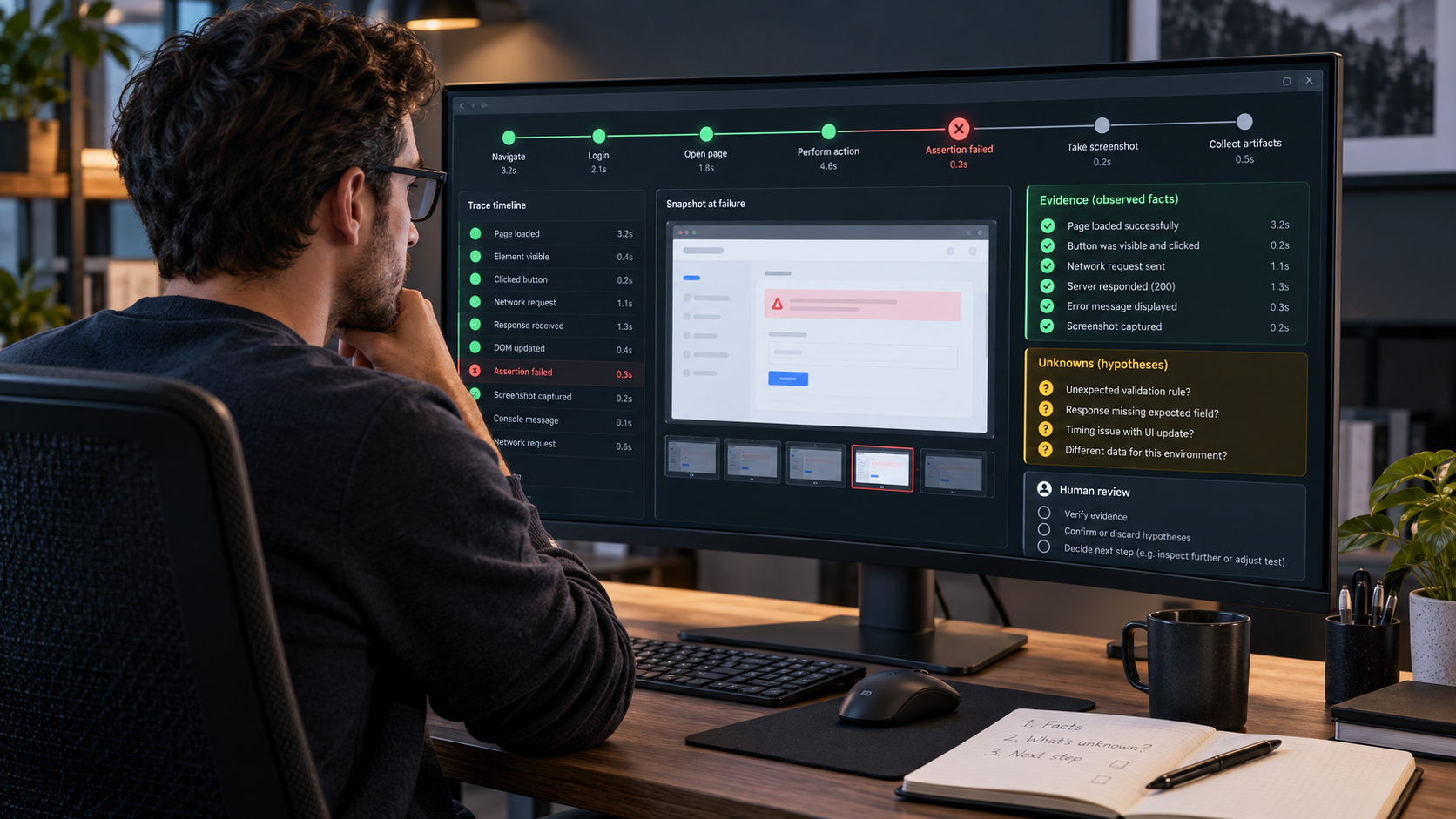
Developers and QA engineers investigating a failed browser test use a Playwright trace review workflow to turn a bounded artifact set into a human reproduction brief, separating recorded facts from missing evidence before a maintainer considers any test or application code change.
All example artifacts are synthetic BPH demonstrations. They are not a Playwright export, a customer incident, or proof of a root cause.
Workflow Overview
Trace Viewer is designed for inspecting recorded traces after a run, including CI failures, while related failure information can also appear in terminal output or an HTML report. This chain makes the boundary explicit: it inventories supplied observations, separates facts from hypotheses, records evidence gaps, and gives a maintainer a reproduction brief. It does not access CI, execute a test, alter selectors, edit code, or decide root cause.
Prompt 1: Normalize the Artifact Inventory
Target: define what a reviewer may inspect. Input: only the failed test name, error text, authorized trace/report/screenshot notes, test context, and environment record. Model fit: ChatGPT can normalize supplied text into an inventory; a human verifies every artifact reference. Expected output: a present-versus-absent artifact inventory. Quality check: each entry is tied to supplied evidence or marked unavailable.
Test: [failed test name]
Error: [recorded error text]
Authorized observations: [trace report screenshot test and environment notes]
Known gaps: [unavailable artifacts]

Return item | supplied observation | location or time | confidence | unavailable detail. Do not execute tests, fetch CI data, infer DOM or network state, or suggest code changes.
Prompt 2: Separate Observed Facts From Hypotheses
Target: stop a plausible story becoming a diagnosis. Input: the inventory. Model fit: ChatGPT can structure an evidence ledger but cannot validate an unavailable artifact. Expected output: facts and human-review hypotheses in separate sections. Quality check: each hypothesis names the evidence needed to test it.
Inventory: [artifact inventory]

Create OBSERVED FACTS from supplied events only. Create HUMAN-REVIEW HYPOTHESES using “may be consistent with” and state the missing evidence for each. Write “insufficient evidence” where needed. Do not name a root cause or recommend a selector change.
Prompt 3: Build a Time-Ordered Review Ledger
Target: make the recorded sequence inspectable. Input: timestamped or ordered observations. Model fit: ChatGPT can order supplied events without filling gaps. Expected output: a factual timeline with gaps. Quality check: missing timestamps remain missing.
Events: [recorded events and timestamps]

Return order or time | observed action or result | artifact reference | confidence | missing context. Say “order unavailable” rather than filling gaps with expected behavior.
Prompt 4: Record Missing Evidence and Safe Next Actions
Target: turn uncertainty into a safe maintainer question. Input: facts, hypotheses, and the ledger. Model fit: ChatGPT can draft questions, while a maintainer controls what evidence may be inspected. Expected output: a missing-evidence matrix. Quality check: each next action requests review or an authorized observation, never an automated repair.
Facts: [observed facts]
Gaps: [missing evidence]

For each gap return missing evidence | why it matters | safe maintainer question | allowed next action | prohibited assumption. Do not request credentials, CI access, confidential uploads, or code changes.
Prompt 5: Draft the Human Reproduction Brief
Target: prepare a maintainer-owned handoff. Input: the completed ledger and gap matrix. Model fit: ChatGPT can consolidate approved notes; the test owner decides whether to act. Expected output: a brief with explicit uncertainty. Quality check: it has no root-cause verdict and no claim that listed steps will reproduce the incident.
Test and environment: [known facts]
Observed timeline: [review ledger]
Gaps and hypotheses: [labelled uncertainty]

Return purpose, bounded inputs, observed sequence, proposed human checks, evidence still required, owner questions, and the statement: no code change or root-cause conclusion is authorized by this brief.
Implementation Steps
- Enter only authorized failure observations in Prompt 1 and list every absent screenshot, trace step, DOM detail, network detail, or retry record as unavailable.
- Run Prompts 2 and 3, keeping quoted observations and human-review hypotheses visibly separate.
- Use Prompt 4 to turn every uncertainty into a maintainer question or authorized observation request.
- Give Prompt 5’s brief to the test owner, who decides whether to reproduce, inspect more evidence, or make a code change.
Workflow Use Cases
- Frontend teams: hand off a CI browser-test failure with a timeline and evidence gaps rather than a speculative fix request.
- QA engineers: reconcile terminal, report, and Trace Viewer observations before opening a defect.
- Engineering managers: decide whether an incident needs more artifact retention, a maintainer reproduction, or a separate product investigation.
Troubleshooting & Optimization
- A trace lacks a screenshot or step: append “insufficient evidence for visual-state confirmation” and do not reconstruct the missing state.
- A teammate asks for root cause: replace the request with a human-review hypothesis and list the observation needed to test it.
- Report and trace disagree: preserve both observations with references and ask the test owner which run or environment record is authoritative.
- The team wants a selector fix: stop at the reproduction brief; a test or code change needs a separate maintainer decision.
FAQ
- Q: Does a Playwright trace review workflow identify root cause?
A: No. It organizes observations, labels hypotheses, and identifies evidence a maintainer still needs. - Q: Can it reproduce a flaky failure automatically?
A: No. It produces proposed human checks; an authorized maintainer must run and confirm a reproduction. - Q: What if a trace lacks detail?
A: Record the gap and leave the relevant conclusion as insufficient evidence.
Related Workflows
For UI implementation work after a maintainer verifies evidence, see the Figma to React Agent Workflow and Frontend UI Workflow AI Prompts.
If verified evidence reveals a user-facing content or UX question, continue with AI Website Audit Prompts.
Explore more in Prompt Engineering Guides and follow @bigprompt.
Big Prompt Hub Review
This workflow is useful when a team needs a disciplined handoff from a failed browser-test artifact to a human-owned reproduction decision. Its value is restraint: it preserves observed evidence and uncertainty instead of converting a timeout into an invented diagnosis, selector patch, or automated code-repair claim.
Leave a Reply
You must be logged in to post a comment.