
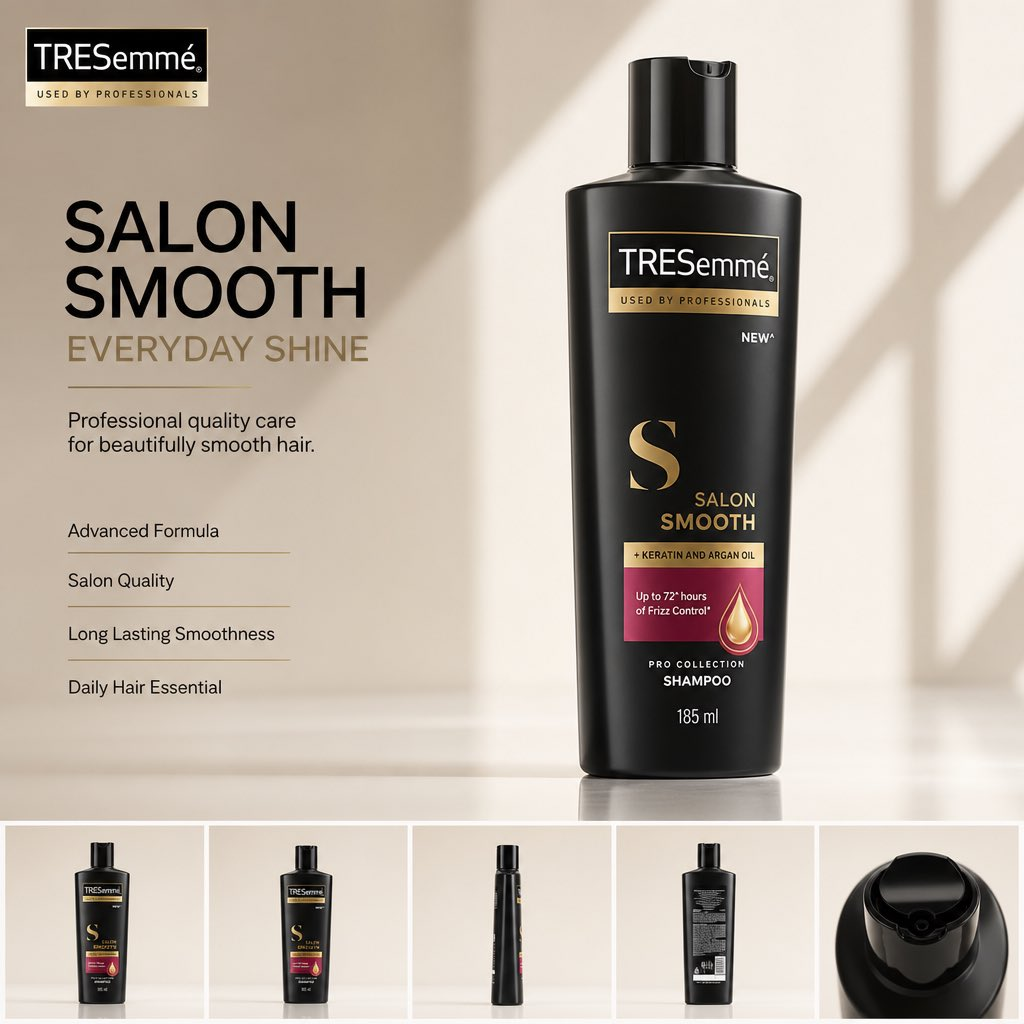
Product marketers and brand designers use a product photo to ad creative workflow when one approved packshot must become campaign visuals, channel crops, and reviewable copy zones. The source-backed beauty product ad prompt sets the main rule: the uploaded product image is the protected reference, and the generated ad must not redesign the package, logo, label, material, color, cap, or proportions.
Workflow Overview
This workflow turns a single product image into five reviewable artifacts: a reference ledger, package-locked ad brief, master creative, channel variant handoff, and human approval ledger. Model fit: GPT Image 2 is the source-supported still-image model tag because the source page names it for product-image interpretation, package preservation, and clean ad layout generation. The model can explore campaign direction, but brand, product, and legal owners still approve final packaging details and claims.
Prompt 1: Product Reference Intake
- Target: turn the uploaded product photo into a reference contract before ad generation begins.
- Input: one approved product image or packshot, brand name, product type, verified label facts, pack color, cap or closure details, and forbidden claims.
- Model fit: GPT Image 2 can use the uploaded product image as the visual authority; a human should confirm label facts that are too small to read.
- Expected output: a reference ledger covering silhouette, logo zone, label areas, material, color, proportions, and approved angle.
- Quality check: unreadable label text must be marked unreadable, not invented.
Analyze the uploaded [approved product photo] as the reference authority for an ad creative workflow.
Record only visible and verified facts:
- product type
- package silhouette and proportions
- logo position
- label zones that must not change
- cap, closure, material, color, and finish
- readable text versus unreadable small text
- visual details that must be preserved
Return a reference ledger and a list of details that require human confirmation before generation.
Prompt 2: Package-Locked Ad Layout Brief
- Target: define the master ad before rendering so the product does not get buried under effects.
- Input: the approved reference ledger, objective, audience, channel, aspect ratio, headline, subheading, feature bullets, CTA, and brand palette.
- Model fit: a language model or multimodal assistant can separate protected package facts from editable campaign copy zones.
- Expected output: a master creative brief with product hero placement, headline zone, feature zone, CTA zone, lighting, background, negative prompt, and production format.
- Quality check: the brief must say which elements are protected product facts and which are editable campaign design.
Create a package-locked ad layout brief from this reference ledger: [paste product reference ledger].
STRUCTURE:
- campaign objective: [launch, marketplace hero, paid social, catalog, deck visual]
- aspect ratio: [4:5, 1:1, 9:16, 16:9]
- headline zone: [approved or draft headline]
- subheading zone: [approved or draft support line]
- feature zone: [verified claims only]
CONTROLS:
Protect product shape, logo, label, colors, cap, material, and proportions.
NEGATIVE PROMPT:
Do not invent claims, ingredients, prices, certifications, legal copy, or package details.
PRODUCTION FORMAT:
Return a master ad-generation brief with layout zones, lighting, background, copy hierarchy, and manual-review notes.
Prompt 3: Generate and Repair the Master Creative
- Target: create one master ad image that keeps the package recognizable before variants.
- Input: uploaded product photo, layout brief, approved copy, reference ledger, and negative constraints.
- Model fit: GPT Image 2 fits the still-image generation step; exact small text and regulated claims still need manual repair.
- Expected output: one master ad creative with protected product hero, clean copy hierarchy, and edit space for final design work.
- Quality check: compare package silhouette, logo area, label blocks, cap, color, and material against the ledger before judging aesthetics.
Generate a premium ad creative using the uploaded [approved product photo] as the protected hero reference.
STRUCTURE:
- product hero: about 70% of the layout
- headline, subheading, feature bullets, and CTA in separate zones
- optional product-angle strip only if it preserves the same package facts
CONTROLS:
Preserve [silhouette, logo zone, label zones, cap, material, color, proportions].
Use [commercial studio, editorial, marketplace clean, launch campaign] lighting and background.
NEGATIVE PROMPT:
No redesigned packaging, changed label, fake claim, wrong color, distorted cap, extra product, unreadable headline, clutter, watermark, or invented certification.
PRODUCTION FORMAT:
Return one master still image plus a repair checklist for text, logo, label, and claim accuracy.
Prompt 4: Channel Variant Handoff
- Target: adapt the approved master creative without reopening product identity.
- Input: approved master image, reference ledger, required channels, crop ratios, safe zones, and copy length limits.
- Model fit: a model can draft variant briefs; a designer should finalize typography, legal text, and export specs.
- Expected output: a handoff for paid social, marketplace thumbnail, PDP hero, story cover, and presentation slide.
- Quality check: every variant keeps the same product silhouette, logo zone, and verified claims.
Create channel variants from this approved master creative: [master creative link or description].
Keep the same product reference facts: [reference ledger].
Return variant briefs for:
- 4:5 paid social
- 1:1 marketplace tile
- 9:16 story or reel cover
- 16:9 presentation or landing hero
For each variant, specify crop, safe zones, copy length, product size, CTA placement, manual text repair notes, and export owner.
Prompt 5: Human Copy and Approval Ledger
- Target: make approval explicit before the creative leaves concept stage.
- Input: reference ledger, master creative, variants, product facts, campaign copy, claims, prices, legal notes, and owner names.
- Model fit: a model can organize a review ledger, but a human must approve brand, rights, product accuracy, and legal language.
- Expected output: pass, revise, or reject status for each asset, with package, copy, channel, and owner notes.
- Quality check: no generated claim, ingredient, SPF value, price, or certification ships without verified source approval.
Build an approval ledger for this product ad set.
Inputs:
- reference ledger
- master creative
- channel variants
- approved product facts
- draft copy and claims
Review:
1. package shape, logo, label, cap, color, material
2. headline, subheading, CTA, and feature bullets
3. legal or regulated text
4. channel fit and crop safety
5. required manual edits
Return pass, revise, or reject, with owner and next action.
Implementation Steps
- Upload the product image first: attach a rights-cleared packshot so the model can control silhouette, label zones, cap shape, material finish, product color, and package proportions.
- Build the reference ledger: separate verified package facts from unreadable or unapproved details.
- Generate one master creative: keep the output in one aspect ratio until the product owner accepts the package read.
- Run a post-production repair pass: rebuild small label text, legal notes, URLs, prices, and exact claims in a design tool before approval.
- Create channel variants last: crop and adapt only after the master layout and product facts are approved.
Workflow Use Cases
- Beauty and personal-care launches: keep a bottle, tube, jar, or carton recognizable while testing premium campaign layouts.
- Marketplace creative: turn one product photo into clean thumbnail and hero directions without inventing package claims.
- Retail sell-in decks: create concept visuals for internal review before a designer rebuilds final artwork.
- Paid social variants: adapt one approved visual idea into multiple aspect ratios while preserving product facts.
- Agency concept rounds: compare layout routes while keeping legal and product owners in the approval loop.
Troubleshooting & Optimization
- The label changes: restate protected label zones and rebuild exact copy manually.
- The product color drifts: add material, finish, lighting, and color notes from the reference ledger.
- The layout becomes cluttered: reduce the ad to one headline, one support line, three or four bullets, and one CTA.
- The model invents claims: replace benefits with verified claims only, or mark the zone as placeholder text.
- Variants lose the product: return to the approved master and write crop-specific safe zones before regenerating.
product photo to ad creative workflow FAQ
- Q: What is a product photo to ad creative workflow?
A: It is a staged process for turning an approved product photo into campaign visuals while preserving package identity, copy zones, and human approval gates. - Q: Can this replace a designer?
A: No. It can create campaign concepts and variant briefs, but a designer still needs to repair exact text, exports, brand rules, and final layout details. - Q: What details need human review?
A: Claims, ingredients, certifications, prices, regulated language, legal notes, logos, label text, rights, and final channel exports.
Run this workflow chain in your next project? Share the output path in the comments.
Explore more? View Marketing & Growth, Image & Design, or Prompt Engineering Guides.
I hope this product photo to ad creative workflow helps you turn one approved product image into a cleaner campaign production path.
Follow @bigprompt for more AI workflows and prompt systems.
Related Big Prompt Hub pages:
Beauty Product Ad Prompt That Preserves the Package
Seedance Product Commercial Video Workflow: Reference-Locked Ads
Branding Flat Lay Mockup Prompt for Overhead Identity Scenes
Juice Advertising Poster Prompt: Pack-Led Fruit Splash Campaigns
ChatGPT Work Local Folder Guide: Desktop Access vs Cloud Uploads
Big Prompt Hub Review
Big Prompt Hub treats this workflow as a practical bridge between one strong product ad prompt and a real campaign production process. Its value is the separation of reference truth, layout exploration, channel adaptation, and human approval. The main limitation is text accuracy: image generation can suggest hierarchy and mood, but exact packaging, legal copy, and claims still belong in a human-controlled design and review pass.