
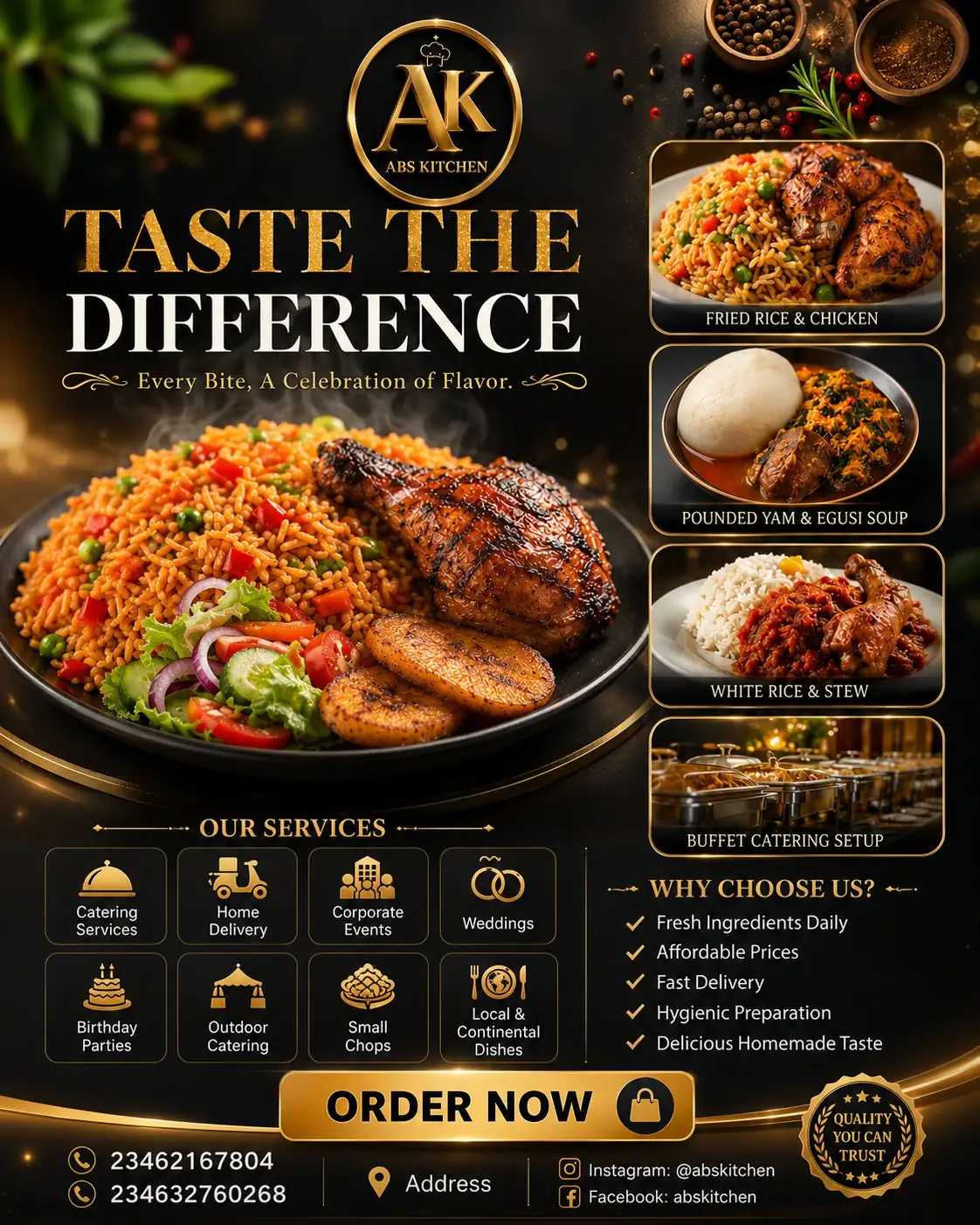
For restaurant owners and marketers, a restaurant promotional flyer prompt turns brand details into a polished 4:5 food ad with hero dish photography, services, trust bullets, CTA, contact blocks, and proofread campaign hierarchy online.
Image Example

Strategic Deployment Guide
Model fit: Use GPT Image first because this prompt needs a clean flyer layout, food realism, readable typography zones, and service icons. Replace the brand and contact variables, keep the 4:5 hierarchy, and proofread every visible word before publishing.
restaurant promotional flyer prompt Code
FLYER IDENTITY:
Design an ultra-premium luxury restaurant promotional flyer in 4:5 aspect ratio for [restaurant brand name]. Use [brand identity], [logo initials], [brand colors], and [visual style direction]. The design should feel elegant, high-end, and professionally crafted for social media marketing.

LAYOUT STRUCTURE:
Top: place a luxurious circular logo with metallic details. Main headline: [headline]. Tagline: [tagline]. Center: feature one large hero image of [hero dish] with cinematic lighting, glossy textures, steam, and premium restaurant presentation. Preserve [layout spacing] between logo, headline, food, services, CTA, and footer.

MENU AND DATA BLOCKS:
On the right side, show four smaller rounded-corner food images: [supporting dish 1], [supporting dish 2], [supporting dish 3], and [supporting dish 4]. Add a premium services section with icons for [service list]. Add a Why Choose Us section with [trust bullets]. Add a bold CTA button: [call to action]. Footer: include [data fields and contact details], [phone], [address], and [social handles].

MATERIALS AND STYLE:
Use cream, white, matte black, metallic gold, [material finish], subtle gradients, soft shadows, glassmorphism cards, premium lighting effects, abstract golden curves, floating spices, herbs, soft bokeh, excellent spacing, and strong visual hierarchy.

OUTPUT REQUIREMENTS:
Photorealistic modern food advertising, minimal but rich composition, polished typography, realistic reflections, cinematic lighting, [output resolution and delivery format]. Keep the final flyer suitable for Instagram, WhatsApp promotion, print handouts, or paid local ads.

NEGATIVE CONSTRAINTS:
No unreadable text, no fake phone numbers unless placeholders are requested, no cluttered service icons, no distorted food, no messy spacing, no extra logos, no watermark, and no public personal data beyond the variables supplied by the user.

TEXT SAFETY:
Keep all contact details editable and proofread-ready. Use short service labels, separate the CTA from the phone line, and reserve clean footer space for legally safe business information. If the model garbles numbers, leave the area as a blank contact placeholder for manual design cleanup and final brand scene review before export delivery.
Implementation Steps
- Verify brand data: Fill the logo initials, headline, tagline, services, CTA, phone, address, and social variables before rendering.
- Lock the flyer layout: Keep the 4:5 aspect ratio, hero dish, right-side menu cards, service section, CTA, and footer hierarchy intact.
- Plan post-processing: Use Photoshop, Illustrator, or Canva to repair typography, phone numbers, icon spacing, and food crops before publishing.
Application Scenarios
- Restaurant owners: Create a social media food ad for delivery, catering, or weekly specials.
- Food marketers: Build a paid local campaign asset with clear offer, menu, CTA, and contact details.
- Design studios: Produce a client preview for restaurant branding, flyer layout, or launch promotion.
Why This Prompt Works
The prompt works because it treats the flyer as a marketing layout, not just a food image. The logo, headline, hero dish, supporting dishes, services, trust bullets, CTA, and footer each have a defined role, which helps the model preserve visual hierarchy and gives the designer clear places to proofread.
Troubleshooting & Optimization
- If text is unreadable: replace long copy with shorter variables and append “large clean typography, generous spacing.”
- If food looks artificial: add the phrase “realistic steam, glossy textures, natural plate shadows, true food photography.”
- If the flyer feels cluttered: remove two service icons and instruct the model to preserve negative space around the CTA.
restaurant promotional flyer prompt FAQ
- Q: What is a restaurant promotional flyer prompt?
A: A restaurant promotional flyer prompt is an AI image prompt that turns food, brand, offer, services, CTA, and contact information into a structured marketing flyer. - Q: Can I use real contact details?
A: Yes, but proofread them manually. AI image tools often distort phone numbers, addresses, and social handles. - Q: Which model should I use?
A: Use GPT Image for the first pass when the layout needs food realism and cleaner typography zones, then polish text in a design editor.
Use this prompt to build a restaurant flyer concept, then manually verify all text, contact details, food claims, and brand marks before publishing.
Explore more growth assets in Marketing & Growth and visual systems in Image & Design.
Follow @bigprompt for more prompts and workflow systems.
Related Big Prompt Hub pages:
Low Carb Dinner Party Prompt Builds Isometric Menu Boards
Luxury Culinary Poster Prompt for Exploded-View Food Grids
Luxury Perfume Commercial Video Prompt for Bottle Transformations
Character Consistency Video Prompt for an 8-Scene Skate Story
Seedance Product Commercial Video Workflow: Reference-Locked Ads
Big Prompt Hub Review
This prompt is useful for restaurant marketing because it gives every flyer element a job: food desire, service clarity, trust, and ordering action. Its main limitation is text reliability, so phone numbers, addresses, social handles, and service claims need manual correction before the design goes live.