
Through Glass Video Prompt helps video creators and short-form directors stage one believable 9:16 take with physical contact, breath condensation, and a readable final mark. It is built for a fixed lens and a continuous shot, so the viewer can follow every touch, pause, wipe, and final reaction without relying on a cut or an automatically appearing symbol.
Source Video Demonstration
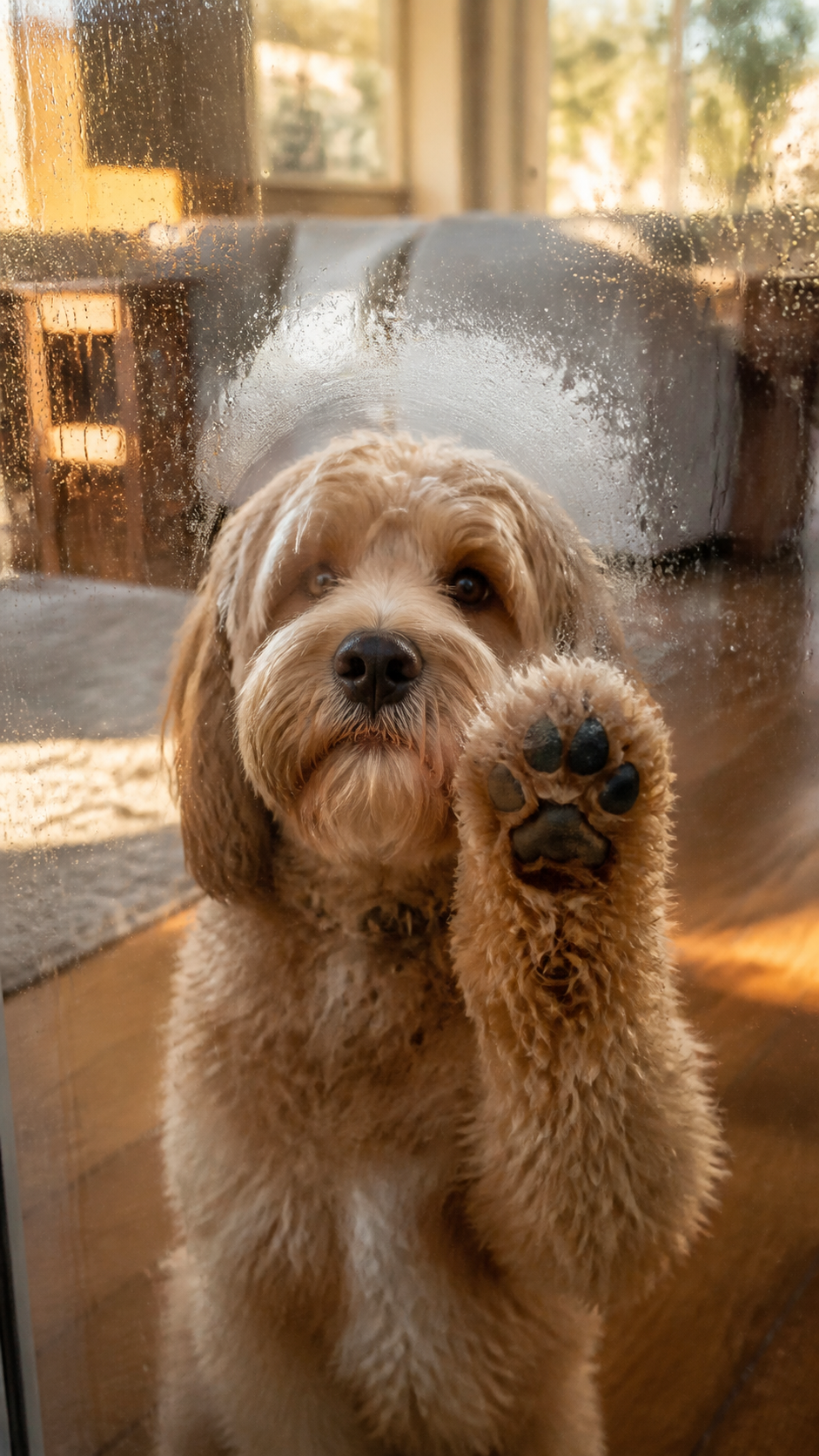
Source Video Demonstration: play the original user-provided MP4 to inspect the complete action order.
Strategic Deployment Guide
Model fit: Use a video model that can preserve temporal continuity, realistic contact, condensation, and a fixed camera through one short take. Replace the variables, keep the causal order, and inspect the result frame by frame for contact, mist formation, and mark continuity.
Through Glass Video Prompt Code
COMPOSITION AND LAYOUT:
[aspect ratio, duration, lens, and shot structure]; keep one continuous, photo-grade realistic take.
[lens and transparent barrier relationship]; place the clear barrier against the lens plane so the subject reads as being on the other side of the screen.

IDENTITY AND SETTING:
[animal subject] remains in [home interior and background], with natural depth blur and no interface elements.

ACTION AND POSE:
The subject looks at the lens, then performs [tap or contact count and rhythm] in [contact pose and timing]. Show believable contact deformation and a pause. It approaches the barrier and performs [breath or condensation behavior]; the fog must come from breath.

MATERIALS AND MARK LOGIC:
Use [surface material and moisture behavior]. Show the barrier's edge, reflections, and changing moisture density consistently, without magical particles or a cutaway. After pulling back, the subject wipes [wiped shape or mark] by physically removing condensation, never by adding a glow or overlay. Keep the cleared path transparent while untouched fog remains around it. End with a look through the cleared mark and a small natural reaction.

STYLE AND CONTROLS:
Warm realistic lighting, stable perspective, restrained emotion, and visible contact physics. Keep the background naturally blurred while the barrier stays readable at the lens plane. Preserve the subject's identity and silhouette across the entire take; do not swap anatomy, add a second subject, or move the camera to hide a continuity error. Keep this order: look -> contact -> pause -> approach -> exhale -> mist -> pull back -> wipe -> retract -> look through mark -> blink or final hold. Make every transition visible long enough for a viewer to understand cause and effect. Preserve the same framing and physical scale throughout the take.

OUTPUT FORMAT:
Fixed-lens single take in [production output format].

NEGATIVE PROMPT:
No interface overlays, time/date, subtitles, text, cuts, camera movement, cartoon style, 3D animation feel, exaggerated eyes, human fingers, auto-appearing mark, or broken contact physics.
Implementation Steps
- Lock camera and glass: Set the aspect ratio, duration, fixed lens, one-take rule, barrier-to-lens layout, and blurred background before describing the subject.
- Stage pose and identity: Direct the subject identity, contact pose, pause, approach, breath, condensation, wipe, and final reaction in one ordered chain.
- Post-render check: Review the first tap, condensation onset, wiped path, final mark, and absence of UI or cuts frame by frame; use layout repair if the barrier drifts.
Application Scenarios
- Social short tests: Give a creator or editor a fixed-lens 9:16 clip brief for a social feed experiment.
- Campaign review: Give a creative team a repeatable take to inspect for contact physics, mist, and mark continuity.
- Production handoff: Pass the shot brief to an editor for frame-by-frame cleanup, sound design, or final delivery.
Why This Prompt Works
This template makes causality explicit: the barrier establishes a stable surface, touch has visible contact physics, breath creates the mist, and the paw or contact point removes it to create the final mark. Keeping those causes in order reduces the common failure where a generated symbol appears as an overlay or a cut hides the physical transition.
Troubleshooting & Optimization
- If the output drifts: append “keep one fixed-lens take and preserve the exact action order” to the prompt.
- If contact breaks: append “show visible soft-tissue compression at every touch; do not skip the pause” and rerun.
- If the mark appears as an effect: replace the mark instruction with “the paw physically wipes away condensation; nothing appears automatically.”
Through Glass Video Prompt FAQ
- Q: What is a Through Glass Video Prompt?
A: It is a reusable fixed-lens video brief for a subject behind a transparent barrier, where contact, breath mist, wiping, and the final reaction happen visibly in one ordered take. - Q: Which parts should I edit first?
A: Set the animal or subject, interior, barrier relationship, contact rhythm, condensation behavior, wiped mark, and output settings before changing mood or styling. - Q: How should I check the result?
A: Watch frame by frame for two contacts, physical mist formation, a continuous wipe path, no cuts or UI, and a final look-through-and-blink hold.
Use this prompt to generate your version? Share the result in the comments.
Explore more in Video & Music or Prompt Engineering Guides.
I hope you found this Through Glass Video Prompt helpful.
Follow @bigprompt for more prompts and workflow systems.
Continue with related video and prompt guides
For a broader map of repeatable AI video and workflow prompts, start with the AI Workflow Prompts Hub for planning and production routes.
If your next project expands from one fixed take into a scripted sequence, use the AI short-drama workflow for moving from script beats to generated clips.
Big Prompt Hub Review
This prompt is useful for warm, tactile micro-stories where the physical illusion is the message. Its boundary is temporal reliability: generated video may still break contact, condensation, or lettering, so a human should inspect the complete take before delivery.