
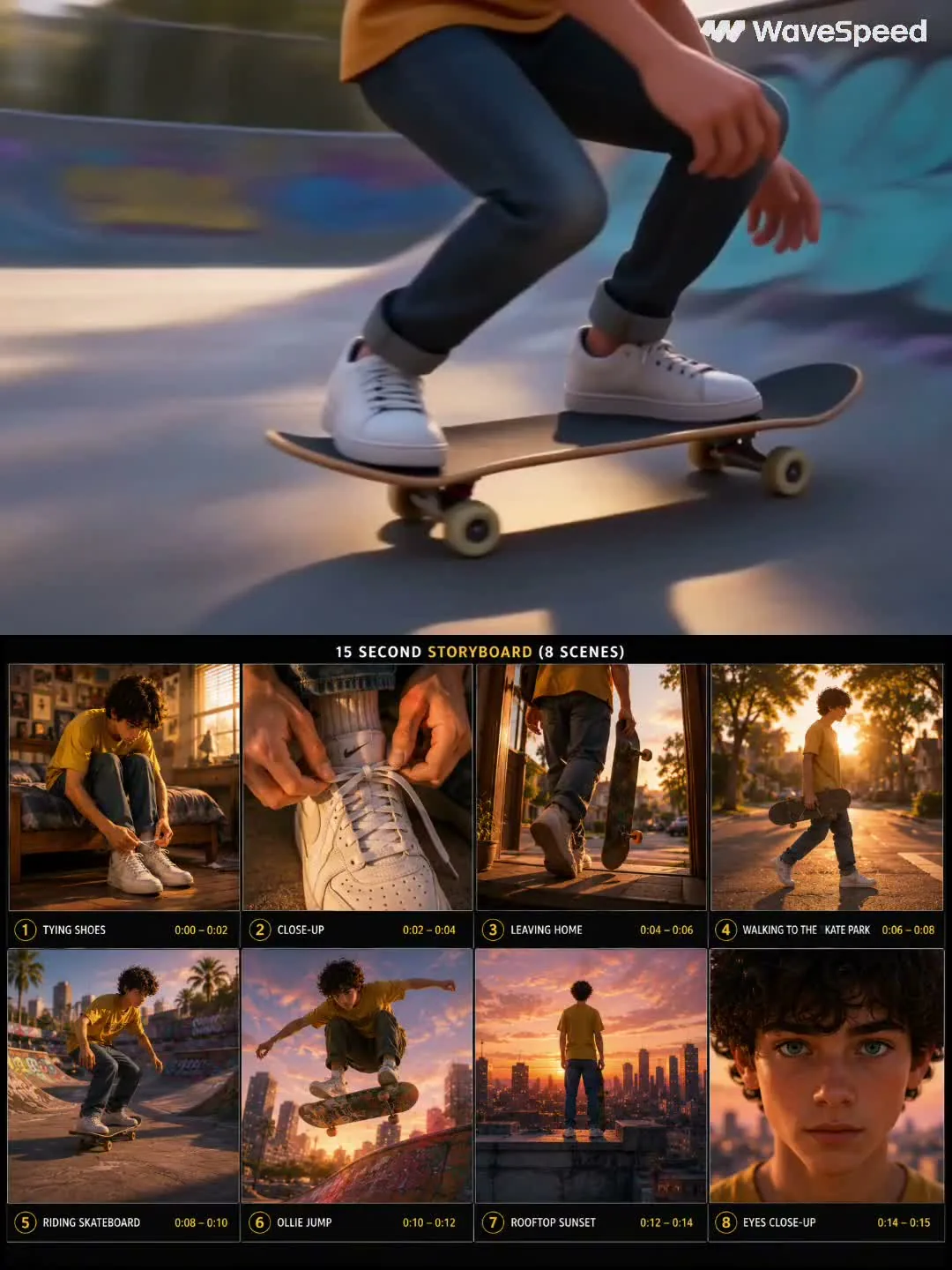
For creators and studios, a character consistency video prompt keeps one hero recognizable across an eight-scene AI film, from bedroom preparation to street travel, skate-park action, rooftop reflection, and a final emotional close-up ready for edit review.
Image Example

Strategic Deployment Guide
Model fit: Use Seedance first because multi-shot narrative coherence is the priority; use Runway Gen-4 References or Kling Elements when uploaded character images matter more. Upload a clean front-facing reference, keep the global character lock above every scene, and test the opening, action, and close-up beats before rendering the full 15-second sequence.
character consistency video prompt Code
GLOBAL CHARACTER CONSISTENCY:

REFERENCE CHARACTER:
[character age and role], with [hair style and color], [eye color or key facial detail], [body type], wearing [primary shirt or jacket], [lower-body clothing], [socks or accessories], and [shoes]. Maintain the exact same face, hairstyle, clothing, body proportions, colors, and [animation or realism style] consistently across every scene.

SCENE 1 (0-2s) - [opening location]:
[character name or role] sits or stands in [specific morning setup], preparing for [main activity]. Use [time of day], [room or environment details], cinematic lighting, shallow depth of field, and a slow push-in camera. Keep the same character identity and [animation or realism style].

SCENE 2 (2-4s) - [preparation close-up]:
Close-up of [specific preparation action] with [emotion]. Emphasize [fabric, hand, object, or face detail], soft light, realistic textures, cinematic depth of field, and smooth handheld camera movement.

SCENE 3 (4-6s) - [transition out]:
The character moves from [home or starting point] toward [destination], carrying [main prop]. Use [outdoor light], [street or landscape detail], long shadows, and a cinematic tracking shot.

SCENE 4 (6-8s) - [journey beat]:
The character continues through [route or environment], still carrying or using [main prop]. Add [trees, city, hallway, crowd, or weather detail], subtle lens flare if appropriate, realistic motion, and a smooth tracking camera.

SCENE 5 (8-10s) - [main action location]:
The character performs [main action] in [primary activity location]. Use dynamic follow-camera movement, energetic pacing, bright cinematic lighting, realistic motion blur, and consistent character identity.

SCENE 6 (10-12s) - [hero action]:
The character performs [signature move or dramatic action] over / through / beside [specific obstacle or set piece]. Use a dramatic low-angle shot, [background detail], realistic physics, and cinematic slow motion.

SCENE 7 (12-14s) - [emotional wide shot]:
The character stands or pauses at [final overlook or reflective location], facing [view direction]. Use [sky color], gentle environmental motion, a cinematic wide shot, and an emotional atmosphere.

SCENE 8 (14-15s) - [final close-up]:
Extreme close-up of the character's face. Show [eye reflection or expression detail], [hair or clothing movement], warm cinematic light, shallow depth of field, and a quiet final expression.

STYLE AND OUTPUT:
[animation or realism style], cinematic lighting, [dominant light quality], [composition and aspect ratio], volumetric sunlight or atmospheric depth when appropriate, smooth camera movement, shallow depth of field, realistic textures, premium color grading, consistent character identity, [output resolution and delivery format].

NEGATIVE CONSTRAINTS:
Do not change the face, hairstyle, outfit colors, body proportions, age, or main prop between scenes. Avoid extra characters, random wardrobe swaps, flickering facial features, unreadable hands, broken physics, text overlays, logos, and watermarks.
Implementation Steps
- Start with the identity lock: Fill in the character profile before touching the scene list, then use the same wording for clothing, face, body shape, and style throughout the prompt.
- Attach a reference image when available: In Runway, Kling, or similar tools, upload a clear front-facing character still and treat the prompt as the scene plan rather than the only identity source.
- Use identity anchoring tests: Generate scenes 1, 5, and 8 first. If the face, outfit, or body proportions drift, strengthen the global lock before rendering every shot.
- Plan post-render review: Change camera direction inside each scene, then compare frames in editing software so continuity constraints stay stable while the visual rhythm changes.
Application Scenarios
- Animation studios: Build a 10-15 second production preview where the same animated lead moves through a compact story arc.
- YouTube creators: Turn one mascot, host, or avatar into a repeatable intro reel without redesigning the character each time.
- Brand teams: Check whether a product mascot or campaign character can survive teaser ads, wide shots, and emotional close-ups.
- Editors and directors: Create a portfolio study or client preview before commissioning full animation, storyboards, or live-action references.
Why This Prompt Works
This prompt separates identity, scene action, and style instead of mixing them into one long cinematic paragraph. The global character block tells the model what must never change, the timecoded scenes give each shot a simple purpose, and the final negative constraints catch the common failure modes: face drift, wardrobe swaps, broken motion, and random text.
The source structure is especially useful for video because every scene repeats enough character information to preserve identity while still changing the camera, location, and emotional beat. That balance makes the template easier to adapt than a one-shot prompt that only describes the final look.
Troubleshooting & Optimization
- If the character changes face: shorten style adjectives and move the face, hair, clothing, and body-proportion lock into the first line of every scene.
- If the outfit shifts colors: replace broad color words with exact garment descriptions, then add “no wardrobe changes” to the negative constraints.
- If motion looks floaty: reduce the number of actions in a scene and add one physical anchor, such as feet on pavement, hand on prop, or body weight landing after a jump.
- If the final edit feels rushed: expand the sequence into two generations: scenes 1-4 as setup and scenes 5-8 as action plus emotional close.
character consistency video prompt FAQ
- Q: What is a character consistency video prompt?
A: A character consistency video prompt is a structured AI video brief that defines one character first, then carries that same identity through multiple scenes, cameras, actions, and lighting setups. - Q: Do I need a reference image?
A: Use one whenever your video tool supports it. The prompt can describe the character, but a clean reference image gives identity-aware models a stronger anchor. - Q: Can I change the skateboard story?
A: Yes. Replace the prop, location, and action beats, but keep the global identity block and the eight-scene structure if continuity is the main goal. - Q: Which models fit this prompt best?
A: Choose video tools with reference, elements, or multi-shot consistency controls. Runway Gen-4, Kling Elements, and Seedance-style workflows are better fits than a basic text-to-video model with no identity memory.
Use this prompt to plan your own consistent AI video character, then test the opening, action, and close-up shots before rendering the full sequence.
Explore more reusable creative systems in Video & Music and Prompt Engineering Guides.
Follow @bigprompt for more prompts and workflow systems.
Related Big Prompt Hub pages:
GEO SEO Claude Code Skill Collection for AI Search Audits
AI Website Audit Prompts: Seven Checks Before a Redesign
Seedance Product Commercial Video Workflow: Reference-Locked Ads
Figma to React Agent Workflow for Production Components
Risograph Travel Poster Prompt for City Stories and Print Texture
Big Prompt Hub Review
This is a strong reusable video prompt because it gives the model a persistent identity contract before it asks for motion or scene variety. Its main limit is that text alone may not preserve a face across every shot, so serious production work should pair the prompt with reference-image controls and manual continuity review.