
Illustrators and portrait artists designing a manga page prompt need the uploaded face, wardrobe, and personality to remain recognizable across every dramatic panel. This reusable template turns one reference photo into a full-color 5–7 panel page with an intentional story arc, varied shots, expressive motion, English lettering, and print-like manga texture.
Image Example
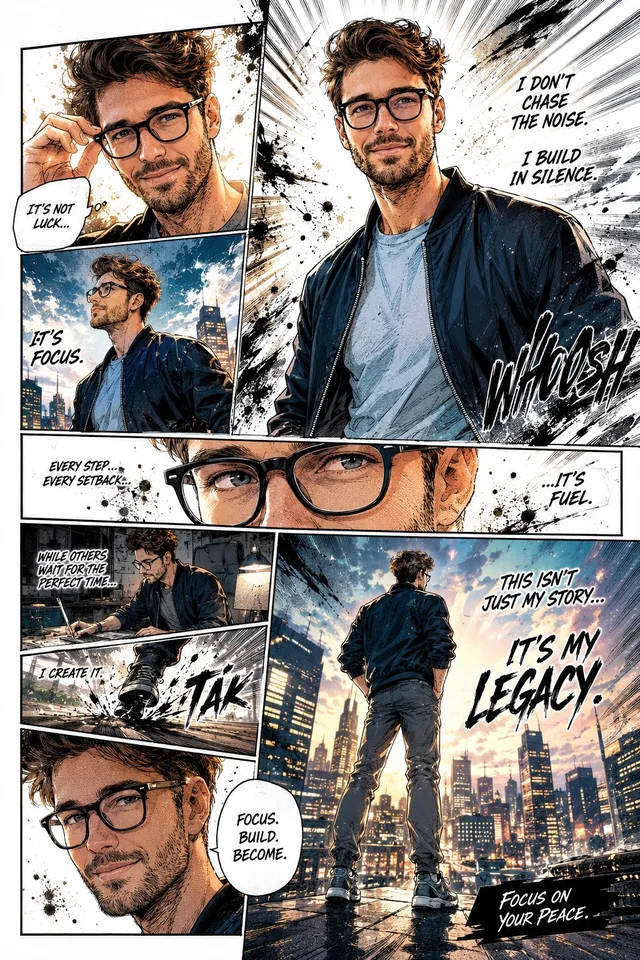
Strategic Deployment Guide
Model fit: Use a multimodal ChatGPT image model or another image editor that accepts an uploaded portrait. Attach a rights-cleared reference photo first; it anchors the character’s face, hair, body proportions, wardrobe, accessories, and overall presence while the bracketed variables control the story, panel direction, lettering, and page finish.
Manga Page Prompt Code
IDENTITY CONTROL:
Use the uploaded [reference photo] as the visual authority for [character name and role]. Preserve the recognizable [identity traits: face, hair, body proportions, skin tone, accessories] and [wardrobe and material details] throughout the page.

PAGE STRUCTURE:
Create one full-color, full-page manga illustration about [story theme] with an emotional progression from [opening emotion] to [closing emotion]. Use [panel count: 5–7] dynamic, interconnected panels in [asymmetrical page layout]. Keep a clear reading order and make each panel lead visually into the next.

SHOT AND ACTION DIRECTION:
Direct the sequence with [panel-by-panel story beats], [camera-view sequence: wide, low angle, close-up, profile, overhead], [expression progression], and [action-pose sequence]. Include cinematic perspective, speed lines, impact frames, reaction close-ups, and an intense visual flow without repeating the same composition.

LETTERING CONTROL:
Place handwritten English dialogue bubbles using only these approved lines: [English dialogue lines]. Add comic-style sound effects from [English sound effects], positioned near the action without covering the face or important gestures. Verify spelling and leave enough safe space to rebuild lettering manually if needed.

STYLE SYSTEM:
Emphasize personality with [symbolic visual motif] and [atmospheric energy effect]. Combine [color palette] with manga shading, strong contrast, ink splashes, halftone textures, comic sketch lines, and graphite-inspired brush strokes. Balance clean white negative space against chaotic ink texture.

PRODUCTION FORMAT:
Render in [manga color and shading style] at [page aspect ratio and resolution]. The result should feel detailed, emotional, energetic, and editorially finished.

Negative prompt: identity drift, different face between panels, changed hairstyle, changed accessories, inconsistent wardrobe, repeated panel composition, broken reading order, extra limbs, fused hands, unreadable lettering, misspelled dialogue, random text, covered face, flat poses, weak contrast, muddy colors, photorealistic rendering, 3D CGI, watermark, logo.
Implementation Steps
- Prepare the portrait: Upload a rights-cleared image with a visible face, hairstyle, upper-body proportions, wardrobe, and any identity-defining accessory.
- Write the page before rendering: Define one emotional arc, 5–7 story beats, exact dialogue, sound effects, and the final visual payoff.
- Use identity anchoring: Compare every panel with the uploaded photo and reject any page that changes face shape, hair, glasses, clothing, or age.
- Run a layout repair pass: Check reading order, panel variety, face visibility, balloon placement, and white-space balance before accepting the composition.
- Rebuild final lettering: Treat generated dialogue as a placement guide, then typeset approved copy manually for publication or print.
Application Scenarios
- Creator profile stories: Illustrators can turn a founder, musician, artist, or athlete portrait into a one-page origin or mindset narrative.
- Editorial character features: Publishers can prototype a visual profile with cinematic portrait panels, captions, and a closing statement.
- Social campaign art: Marketing teams can adapt an approved spokesperson photo into a vertical story asset for launches or community posts.
- Personal milestone gifts: Portrait artists can frame a graduation, career change, competition, or anniversary as a compact manga sequence.
Why This Prompt Works
The template separates identity, narrative, layout, lettering, and surface style instead of asking the model to improvise all five at once. The reference image locks recognizable traits; the story beats and camera sequence establish continuity; approved dialogue prevents invented copy; and the texture controls create a manga finish without sacrificing white-space rhythm. Human review remains necessary because a single generation can still drift in facial details, hands, panel order, or text accuracy.
Troubleshooting & Optimization
- If the face changes: Append “Preserve the exact face, hair, age, accessories, and skin tone from the uploaded reference in every panel.”
- If the page feels like separate images: Replace the story-beat line with connected actions where each panel’s final pose or gaze points into the next panel.
- If dialogue becomes unreadable: Append “Render blank speech balloons with reserved space; do not invent text,” then typeset the approved lines manually.
- If the composition becomes crowded: Replace one action panel with a narrow close-up and reserve at least one clean white breathing area around the focal character.
Character and Panel FAQ
- Q: What does this manga page prompt create?
A: It creates one full-color page with 5–7 connected panels based on an uploaded person, including cinematic shots, dialogue, sound effects, manga shading, and expressive ink texture. - Q: Do I need a reference photo?
A: Yes. The image anchors the character’s recognizable face, hair, proportions, wardrobe, and accessories across the panel sequence. - Q: Will generated dialogue be ready to print?
A: Not automatically. Verify every word, then rebuild important dialogue and sound effects as editable type before public or commercial use.
Use this prompt to plan a reference-led manga page, then review character continuity, text, anatomy, and reading order before sharing the final artwork.
Explore more in Image & Design and Prompt Engineering Guides.
Follow @bigprompt for more prompts and workflow systems.
Related visual prompt systems:
Carry a locked anime character from a reference sheet into cinematic motion
Explore a structured collection of reusable Codex creative skills
Review security boundaries before installing third-party agent skills
Follow a source-backed workflow for a technical model-training project
Compare another reference-locked image prompt for commercial poster design
Big Prompt Hub Review
This prompt is useful when one portrait needs to carry a complete visual narrative rather than become a single stylized headshot. Its strongest control is the split between fixed character identity and editable panel storytelling. A single-page generation may still mishandle hands, repeat poses, break reading order, or misspell dialogue, so the result should be treated as a compositional draft until a human checks every panel and rebuilds final lettering.