
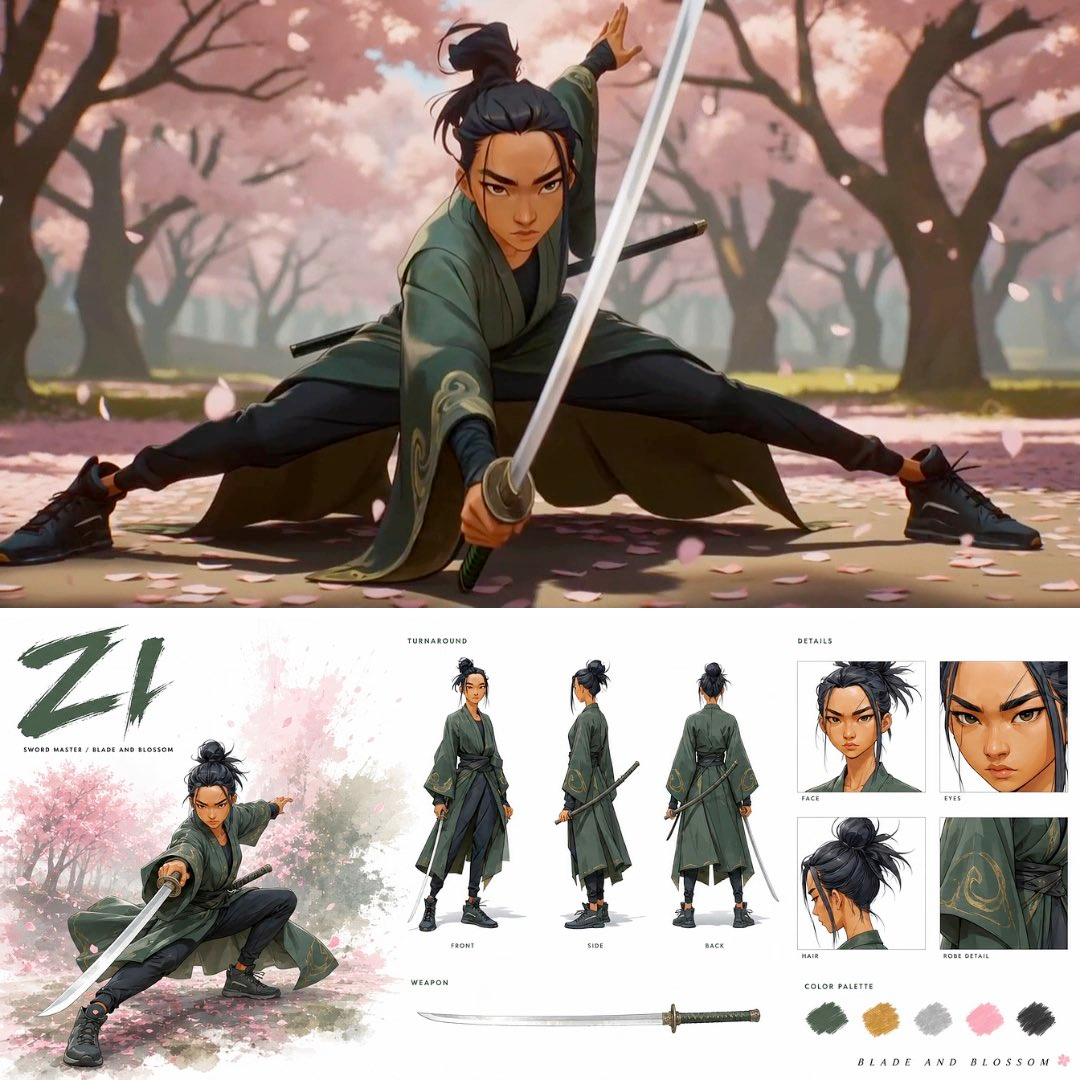
Video creators building an anime sword fight video prompt need one stable character before directing a six-beat action clip. The first prompt creates a reviewable character bible in GPT Image 2; the second carries that approved sheet into a 15-second Seedance 2.0 sequence with timed movement, camera, audio, and a final hero pose.
Workflow Overview
This is a two-prompt chain. Prompt 1 turns an uploaded character reference into a single identity sheet with a hero pose, turnaround, detail crops, weapon, and palette. Review that sheet first; its output becomes the strict uploaded reference for Prompt 2.
Prompt 2 does not ask the video model to rediscover the character. It concentrates on six timed action beats, natural-speed movement, changing camera angles, sound direction, and a still closing pose. The prompts describe a method; exact identity and choreography still require review after each render.

Prompt 1: Build the Character Bible
- Target: create one identity-locked sheet that a video model can use as the visual authority.
- Input: upload a rights-cleared [character reference image], then provide the character, costume, weapon, setting, palette, labels, and style variables.
- Model fit: GPT Image 2 for reading the reference and arranging a detailed image-generation layout.
- Expected output: one character bible containing a full-height hero pose, front/side/back turnaround, four detail panels, weapon, palette, and readable labels.
- Quality check: compare face, proportions, hair, skin tone, costume, weapon, palette, and labels against the approved input before moving to video.
Create a cinematic character bible sheet for [character role] named [character name]. Use the uploaded [character reference image] as the strict visual reference for the exact face, body, proportions, hair, skin tone, and outfit. Do not change the character's appearance.

LEFT SIDE:
- Add massive expressive brushstroke text [character name] in [display color].
- Add the small role line [role label / story phrase].
- Use a [character-sheet layout] with [required turnaround views].
- Place one full-height dynamic hero image below: [hero pose], with [atmospheric motif] moving around the figure, [costume] settling naturally, and [weapon] catching the light.
- Show [environment] behind the figure. Use a soft [watercolor accent colors] splash that fades into white, with no box or frame.

CENTER:
- Label the section TURNAROUND.
- Show three full-body views: front, side, and back. Keep the same character, outfit, proportions, and weapon.
- Add a WEAPON section with one clean, fully visible illustration of [weapon description].

RIGHT SIDE:
- Label the section DETAILS.
- Build four close-up panels: face front with [expression], eyes, hair construction, and costume detail rendered with [fabric and material finish].
- Add a COLOR PALETTE using [five verified palette colors].
- Add the tagline [short tagline] at bottom right.

OVERALL:
Clean white background, minimal typography, generous white space, [visual style], hand-painted texture, hard-edge brushwork, and [output format and resolution]. Avoid unrelated props, inconsistent costume variants, extra weapons, illegible labels, and identity drift.
Prompt 2: Direct the 15-Second Sword Fight
- Target: turn the approved character bible into one continuous 15-second action sequence.
- Input: upload the approved character bible from Prompt 1, then specify the environment, atmospheric motif, six action beats, cameras, music, sound effects, and final pose.
- Model fit: Seedance 2.0 for reference-led image-to-video generation with time-coded motion direction.
- Expected output: one short clip that starts in motion, changes angle across six beats, keeps movement at natural speed, and ends in a still hero stance.
- Quality check: review identity, costume, weapon geometry, hand contact, action continuity, camera changes, speed, audio balance, and the last-frame hold.
Create a cinematic [anime / CGI style] short film clip, 15 seconds. Set it in [environment] with [atmospheric motif], [lighting], and no other characters.

CHARACTER:
Use the uploaded [approved character bible] as the strict visual reference. Preserve the exact face, body, proportions, hair, skin tone, [costume], and [weapon] in every shot.

AUDIO:
Use [music direction] from frame one. Build intensity with each action beat. Keep [weapon sounds], movement, landing, and [environment sounds] audible beneath the score.

VIDEO:
Start mid-action on frame one. Use a different angle for every cut. Keep jumps and attacks at natural speed: no slow motion, floating, or levitating. Let [atmospheric motif] react to each weapon pass, and keep the costume moving naturally.

0:00-0:02 — [opening weapon form]. Wide environment shot, then close-up of the weapon. SFX: [opening sounds].

0:02-0:04 — [natural-speed jump and landing]. Side profile, then weapon close-up. Continue directly into the next form.

0:04-0:07 — [rapid combination and aerial turn]. Overhead, side profile, low angle, and close-up of weapon trails. Land and keep moving.

0:07-0:10 — [movement through the environment]. Close-up of footwork, wide location view, then overhead follow.

0:10-0:12 — [fastest combination]. Close-up of weapon blur, wide shot, then side profile. Keep the expression [final expression].

0:12-0:15 — HERO MOMENT. [final jump or turn], then land in [final low stance]. Let the costume settle and the atmosphere drift down. Hold completely still, look toward camera, and end.

Finish in [visual style] with [dominant palette], clear weapon highlights, film grain, tactile texture, and balanced shadows. Avoid character drift, extra limbs, changing costume, warped weapon geometry, missing contact, slow motion, floating, and random cuts.
Implementation Steps
- Prepare the identity reference: use identity anchoring with a rights-cleared image that shows a readable face, full-body proportions, costume, and weapon. Crop or clean the input before asking GPT Image 2 to build the sheet.
- Generate and review the bible: reject any sheet that changes the face, swaps costume pieces, hides the weapon, or produces inconsistent front/side/back views.
- Upload the approved sheet to Seedance 2.0: this image is the visual authority for Prompt 2; do not substitute a new one mid-sequence.
- Customize all six beats: keep each beat physically possible and make the landing or transition lead into the next action.
- Run a post-render repair pass: mark identity drift, hand/weapon contact errors, speed changes, camera discontinuity, and audio misses before regenerating only the failed beat or full clip.
Workflow Use Cases
- Indie anime creators: move one approved character design from a static bible into a short action proof without rewriting identity in every shot.
- Game studios: turn a hero sheet into a compact combat concept trailer for internal mood and motion review.
- Previsualization artists: test a martial-arts pitch scene, environment interaction, and closing pose before a longer production is commissioned.
- Social video teams: align six visible action beats to a 15-second reel while keeping sound effects readable.
- Animation directors: compare which character-sheet assets survive the image-to-video handoff and document weak points for a second pass.
Troubleshooting & Optimization
- The face changes between cuts: Append “Preserve the exact face from the approved character bible in every cut” to the opening of Prompt 2, then rerun the failed clip.
- The weapon bends or changes size: Replace the weapon motion line with one simpler action and append “Maintain one fixed weapon length and clear hand-to-hilt contact.”
- The jumps look weightless: Append “Show a visible takeoff, natural-speed arc, and grounded landing” and remove camera motion that masks foot contact.
- The six beats feel disconnected: Replace each beat ending so its final pose becomes the starting pose of the next segment.
- The final pose never settles: Append “Reserve the last three seconds for landing, costume settling, environmental drift, a fixed gaze, and a still hold.”
Character Lock and Motion FAQ
- Q: What is an anime sword fight video prompt workflow?
A: It is a two-prompt chain that creates a character bible first, then uses that approved image as the strict reference for a time-coded action video. - Q: Do I need to upload an image twice?
A: Yes. Prompt 1 needs a character reference, and Prompt 2 needs the approved character-bible output so the video stage inherits the reviewed identity, outfit, palette, and weapon. - Q: Can I change the character or setting?
A: Yes. Replace the bracketed identity, costume, weapon, environment, palette, music, and action variables, while keeping the character-bible-first handoff and six-beat timing. - Q: Does the workflow ensure exact continuity?
A: It reduces ambiguity, but a human still needs to review identity, anatomy, weapon contact, movement, camera continuity, and audio before accepting the clip.
Run this workflow chain in your next project? Share the output path in the comments.
Explore more? View Video & Music, Image & Design, or Prompt Engineering Guides.
I hope this anime sword fight video prompt workflow helps you move from a reviewed character design to a more controllable short action sequence.
Follow @bigprompt for more AI workflows and prompt systems.
Related character-to-video workflows:
Review a broader AI anime workflow from character sheet to Seedance video
Build multi-scene sports anime clips with character-sheet references
Connect GPT Image 2 storyboards to short Seedance advertising cuts
Use a character-consistency workflow for multi-shot short drama episodes
Plan an AI short drama from story beats to Seedance clips
Big Prompt Hub Review
This workflow is most useful when the main problem is identity drift between a static design and a short action render. The character bible makes face, costume, weapon, palette, and proportions reviewable before motion consumes the creative budget. Its limitation is choreography: six time-coded beats can organize intent, but generated anatomy, contact, timing, and continuity still require frame-by-frame human judgment and targeted regeneration.