
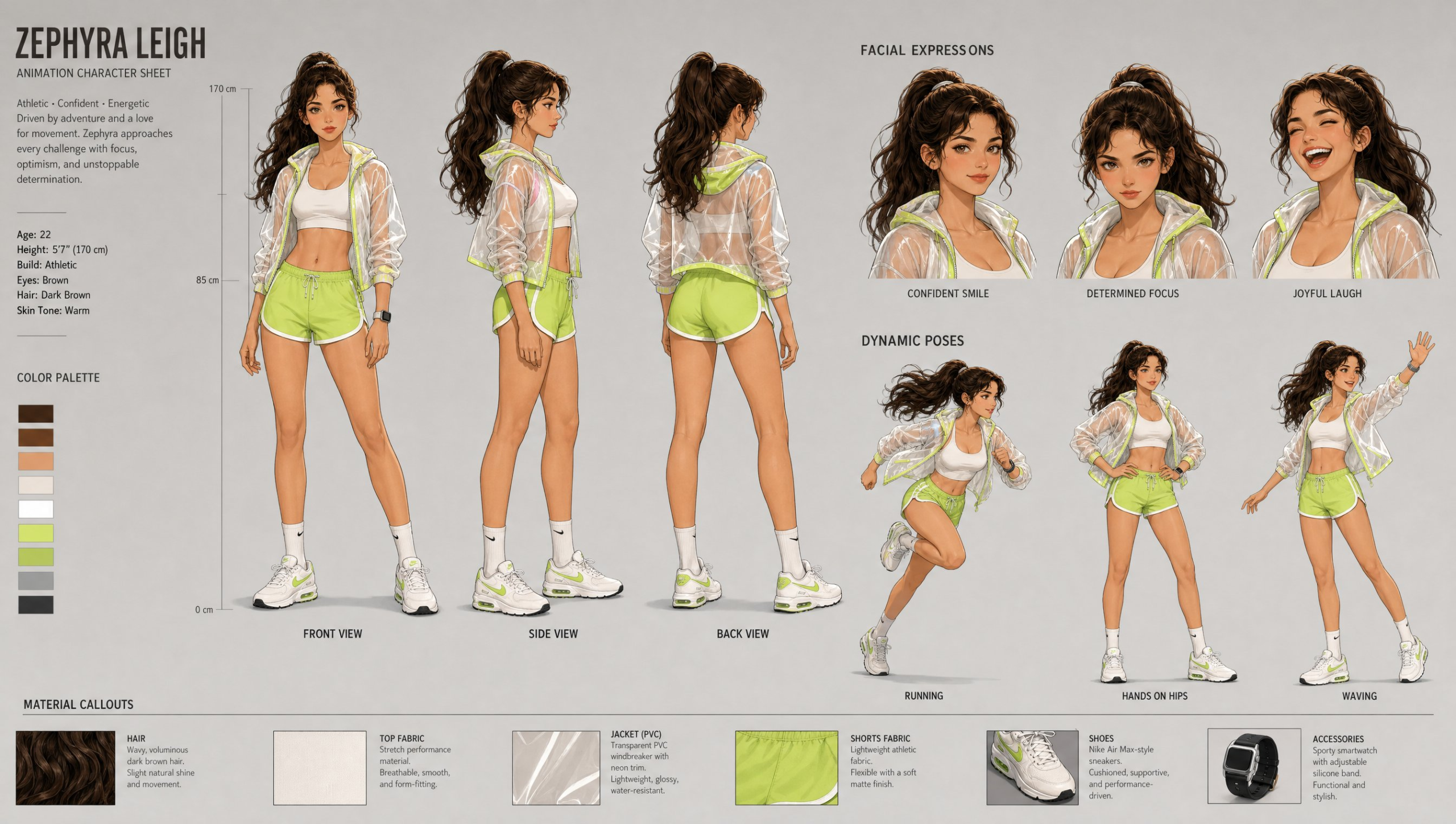
Animation teams need an animation character sheet prompt when a character brief has to become a production-readable model sheet with views, acting choices, and material evidence. The template keeps the output focused on pre-production communication, so concept artists can judge identity, costume, silhouette, and pose consistency before any final illustration or rigging work begins.
Image Examples


Strategic Deployment Guide
Model fit: Use GPT Image 2 as the primary fit because the job is an ordered multi-panel image brief, not a single dramatic portrait. Before generating, fill the identity, proportion, costume, palette, layout, view, expression, pose, material, and output variables; a character name alone cannot define a production model sheet. If the first pass collapses the layout or drifts from the brief, simplify the panel plan and regenerate one coherent sheet rather than mixing panels from different outputs.
Animation Character Sheet Prompt Code
CHARACTER IDENTITY:
Name and story role: [character name and role]
Personality and acting energy: [personality traits, temperament, and movement quality]
Age and body proportions: [age range, height, build, and head-to-body ratio]
Face, hair, and silhouette anchors: [must-preserve facial features, hairstyle, and silhouette]
Costume and footwear: [costume layers, footwear, construction details, and fit]
Accessories or signature props: [accessories, equipment, or none]
Color palette: [primary, secondary, accent, skin, hair, and material colors]
Design style: [2D animation, stylized 3D, anime, graphic, painterly, or studio style]

Create ONE professional animation character sheet. Treat every completed identity field above as a locked design anchor across all panels.

SHEET LAYOUT AND PANEL ORDER:
Canvas and orientation: [landscape or portrait orientation, aspect ratio, and target canvas size]
Panel layout and order: [panel grid, reading order, relative panel sizes, and spacing]
Labels and typography: [label language, heading style, callout style, and text size]
Keep the sheet focused on character information rather than environmental storytelling, with enough separation to compare every panel at a glance.

ORTHOGRAPHIC VIEWS:
Required views: [front, three-quarter, profile, back, close-up, or other required angles]
View consistency checks: [proportions, costume seams, hair volume, accessories, and silhouette details that must align]
Render each selected view at a comparable scale and camera height so they read as the same animation-ready design rather than alternate costumes or unrelated portraits.

EXPRESSIONS AND POSES:
Expression set: [specific emotions, intensity, mouth shapes, and eye direction]
Pose set: [specific actions, gestures, balance, props, and acting beats]
Preserve the locked facial structure, hairstyle, costume, proportions, and design language while varying only the requested acting choices.

MATERIAL CALLOUTS:
Materials and construction details: [fabrics, hard surfaces, hair treatment, hardware, wear, and finish]
Callout priorities: [features that need zoomed details, swatches, arrows, or short notes]
Connect each callout to the relevant feature and keep every swatch consistent with the locked palette.

VISUAL CONTROLS:
Line, shading, and rendering treatment: [line weight, shading method, render detail, and finish]
Background and sheet styling: [neutral background color, borders, guides, and spacing system]
Use clean production design, consistent proportions, readable labels, and balanced composition.

NEGATIVE CONSTRAINTS:
Avoid: [unwanted scenery, effects, anatomy errors, costume drift, duplicate panels, unreadable labels, and style conflicts]

PRODUCTION FORMAT:
Output requirements: [resolution, file use, print or screen target, safe margins, and export needs]
Deliver one organized character-sheet image suitable for concept review. Keep labels and material notes clear enough for a human artist to verify and refine in a layout or illustration tool.
Why This Framework Functions
The prompt separates design analysis from sheet layout. Personality, proportions, costume, silhouette, and design language tell the model what must stay coherent; the front, side, and back views test that coherence from more than one angle. Expressions and dynamic poses then extend the same character into acting and movement, while material callouts make the sheet useful for a conversation between concept, animation, and look-development teams.
Implementation Steps
- Complete the identity block: Use an original or rights-cleared character, then fill the role, personality, proportions, face, hair, silhouette, costume, accessories, palette, and design-style variables. A name without those decisions is not a usable model-sheet brief.
- Protect the silhouette: Decide which hair shape, body proportion, garment layers, and signature accessories have to appear in every core view before generating.
- Inspect the three-view set first: Check that front, side, and back views agree on the same clothing seams, hair volume, footwear, and palette before spending time on expressions and poses.
- Run an identity-anchoring pass: If one view drifts, regenerate from the same approved brief and explicitly compare the silhouette, face, costume layers, and color palette against the strongest view.
- Use expressions as acting notes: Keep the three expressions distinct enough to communicate range, but make sure the face still reads as the same character.
- Finish with post-render layout repair: Correct tiny labels, verify materials, and redraw any ambiguous construction details before handing the sheet to illustration, rigging, or client approval.
Application Scenarios
- Animated series pitch decks: Give producers a quick view of one hero character’s identity, wardrobe, and acting range before commissioning final art.
- Game NPC planning: Test how an original character reads from several angles before a 3D artist begins a low- or high-poly model.
- Brand mascot systems: Create a clean reference sheet for a campaign mascot that needs consistent poses across social posts, packaging, and motion assets.
- Student portfolio development: Turn a written character concept into a sheet that shows design decisions, not only a single finished portrait.
Why This Prompt Works
This prompt works because it asks for one organized sheet rather than a dramatic standalone illustration. The neutral studio background removes competing scenery, polished line work makes the design easy to inspect, and the fixed view-expression-pose sequence gives the model a practical layout hierarchy. Its value is strongest at the exploration and communication stage; it cannot replace approved turnarounds, technical construction drawings, or final animation supervision.
Troubleshooting & Optimization
- The side or back view changes the outfit: Repeat the must-keep costume pieces in the character brief, then regenerate with fewer optional descriptors until the views agree.
- The expressions look like different people: Reduce the emotional range temporarily and restate the character’s facial structure, hairstyle, and design language before adding stronger acting choices.
- The sheet feels crowded: Keep the neutral studio background and remove extra props or scenery. The source format needs the view and callout panels to remain readable at a glance.
- Material callouts are vague or wrong: Treat generated swatches and labels as design discussion starters, then replace them with verified fabric, hardware, or surface specifications in your final layout tool.
Common Questions for Character Sheet Planning
- Q: What is an animation character sheet prompt?
A: It is a reusable image prompt that organizes a character into front, side, and back views plus expressions, dynamic poses, and material notes. It is most useful for concept communication and early visual consistency checks. - Q: Should I use a celebrity or real person as the character?
A: Prefer original characters or images you are authorized to use. A recognizable person’s name, likeness, wardrobe, or brand markings can introduce permission, publicity, and commercial-use issues even when the sheet is only a concept. - Q: Can this replace a professional model sheet?
A: No. Use it to explore and align a design direction, then have the appropriate artist or production team verify anatomy, construction, labels, continuity, and animation requirements.
Use this prompt to explore a character direction, then share the result in the comments after you have completed a rights and continuity review.
Explore more visual systems in Image & Design and Prompt Engineering Guides.
When the sheet moves into an episode, carry the character reference into multi-shot continuity checks.
I hope you found this animation character sheet prompt useful.
Follow @bigprompt for more prompts and workflow systems.
Related Big Prompt Hub pages:
Extract Character Turnarounds Prompt for Consistent Model Sheets
3D Cartoon Sticker Pack Prompt for Expressive Character Sheets
AI World Cup Anime Video Workflow for Character Sheets and Seedance Scenes
Pixar Style AI Prompts That Keep Character Identity Intact
Architect GPT Image 2 Visuals via Cinematic Character Design Prompt
Big Prompt Hub Review
This asset has a clear pre-production use: it gives a team one frame for checking character identity across views, facial acting, action, and surface details. Its boundary matters just as much. Image models can suggest a sheet structure, but human artists and production leads still need to resolve exact construction, readable labels, legal usage, and the continuity needed for animation or game production.