
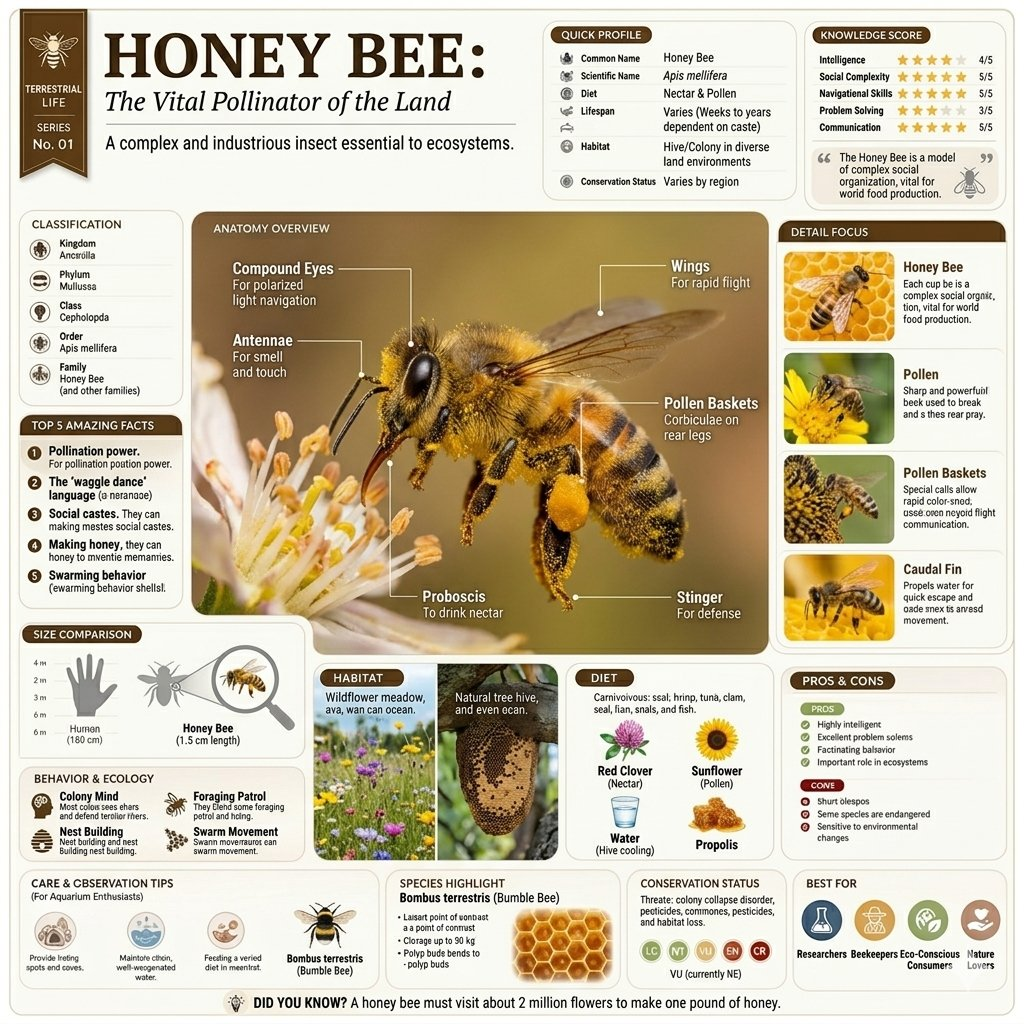
Science educators and visual-learning teams need an educational infographic prompt when a topic must become one readable page rather than a loose collection of facts. This template organizes a subject into a central labeled visual, profile data, comparisons, supporting detail panels, and a compact footer system, while leaving every factual claim ready for expert verification.
Image Examples


Strategic Deployment Guide
Model fit: Use GPT Image 2 as the primary fit because the task needs a single canvas that balances a central subject, thin labels, and several information panels. If the page loses hierarchy or combines data modules, run the same verified brief through one fallback image model and keep the clearer layout; do not splice unverified text from multiple generated versions into an educational asset.
Educational Infographic Prompt Code
TOPIC AND SUBJECT:
Based on [TOPIC], create a high-quality vertical encyclopedia-style educational infographic image. Make the page a professional educational infographic for [SUBJECT], using [STYLE DIRECTION] adapted to the selected topic.

IDENTITY ANCHOR:
Use [VERIFIED SUBJECT FEATURES] as the identity anchor for the selected subject. Keep all labels, facts, close-ups, and icons aligned to that same verified identity.

CENTRAL ILLUSTRATION AND LABELS:
Place one large, realistic 3D central illustration of the selected subject at the center of the composition. Add [VERIFIED ANATOMICAL OR FEATURE LABELS] using thin pointer lines. Keep the central visual large enough to explain the topic before the reader moves to smaller panels.

PAGE LAYOUT AND DATA MODULES:
Use [VERTICAL LAYOUT AND PANEL ORDER] with soft beige and muted tones, crisp typography, clean vector lines, and a professional scientific-journal aesthetic. Include a Quick Profile sidebar populated with [VERIFIED PROFILE FIELDS AND VALUES], a Top 5 Amazing Facts list using [FIVE VERIFIED FACTS], a Size Comparison chart based on [VERIFIED SIZE VALUE AND COMPARISON REFERENCE], and a Knowledge Score panel using [RATING LABEL, CRITERIA, AND VALUE]. Keep each panel distinct, balanced, and readable; do not let decorative elements compete with the main subject.

VISUAL CONTROLS:
Maintain a calm art direction with a clean color palette, neutral background, consistent label treatment, and a realistic render style that supports study rather than spectacle.

DETAIL FOCUS AND ECOLOGY:
Add a Detail Focus section on the right with four square macro-photography close-ups defined by [FOUR VERIFIED DETAIL SUBJECTS AND CAPTIONS]. At the bottom, include Habitat and Diet icons using [VERIFIED HABITAT AND DIET], a Conservation Status slider using [VERIFIED CONSERVATION STATUS AND AUTHORITY], and a small Did You Know? footer using [ONE VERIFIED FOOTER FACT]. Ensure every label, image, and value matches the same selected subject. Keep the contextual scene minimal so the science-page layout remains the primary reading surface.

NEGATIVE PROMPT:
Avoid unreadable small text, inaccurate anatomy, invented scientific claims, conflicting measurements, cluttered panels, overlapping pointer lines, random extra subjects, low-resolution close-ups, dramatic scenery, and decorative effects that reduce educational readability.

PRODUCTION FORMAT:
Deliver [OUTPUT RESOLUTION AND EXPORT FORMAT] as one organized vertical science-page image suitable for editorial review and export. Use only the supplied verified content fields for facts, scientific names, status labels, measurements, and ratings. Keep all text editable and clearly separated so a human subject-matter expert can verify the final layout before publication.
Why This Framework Functions
The framework gives the page a reading order. The central 3D illustration creates the visual anchor, labels turn that illustration into an explanation, and the profile, facts, comparison, and detail-focus modules give the reader different ways to inspect the same subject. Habitat, diet, status, and footer facts then complete the page without turning the composition into an unstructured poster.
Implementation Steps
- Choose a verifiable subject: Start with a topic that has trustworthy anatomy, lifecycle, habitat, diet, scale, and conservation references.
- Prepare a fact sheet before generation: Supply approved names, measurements, labels, and source notes so the model has a clean identity anchor for the subject.
- Run a panel-hierarchy review: Check that the central illustration stays dominant and that profile, fact, comparison, and Detail Focus modules remain readable at the intended output size.
- Use post-render layout repair: Correct text, pointer-line endpoints, units, icon labels, and rating values in a design tool rather than trusting generated typography.
- Obtain expert approval: Ask a qualified educator or subject-matter reviewer to verify every factual panel before distributing the page to students, customers, or the public.
Application Scenarios
- Teacher classroom PDF pages: Give science teachers a structured organism, geological-feature, or physical-process page asset for lesson planning and student discussion.
- Museum educator exhibit-page assets: Let museum or zoo educators test visitor-facing page hierarchy before curators and designers finalize facts and graphics.
- Science publisher newsletter art: Develop an educational newsletter feature, social carousel cover, or magazine page around an approved topic.
- Curriculum-studio pitch decks: Show curriculum designers and editorial teams how one verified subject can become a repeatable encyclopedia-style page system.
Why This Prompt Works
This prompt works because it controls the page as a system rather than only asking for a labeled illustration. The central image, profile, facts, comparison, close-ups, and ecology modules each have a job, while the neutral palette and scientific-journal direction keep the page coherent. Its limitation is factual reliability: generated text and science claims remain draft material until a human reviewer validates them.
Troubleshooting & Optimization
- The text is unreadable: Keep panel labels short, regenerate for the strongest structure, and replace all final typography manually in Figma, Illustrator, Canva, or another layout tool.
- The facts conflict: Remove unsupported values from the prompt, work from one reviewed fact sheet, and check scientific names, units, status, and dates before publication.
- The central subject looks generic: Add verified identifying features and replace broad labels with subject-specific anatomy or lifecycle detail.
- The layout feels crowded: Reduce decorative imagery, preserve the central illustration, and give the Quick Profile, facts, comparison, and Detail Focus panels separate visual space.
Common Questions for Science-Page Design
- Q: What is an educational infographic prompt?
A: It is a reusable image prompt that organizes a topic into a teaching-oriented page with one central visual, labels, profile data, facts, comparison, close-ups, and supporting ecology or context panels. - Q: Can I publish the generated facts as-is?
A: No. Treat all generated copy, measurements, scientific names, ratings, and conservation labels as provisional until they have been checked against authoritative subject sources. - Q: Which topics work best?
A: The structure is especially useful for organisms, natural phenomena, objects, places, and processes that can be explained through a central visual plus concise comparison and detail modules.
Use this prompt to prototype a science page, then complete a factual and accessibility review before sharing the final visual.
Explore more visual systems in Image & Design and Prompt Engineering Guides.
I hope you found this educational infographic prompt useful.
Follow @bigprompt for more prompts and workflow systems.
Related Big Prompt Hub pages:
Modern House Miniature Infographic Prompt for Blueprint Panels
Technical Product Infographic & Teardown Prompt
Country Infographic Poster Prompt for AI Image Generation
How It Works Educational Dioramas: 3D Isometric AI Prompt
Prompt Hubs for AI Skills, Visual Systems, and Workflows
Big Prompt Hub Review
This asset is valuable because it turns a broad educational topic into a repeatable visual hierarchy instead of a generic science poster. The key boundary is non-negotiable: models can propose a layout and visual language, but experts must validate content accuracy, labels, numerical values, source permissions, and accessibility before the page becomes educational material.