
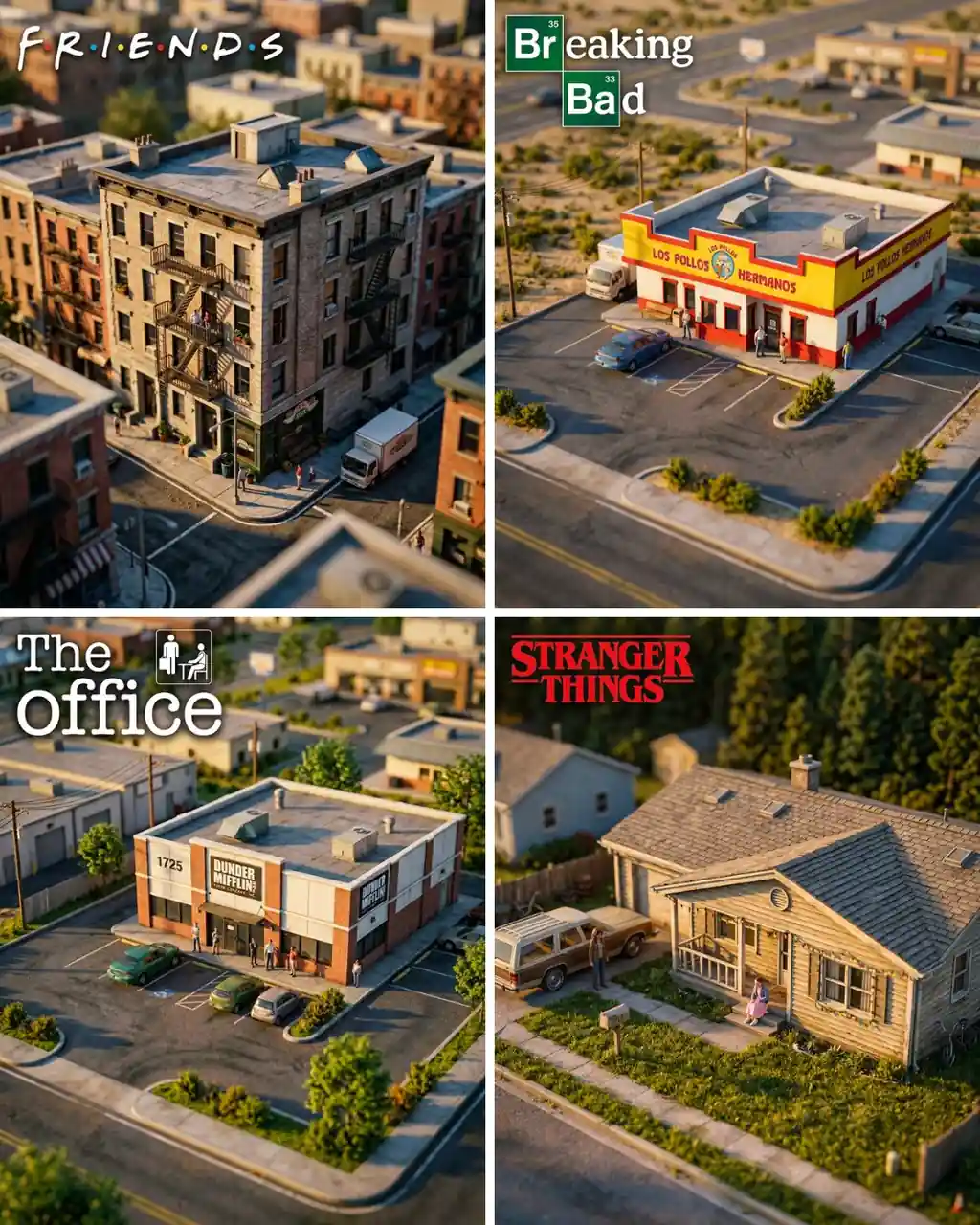
TV show miniature diorama prompt scenes land best when one recognizable set fills the frame like a warm tilt-shift scale model, giving fan artists, entertainment brands, and merch teams a cleaner way to rebuild iconic locations. The template works best when the camera angle, building dominance, and title placement stay fixed while the show-specific location cues change.
Image Example

Strategic Deployment Guide
Model fit: Nano Banana 2 first. Keep the isometric angle, 70% building fill, and corner title treatment. Use Figma or Photoshop if the logo lettering needs cleanup.
TV Show Miniature Diorama Prompt Code
CORE BRIEF:
Create a hyper-realistic miniature diorama of [TV show location] from [show name]. Keep the source logic fixed: the main building fills about 70% of the frame, the shot uses a close elevated isometric angle, the foreground and background use shallow tilt-shift blur, and the scene reads as a carefully photographed scale model instead of full-size architecture.

LOCATION IDENTITY SYSTEM:
Include recognizable cues from [landmark details], [facade colors or materials], [era-specific props], and [street-level context]. Tiny parked cars, curbs, signage, shrubs, figures, and parking lines should help the viewer understand the scale immediately.

ENVIRONMENT STAGING:
Keep the surrounding environment visible but secondary so the world around the building supports recognizability without stealing attention from the hero structure.

TITLE TREATMENT:
Place a large prominent [show logo or title treatment] in the top-left corner, taking roughly 30% of the image width while leaving a clean margin around the main building. If the model struggles with exact typography, keep the placement instruction and plan a manual overlay pass after generation.

LIGHTING AND SURFACE REALISM:
Use warm cinematic light, soft shadow falloff, and photoreal material rendering. Add rooftop detail, window trim, curb paint, and subtle wear so the building feels handcrafted yet believable.

MOOD:
Render the scene in photoreal cinematic quality, with premium entertainment fan-art and editorial-concept energy.

PRODUCTION FORMAT:
Generate one high-resolution 4:5 hero image with 4K detail, suitable for posters, recap thumbnails, newsletter art, pitch decks, fandom mockups, or collectible-style social media visuals. Keep materials sharp, title space editable, and miniature cues readable in both full-size and thumbnail viewing.

NEGATIVE PROMPT:
Avoid full-scale real-estate photography, flat eye-level framing, generic buildings with no show identity, oversized background clutter, distorted typography covering the facade, plastic toy materials with no architectural realism, harsh midday light unless requested, empty streets with no scale cues, or any composition where the location is not instantly readable.

OUTPUT FORMAT:
Keep the building dominant, the logo zone editable, and the miniature scale cues readable at thumbnail size.
Why This Framework Functions
This framework functions because it stacks three recognition systems at once: architectural identity, scale cues, and title anchoring. The building shape and facade details identify the location, the tilt-shift depth plus tiny street props signal miniature scale, and the corner title treatment locks the entertainment reference quickly. That layered control reduces the common failure where the model produces either a generic neighborhood render or a toy-house image that loses the specific TV-world connection.
Implementation Steps
- Lock reference cues: Bundle show name, facade, and era props.
- Set miniature layout: Keep isometric angle, blur, and 70% building dominance.
- Repair logo typography: Rebuild the title in Photoshop or Figma if needed.
- Swap scene context: Update neighborhood, palette, and vehicles with each location.
Application Scenarios
- Newsletter art: Entertainment recap headers with instantly recognizable locations.
- Creator covers: YouTube or podcast thumbnail concepts without screenshot collage fatigue.
- Convention posters: Collectible fan-event prints built around one iconic setting.
- Client decks: Pitch or media concepts that visualize setting identity fast.
Why This Prompt Works
This prompt works because it does not rely on one magic style word. It combines composition ratio, camera height, blur behavior, title placement, and street-level prop density into a single control system. That makes the miniature effect more stable across apartment blocks, diners, office parks, suburban houses, and other well-known locations that need both realism and show-specific identity to land.
Troubleshooting & Optimization
- Drone-photo feel: Append close isometric angle, shallow blur, miniature toy effect.
- Weak identity: Append facade colors, storefront cues, era props, and parking lines.
- Broken logo: Append clean top-left margin and rebuild text in Figma or Photoshop.
- Too synthetic: Append rooftop wear, curb paint, tiny figures, and warm atmosphere.
Common Questions
- Q: How do I stop a TV show miniature diorama prompt from looking like a drone photo?
A: Push the miniature read with close isometric framing, shallow tilt-shift blur, tiny street props, and a building that fills most of the frame. Those cues matter more than the word miniature by itself. - Q: Which locations work best?
A: Locations with strong silhouettes or memorable storefront identity work best: apartment facades, diners, offices, suburban houses, motels, gas stations, schools, and other places viewers can recognize from shape plus context. Weak or generic buildings usually need stronger landmark cues in the prompt. - Q: Can it be used for client or commercial work?
A: It can support editorial art, commentary thumbnails, or concept decks, but exact show names, logos, and locations can trigger rights issues. Replace the logo with custom typography or confirm licensing before client delivery.
Use this prompt to generate your version? Share in the comments or on Twitter!
Explore more? View the Image & Design or Fun & Creative category.
I hope you found this TV show miniature diorama AI prompt helpful.
Follow me @bigprompt for more.
Like/Repost if you can this prompt.
Internal link:
Build Stock Scanner Prompts for Market Research Workflows
Create Paper Cut Collage Prompt Scenes with Childlike Crayon Style
Create World Cup Team Poster Prompt Assets for National Team Campaigns
Build AI Video Ads with GPT Image 2 Seedance Workflow
Create Scrapbook Travel Poster Prompt Layouts for Cities
Big Prompt Hub Review
This template is useful when you need recognizable TV-location fan art without defaulting to a flat screenshot remix. Its strength is the scale-control stack: isometric height, shallow tilt-shift blur, warm light, and title discipline all push the building toward collectible-model logic. The main limits are copyrighted logos, weak landmark cues, and scenes that slip into ordinary aerial photography if you do not reinforce miniature props, facade detail, and manual title cleanup.