
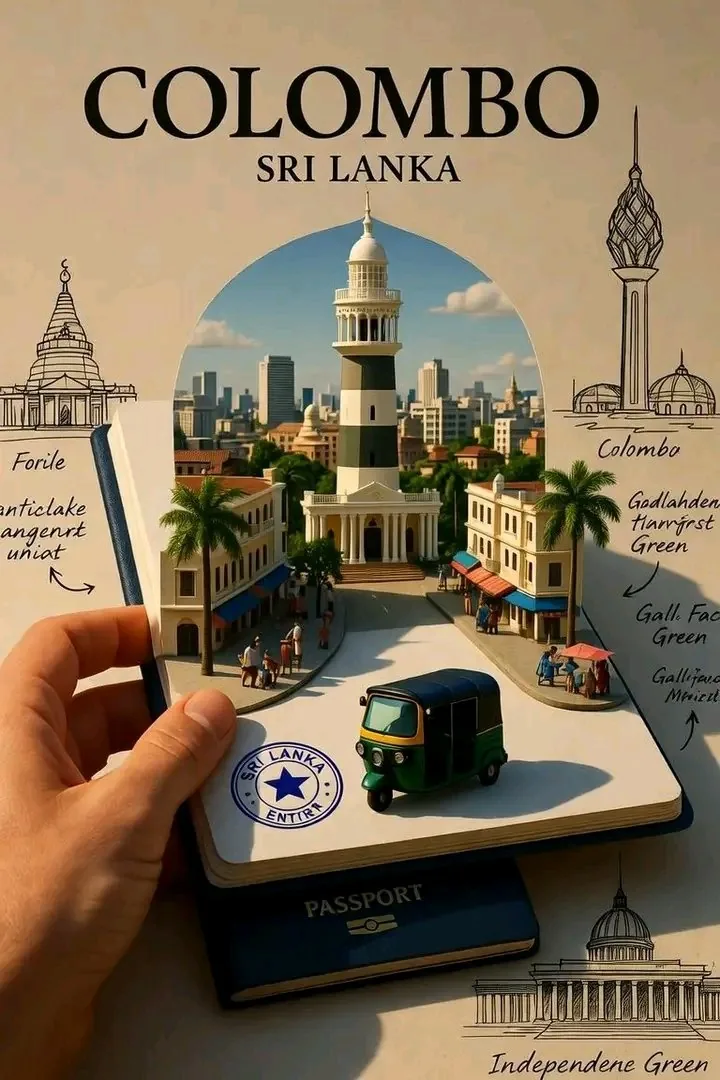
Tourism marketers, destination studios, and editorial designers need a passport city diorama prompt when one destination has to feel tactile, miniature, and instantly recognizable in the same frame. It gives travel teams a compact way to stage skyline depth, landmark streets, and booklet-style tourism presentation without falling back to a flat postcard collage.
Image Examples


Strategic Deployment Guide
Model fit: ChatGPT image generation is a strong first pass for passport object realism, miniature street density, and clean editorial-poster contrast. Gemini is useful for faster city swaps and alternate landmark mixes, but both still need manual cleanup for sketch labels, stamp lettering, and any tiny travel-document text.
Passport City Diorama Prompt Code
CORE SCENE:
Create a highly detailed surreal editorial tourism artwork of [CITY NAME], [COUNTRY NAME]. Show a realistic human left hand holding open an official travel notebook or passport toward the viewer. Rest a dark premium passport beneath the page. From the open page, a 3D miniature city street physically unfolds into real space.

STREET DIORAMA:
Build a compact but richly detailed main street inspired by [CITY NAME], with location-specific architecture, storefronts, windows, balconies, realistic textures, small pedestrians, local vendors, and city-appropriate transport. End the street with one major landmark of [CITY NAME] as the focal point.

SKYLINE WINDOW:
Behind the miniature street, transition into an arched cutout window revealing a distant modern skyline of [CITY NAME] under a cinematic sky with soft clouds and natural depth.

CITY IDENTITY CONTROL:
Keep the landmark language, transport cues, street furniture, and environmental details tied to [CITY NAME] only. The result should read as one coherent destination identity, not a mixed-world travel montage.

TRAVEL-DOCUMENT DETAILS:
Give the open page realistic paper texture, folds, subtle map fragments, coordinates, faint stamps, and an immigration-style seal reading [COUNTRY NAME]. Keep the passport base visible beneath the notebook so the travel-document illusion stays grounded.

EDITORIAL POSTER FRAME:
Place the whole composition on a clean cream premium travel-brochure background. At the top, use bold serif typography for [CITY NAME] and a smaller refined line for [COUNTRY NAME]. Around the border, add delicate architectural line sketches, arrows, and annotated study-board energy tied to real city landmarks.

LIGHTING AND MATERIAL READ:
Use cinematic directional light from the upper right, soft but defined shadows, premium paper realism, vibrant yet natural city color, deep passport tones, hyper-detailed miniature diorama realism, and high-end editorial travel-poster polish.

PRODUCTION FORMAT:
Compose as a vertical editorial poster in 4:5 or 2:3 ratio, with the hand, notebook, passport base, and full landmark stack clearly visible. Leave enough negative space for the city and country title, keep the hero landmark sharp, and preserve readable separation between the foreground street and the distant skyline window.

NEGATIVE CONTROLS:
No floating city disconnected from the page. No random foreign landmarks. No generic skyline with no street-level life. No oversized text blocks replacing the architectural sketches. No extreme fisheye distortion. No glossy sci-fi UI overlays. No extra hands. No broken vehicles or duplicated people in the foreground.

SCENE TRANSLATION LOGIC:
When you swap [CITY NAME] and [COUNTRY NAME], keep the hand-held passport stage, one unfolding street, one anchor landmark, one skyline window, and one editorial poster frame. Let the model infer the right architecture, transport, greenery, and city mood from the destination instead of adding unrelated landmarks or a second style system.
Why This Framework Functions
This framework works because every visual layer has a job. The hand and passport establish scale, the unfolding street creates the miniature illusion, the skyline window adds city depth, and the surrounding sketch border turns the page into a travel-study poster instead of a plain landmark render. That structure keeps the model from drifting into a generic skyline collage.
Implementation Steps
- Lock the scope to one city: Keep [CITY NAME] at city level, not country level, so the landmark focal point and street identity stay coherent.
- Choose one landmark anchor and one transport cue: Before you generate, decide which monument and which local transport mode should instantly signal the city, then keep both visible in every rerender.
- Protect the page attachment: If the city starts floating above the notebook, append physically unfolding from the open page, paper edges visibly supporting the miniature street and rerun.
- Control the final poster format: Render in 4:5 or 2:3, keep the hand and passport fully in frame, then do post-render cleanup in Figma or Photoshop to rebuild sketch annotations, arrows, and passport microtype.
- Run one landmark-accuracy pass: Check landmark selection, skyline silhouette, street furniture, and vehicles. If the render borrows another city’s architecture, tighten the prompt with destination-specific local identity, no foreign landmarks.
Application Scenarios
- Tourism campaign concept boards: Destination posters, seasonal launch treatments, and paid-social creative directions for city marketing teams.
- Hospitality and airline storytelling: Route-launch graphics, hotel welcome visuals, and premium destination brochures that need a collectible travel-object feel.
- Souvenir and editorial packaging: Book covers, postcard series, museum-shop concepts, and travel feature art that need both object realism and city recognition.
- City-brand pitch decks: Investor, cultural, or tourism presentations that need a memorable hero visual rather than a stock skyline photo.
Why This Prompt Works
This prompt works because it combines two scales at once: a tactile travel document in the foreground and a recognizable city identity inside it. The result feels more specific than a normal poster because the passport, street, skyline, and stamp all reinforce the same tourism narrative. That gives the render both campaign polish and a clear sense of place.
Troubleshooting & Optimization
- Passport base disappears: Append dark premium passport visibly resting beneath the open page, lower edge still readable.
- Architecture becomes generic: Append destination-specific local identity, local architectural cues, no foreign landmarks.
- Scene looks flat like a normal photo: Append 3D pop-up miniature diorama, editorial paper-craft realism, soft but defined directional shadows.
- Border sketches overpower the main render: Reduce them to fine-line landmark studies around the edge only so the notebook street stays dominant.
- Text and stamps break down: Keep only short city and country labels in-prompt, then replace the final typography and stamp lettering manually in post.
FAQ
- Q: What is a passport city diorama prompt used for?
A: It is used to turn one city brief into a hand-held travel-document artwork where a miniature street, skyline, and landmark rise from a notebook or passport page. That makes it useful for tourism visuals, editorial travel design, and destination-brand concept art. - Q: Can I use the same structure for different cities?
A: Yes. Swap the city and country, then let the model infer the right landmark, transport, and architectural mood. The structural frame should stay the same even as the destination changes. - Q: How do I stop the result from feeling like a generic skyline poster?
A: Keep one landmark anchor, one local transport cue, one unfolding main street, and one skyline window. Those layers force the model to build a city-specific miniature instead of a random skyline montage.
Use this prompt to generate your version? Share in the comments or on Twitter!
Explore more? View the Image & Design or Marketing & Growth category.
I hope you found this travel destination AI prompt helpful.
Follow me @bigprompt for more.
Like/Repost if you can this prompt.
Miniature Match Worlds from a Football Stadium Map Diorama Prompt
Pop-Up Map Diorama Prompt for Folded Travel Worlds
Football Collectible Diorama Prompt for Museum-Style Player Boxes
World Cup Prompt Pack for Trophy Ads, Team Posters, and Match-Day Graphics
A World Cup Trophy Prompt for Country Football Ads
Big Prompt Hub Review
This prompt is strongest when you want a destination to feel like an object someone could hold, not just a skyline someone could look at. The passport base, unfolding street, and sketch-border treatment give the model a stable tourism-editorial frame that survives city swaps well. Its main weakness is text fidelity and factual detail: AI may still invent micro-annotations, simplify transit cues, or borrow landmark silhouettes from nearby contexts. Use it for campaign concepting, city-brand moodboards, and collectible travel artwork first, then manually correct labels and landmark accuracy before public release or print.