
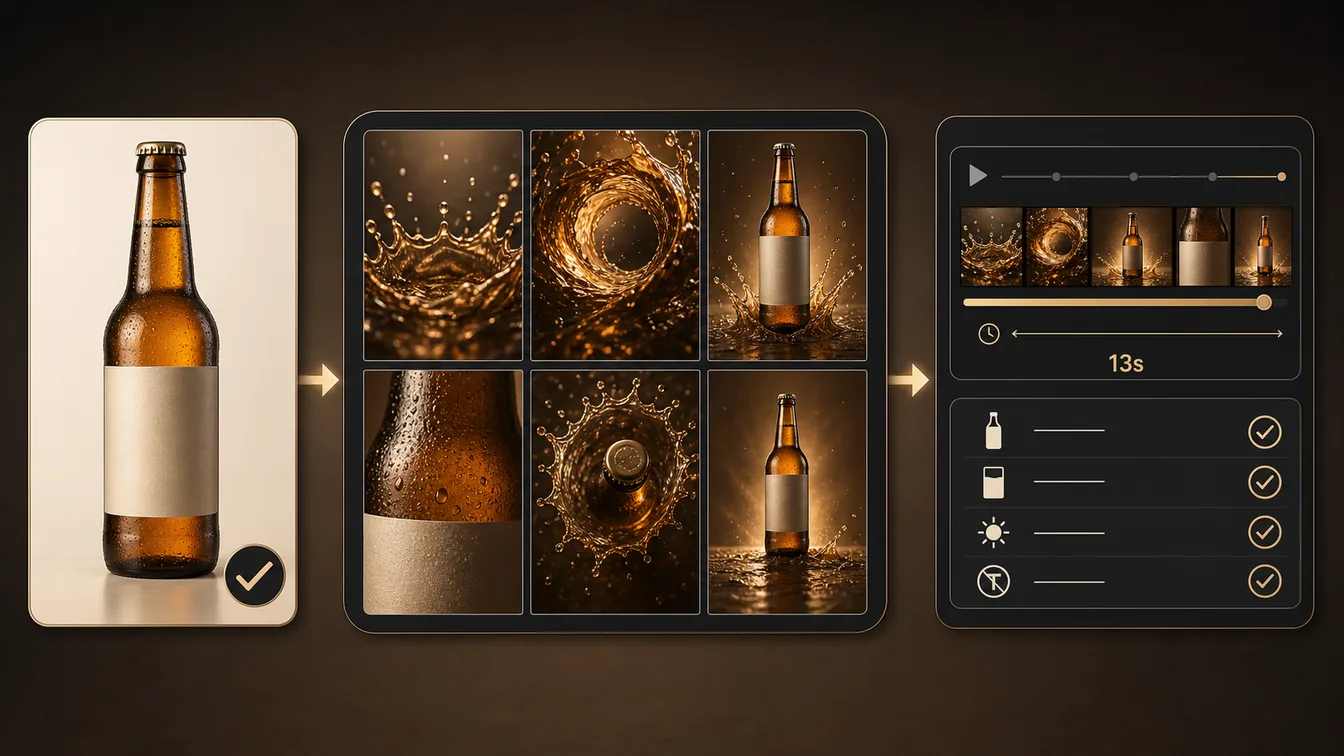
For product marketers, a Seedance product commercial video workflow turns one approved product reference into a short, reviewable launch-film concept instead of relying on a generic video prompt to preserve the package. The chain first fixes the visual facts, then plans shots, animates the selected direction, and checks the cut against the approved reference.
Workflow Overview
Use an approved, rights-cleared product photo or packaging render as the visual authority. Create a six-beat storyboard before animating it, then review the short cut for silhouette, label placement, materials, lighting continuity, and unwanted text. Model fit: GPT Image 2 is the still-image step for planning reference-led frames; Seedance is the video step for camera movement, pacing, and the final short cut. Neither model replaces brand, legal, or product approval.
Prompt 1: Build the Reference-Locked Storyboard
- Target: create one coherent six-frame visual plan before generating motion.
- Input: an approved product reference image, verified package facts, approved palette, and any mandatory end-frame message.
- Model fit: use GPT Image 2 to turn fixed product facts into still storyboard frames; upload the approved reference before running the prompt.
- Expected output: six still frames covering a material reveal, movement transition, hero product shot, macro detail, top-down composition, and end frame.
- Quality check: compare every frame with the approved reference. The product silhouette, label area, cap or closure, colors, and permitted copy must stay consistent.
Create a six-panel product-commercial storyboard using the uploaded [approved product reference image] as the identity authority. Preserve [verified product silhouette, label facts, and closure]; do not invent a logo, claims, or package details. Follow this [panel order and timings]: macro material reveal, flowing material transition, low-angle hero product ascent, macro texture detail, top-down product composition, then a centered end frame with [approved end-frame message]. Use [approved palette], one consistent studio-lighting setup, and [approved prop materials]. Deliver in [output format and aspect ratio]. No altered packaging, extra text, unrelated ingredients, or people.Prompt 2: Animate the Approved Storyboard
- Target: turn the approved still direction into a compact, time-coded commercial cut.
- Input: the selected storyboard frames, a fixed duration, camera plan, sound direction, and negative constraints.
- Model fit: use Seedance after the visual reference is approved; it is responsible for motion and timing, not for redesigning the package.
- Expected output: a short product film with distinct beats, coherent lighting, controlled camera movement, and an end frame that supports review.
- Quality check: pause on the hero and end frames to inspect product identity, label readability, transitions, and any generated copy.
Create a [total duration] premium product commercial from the approved storyboard and [approved product reference]. Subject lock: preserve the verified silhouette, label area, closure, and color treatment; do not redesign the packaging. Materials: [material and liquid or surface behavior]. Lighting: [consistent key, rim, and bounce direction]. Sequence: [beat 1 and time], [beat 2 and time], [hero beat and time], [detail beat and time], [top-down beat and time], then an end frame with [approved message or no text]. Use [camera moves] and [sound direction]. Negative controls: no package distortion, no new label text, no mismatched lighting, no unrelated props, no people unless approved.Prompt 3: Review the Cut Against the Product Brief
- Target: produce a human-review ledger instead of treating a visually exciting first render as approved.
- Input: the approved reference, the storyboard, the generated cut, product facts, and the intended placement.
- Model fit: use the Seedance render as the review object and keep a human brand or product owner responsible for approval.
- Expected output: a pass, revise, or reject ledger with timecodes and specific corrections.
- Quality check: any mismatch in the package, mandatory copy, claims, or rights status is a revise or reject outcome, not a stylistic preference.
Review [generated video cut] against [approved reference image and product facts]. Return a time-coded ledger with pass, revise, or reject for: silhouette, label area, closure, color, material behavior, lighting continuity, camera continuity, required message, accidental text, and unapproved claims. For every revise item, write the smallest correction to the relevant storyboard beat or video-prompt clause. Escalate [brand, legal, or rights questions] to a human owner; do not infer approval.Implementation Steps
- Confirm the reference: use only a product photo or render that the brand is entitled to provide, and write down the non-negotiable packaging facts before generation.
- Plan before motion: run Prompt 1, select the storyboard frames that actually preserve the product, and correct the still direction before spending on video variants.
- Set the cut boundary: choose a duration, aspect ratio, mandatory end-frame treatment, camera moves, and sound direction. Keep the sequence short enough that each beat has one visual job.
- Generate and inspect: run Prompt 2 with the selected reference and pause through the result at transitions, the hero frame, and the end frame.
- Record acceptance evidence: use Prompt 3, then rerun only the failing storyboard beat or prompt clause. A human owner signs off on product identity, claims, and usage rights.
Workflow Use Cases
- Consumer-goods launches: give a product team a short visual concept before commissioning a wider campaign or paid-media cutdown.
- Ecommerce hero clips: plan a compact product-motion asset around a confirmed packshot rather than generating an undefined lifestyle scene.
- Agency concept review: separate visual exploration from client approval by showing the reference lock and the review ledger together.
- Packaging refresh checks: test a new, approved pack render in a controlled motion treatment before committing to a larger production.
Troubleshooting & Optimization
- The label drifts or changes: return to the storyboard prompt and make the reference image, silhouette, label area, and closure explicit. Remove any wording that invites a redesign.
- Lighting changes between shots: name one key-light direction, rim-light rule, bounce color, and background family once, then repeat them in the affected beat instead of adding new moods.
- The cut has attractive motion but no product clarity: shorten or remove a transition and protect one centered hero hold. Commercial energy cannot replace a readable product frame.
- Generated copy is wrong: remove it from the generation brief and composite approved typography later, or use a human-reviewed end frame. Never approve invented claims or malformed labels.
- The output resembles a real brand that was not supplied: stop the run and replace the reference with an authorized asset. This workflow is for approved product materials, not imitation.
FAQ
- Q: What is a Seedance product commercial video workflow?
A: It is a staged image-to-video process that locks an approved product reference, plans still frames, directs a short cut, and reviews the result before use. - Q: Do I need a product reference image?
A: Yes. Upload an approved product image or render before the storyboard stage. It gives the workflow an identity authority and makes packaging drift easier to detect. - Q: Can I use a generated logo or label in the final ad?
A: Do not treat generated copy as approved brand material. Use brand-approved artwork and have an authorized reviewer check claims, marks, packaging, and placement. - Q: Why not write one huge video prompt first?
A: A storyboard creates a checkpoint before motion. It lets the team correct the product, composition, and end-frame logic before camera movement hides a mismatch.
Use this workflow when a short product film needs a clear reference, shot plan, and review trail. Explore Prompt Engineering Guides and Video & Music for adjacent production systems.
Follow @bigprompt for more reusable AI workflows and prompt systems.
Related Big Prompt Hub pages:
AI World Cup Anime Video Workflow for Character Sheets and Seedance Scenes
AI Short Drama Character Consistency Workflow for Multi-Shot Episodes
Animation Character Sheet Prompt: Production Model-Sheet Format
Educational Infographic Prompt: Encyclopedia-Style Science Pages
Home Renovation AI Workflow: Preserve the Original House
Big Prompt Hub Review
This workflow is useful when a team has a legitimate product reference and needs to protect its visual facts through a fast commercial concept. Start with the still storyboard, not the final motion prompt; use the review ledger to catch drifting packages, accidental text, and mismatched lighting; and keep brand, legal, and product owners responsible for what is approved to publish.