
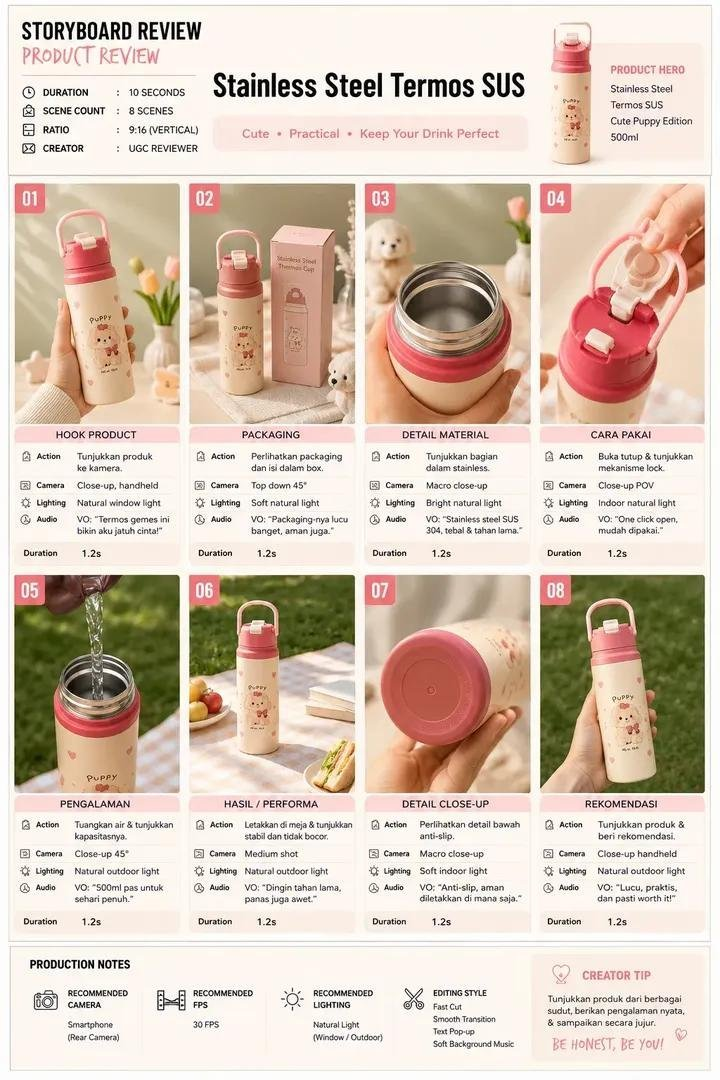
For retail marketers and ecommerce product teams, a thermos bottle video prompt turns a reusable bottle brief into a 10-second vertical UGC review. The sequence moves from a product hook to packaging, material proof, a functional lid demonstration, a realistic use test, lifestyle context, detail proof, and a calm hero ending for social or retail edits.
Image Example

Strategic Deployment Guide
Model fit: Seedance is the primary fit because this sequence depends on timed multi-shot continuity, a vertical 9:16 output, product reference images, and readable motion. If Seedance is unavailable, use a fallback video model only when it supports the same reference and timing controls; do not trade away identity consistency for a generic text-to-video preset. Swap the bracketed product inputs, keep the eight-beat order, lock the reference image and label identity, then generate one or two adjacent scenes as a continuity test before rendering the full sequence. Treat material, capacity, mechanism, and durability statements as claims to verify against the real product.
thermos bottle video prompt Code
PRODUCT INPUTS:
Create a [duration]-second ultra-realistic vertical [aspect ratio] UGC-style product review commercial for a [product type] with [capacity], [verified material], [artwork or colorway], [verified lid mechanism], and [verified base or grip feature]. Use the uploaded product reference and packaging image as the only identity references. Do not invent product claims.

CONTROL DIMENSIONS:
Identity: [brand or product identity]. Layout: [scene layout]. Views: [front angle]. Expressions: [presenter expression]. Poses: [hand pose]. Materials: [verified material]. Style: [visual style]. Output: [resolution and frame rate].

LOOK AND CAMERA:
Use [lighting direction], [color palette], natural handheld movement, shallow depth of field, smooth rack focus, realistic reflections, accurate shadows, and [resolution and frame rate]. Keep the environment [clean lifestyle setting], with no unrelated objects or brand marks.

EIGHT-BEAT REVIEW:
1. Hook (0.0–1.2s): A hand presents the product close to camera and rotates it to reveal the design.
2. Packaging (1.2–2.4s): Place the product beside [verified packaging] on a clean surface; use a slow top-down move.
3. Material macro (2.4–3.6s): Show the inside or surface that proves [verified material detail] with realistic reflections.
4. Mechanism (3.6–4.8s): Demonstrate [verified opening or lock action] in close-up, including the tactile movement without exaggeration.
5. Use test (4.8–6.0s): Add [safe demonstration such as a water pour] to show the stated capacity or use case; keep physics realistic.
6. Lifestyle (6.0–7.2s): Place the product in [specific lifestyle setting] beside only relevant props while the camera makes a gentle orbit.
7. Base or detail proof (7.2–8.4s): Macro-show [verified durability or grip detail] without implying lab-tested performance.
8. Hero recommendation (8.4–10.0s): A hand presents the product toward camera; add the short closing line [approved tagline] only if its wording is supplied and readable.

OUTPUT RULES:
Keep identity, label placement, proportions, hands, and product color consistent across all beats. Preserve [brand or product identity] from the reference. No face drift, extra products, distorted text, floating parts, leaking liquid, unsafe use, fake certification, invented specifications, watermark, or unrelated logo.
Implementation Steps
- Verify the product sheet: Gather the product image, packaging image, dimensions, capacity, materials, mechanism, and any claims that may appear in Prompt Code or on screen; this locks product identity, brand, and camera scenes.
- Map the variables: Replace [product type], [verified material], [required views], and [approved tagline] before the first render; keep the scene palette and aspect ratio consistent.
- Lock the first and last beats: Test the opening rotation and final handoff together so product identity, camera framing, and label placement remain stable.
- Render in continuity pairs: Generate Prompt Code beats 1–2, 3–4, 5–6, and 7–8 as short tests before assembling the final ten-second cut.
- Review every claim: Compare the generated material, lid, capacity, and durability visuals with the supplied product evidence; then use post-render editing to trim continuity breaks and add approved captions before publishing.
Application Scenarios
- Marketplace listing: Use the eight beats to show the product and its most important verified function without replacing the listing’s specifications.
- Social product test: Swap the setting, approved tagline, and product reference while keeping the proof sequence easy to follow on a phone.
- Retail launch: Pair the macro material and mechanism beats with a brand-approved lifestyle scene for a short campaign variant.
Why This Prompt Works
The source prompt earns attention by moving from hook to packaging, material proof, mechanism, use test, lifestyle context, detail proof, and recommendation. This causal sequence lets each shot answer the next buyer question, while the timed handoffs reduce continuity drift between product views. Variables keep the method reusable while requiring the reader to verify specifications instead of turning the source bottle’s 500ml SUS304 and puppy artwork into universal claims.
Troubleshooting & Optimization
- If the label drifts: prepend “preserve the exact product identity and label placement” to Prompt Code, use one product reference image, and repeat the rule before each continuity pair.
- If the mechanism looks impossible: replace the mechanism sentence with “show one real opening motion from this close reference” and describe the hinge or lock without a dramatic transformation.
- If the product claim is unclear: append “show only verified capacity and material details” to Prompt Code, remove unsupported on-screen text, and confirm claims with the manufacturer.
- If the cut feels rushed: keep the eight-beat order but reduce prop movement and camera travel before shortening proof scenes.
thermos bottle video prompt FAQ
- Q: What is a thermos bottle video prompt?
A: It is a reusable brief for a short vertical product review that sequences product identity, packaging, material, mechanism, use, lifestyle, detail, and hero beats. - Q: Can I keep the puppy bottle from the source?
A: Yes, as an example. For a new product, replace the artwork, capacity, material, mechanism, and claims with verified inputs. - Q: Should the model add text to the ending?
A: Only when the tagline is supplied and the rendered lettering can be checked; otherwise add the copy during editing. - Q: How do I avoid misleading product claims?
A: Use the reference and manufacturer-approved specification sheet, then remove any visual or caption that implies testing you cannot support.
Explore related visual prompt formats: Fruit Beer Poster Prompt for a Premium 4-Panel Campaign, Ice Cream Poster Prompt for a Premium 2×2 Flavor Campaign, AI Home Renovation Prompts and Workflows, Fast Food Poster Prompt for a Six-Panel 2×3 Menu Campaign, and Agent Skill Security Scanner.
Follow @bigprompt for more practical prompt systems.
Big Prompt Hub Review
This prompt’s strength is its disciplined proof sequence, not the fixed puppy bottle. Replace the product inputs, verify every claim, and inspect the generated frames before using the video in a listing or campaign.