
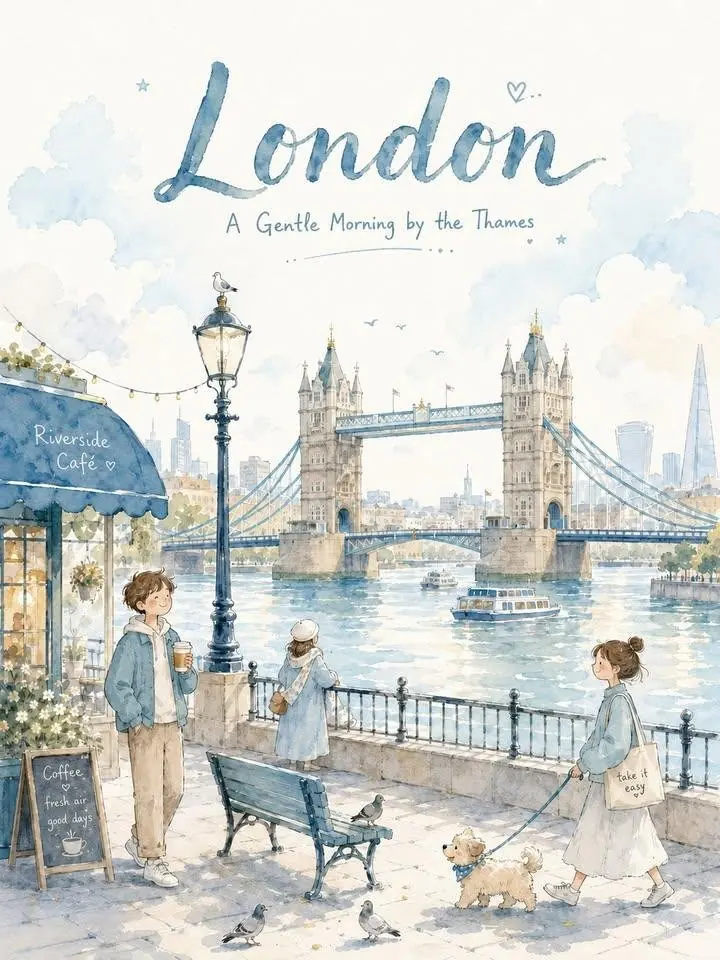
When travel illustrators and destination marketers need a watercolor city poster prompt, the hard part is keeping a place recognizable without building a crowded landmark collage. This template organizes verified local anchors, one everyday moment, airy typography, and watercolor production controls into a repeatable 3:4 postcard workflow.
Image Examples


Strategic Deployment Guide
Model fit: Use the model or tool named in the source when one is specified; otherwise choose the primary model that best follows the source constraints. Replace the variables, preserve the source composition logic, and review the output before publishing client work.
Watercolor City Poster Prompt Code
Warm Minimal Watercolor City Poster Meta Prompt — Aqua Blue Summer Version

OUTPUT FORMAT:
Create a [aspect ratio] vertical soft watercolor city poster for [output format] at [output resolution]. Preserve a warm handmade postcard feeling and leave safe margins for print trimming or social cropping.

CITY IDENTITY:
Build one gentle, emotionally warm illustration around [city name] in [country or region]. Define the city identity as [city identity]. Use [main visual anchor] as the single recognizable anchor, not as one item in a crowded landmark collage.

TYPOGRAPHY AND LAYOUT:
Set the city name as the main title and place [headline phrase] beneath it. Use [typography style]. Follow this poster layout: [poster layout]. Keep generous breathing room around both lines, reserve a clean upper text zone, and place the main scene slightly below center.

SCENE CONTROLS:
Show one cohesive setting with [human figures] engaged in [everyday lifestyle moment]. Add [local environmental or cultural detail], plus [local detail 1], [local detail 2], and [local detail 3]. Make every detail belong naturally to the chosen city. Use only [doodle accents] as small supporting marks.

Before drawing, verify four facts: the main visual anchor is real, the lifestyle moment fits the location, the environmental or cultural detail is accurate, and the supporting details can coexist in one plausible view. If any fact is uncertain, replace it with a verified detail rather than guessing.

STYLE DIRECTION:
Use [watercolor style] with delicate pencil sketch lines, soft brown hand-drawn outlines, rounded forms, translucent washes, subtle pigment granulation, gentle brush blooms, pale layered shadows, slightly uneven painted edges, and visible cold-pressed paper grain.

Use a refreshing blue-and-yellow summer palette: about 75% cool blues and blue-grays, 15% clean white or warm off-white paper highlights, and 10% pale lemon or soft golden accents. Let blue dominate while yellow provides warmth in awnings, window light, flowers, umbrellas, pastries, signs, clothing details, or sunlit building edges.

If people appear, keep facial detail minimal and friendly. Preserve simple proportions and avoid realistic portrait rendering unless the chosen tool and brief explicitly require it.

NEGATIVE PROMPT:
Do not create a flat all-blue background. Avoid a crowded landmark collage, unrelated tourist icons, duplicated buildings, unreadable lettering, warped architecture, extra limbs, overly realistic anatomy, harsh black outlines, neon saturation, dense decorative clutter, or text touching the trim edge.

FINAL CHECK:
The finished poster should read clearly at thumbnail size, keep the city title legible, preserve one unmistakable local anchor, show one quiet everyday moment, and feel comforting, cheerful, peaceful, refreshing, and specific to the chosen city.
Implementation Steps
- Verify the city anchor: Choose one real landmark, canal, street, coastline, hill view, or neighborhood corner, then confirm every local detail belongs in the same plausible scene.
- Set the poster layout: Lock the aspect ratio, upper typography zone, below-center focal scene, safe margins, and the blue-to-yellow palette before rendering variations.
- Repair typography after rendering: Use typographic masking or vector typography in Figma or Illustrator when the generated city name, subtitle, spacing, or letterforms are inaccurate.
- Calibrate the final asset: Compare the landmark, lifestyle moment, and local facts with references, then perform margin control, print calibration, and export at the requested resolution.
Application Scenarios
- Destination illustrators: Build collectible city posters for portfolio series, gallery prints, or commissioned tourism artwork.
- Tourism marketers: Produce seasonal campaign posters, visitor-center graphics, and social posts with verified local landmarks.
- Postcard and stationery sellers: Develop destination postcard sets, travel journals, print listings, and gift-shop previews.
- Editorial designers: Create city-guide covers, newsletter art, event posters, or route-themed feature graphics.
Why This Prompt Works
The prompt separates city identity, scene logic, typography, watercolor treatment, and output format because each layer solves a different failure mode. One verified visual anchor prevents the composition from becoming a generic travel collage, while the lifestyle moment and local details preserve a sense of place. Fixed upper spacing keeps the headline readable, and the restrained blue-yellow ratio controls visual hierarchy without flattening the paper texture. Explicit negative constraints reduce clutter, damaged lettering, and implausible architecture before the final factual and print checks.
Troubleshooting & Optimization
- If the city looks generic: replace the anchor line with “Use [main visual anchor] as the only dominant landmark and include [local environmental or cultural detail] in the same verified setting.”
- If the title is unreadable: append “Reserve a clean upper text zone with high contrast, simple letterforms, generous spacing, and no objects crossing the headline.”
- If the scene becomes crowded: replace the scene controls with “Show one anchor, one lifestyle moment, and no more than three supporting local details.”
- If the palette feels flat: append “Keep blue in varied translucent washes, preserve off-white paper highlights, and restrict yellow to small sunlit accents.”
watercolor city poster prompt FAQ
- Q: What is a watercolor city poster prompt?
A: It is a reusable image prompt that combines a verified city anchor, one local lifestyle moment, airy postcard typography, and controlled watercolor materials in a single scene. - Q: Which parts should I edit first?
A: Start with the city, visual anchor, headline, lifestyle moment, local facts, layout, aspect ratio, and output resolution. Change the fixed watercolor treatment only when the project needs a different art direction. - Q: How should I check the result?
A: Verify the landmark and local details, inspect all lettering, confirm the upper safe area, compare the palette balance, and review the poster at both thumbnail and print size.
Use this prompt to generate your version? Share the result in the comments.
Explore more? View Image & Design or Prompt Engineering Guides.
I hope you found this watercolor city poster AI prompt helpful.
Follow @bigprompt for more prompts and workflow systems.
Related Big Prompt Hub pages:
Build suitcase city scenes with a paper cut travel diorama prompt
Shape polished product layouts with this skincare advertisement prompt
Create folded studio renders with a 3D origami papercraft prompt
Turn travel photos into sparse editorial art with this skill
Run cross-platform username checks with the Sherlock search skill
Big Prompt Hub Review
This template is strongest when a city can be expressed through one recognizable anchor and one believable everyday moment. Its restrained palette and generous upper spacing create a coherent postcard series without forcing every destination into identical architecture. The main limitation is factual reliability: landmarks, signage, language, and local details still need human verification, while generated typography may require manual replacement before print or client delivery.