
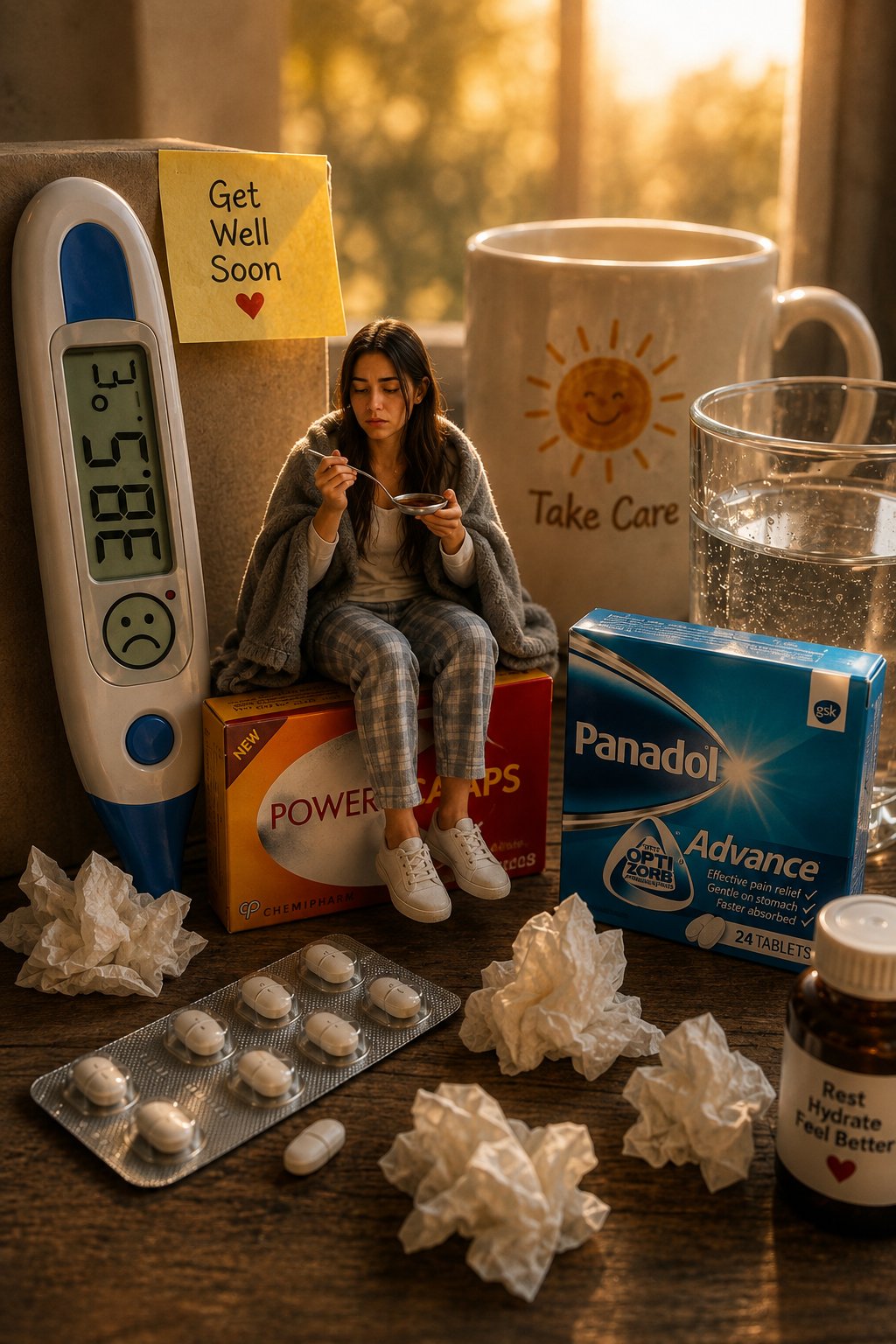
Creators using a miniature world prompt need the tiny subject, oversized objects, camera, and light to obey one coherent scale story. This reusable template turns a reference person, character, or object into the small focal subject of a photoreal scene while the surrounding everyday objects become monumental. The medicine-box image below is one preset, not the limit of the prompt.
Image Example
Strategic Deployment Guide
Model fit: Start with ChatGPT Image because it accepts an uploaded reference and can follow identity, scale, light, and materials in one pass. Upload the reference first to control appearance. Keep the scale mechanism and reference controls locked; swap the subject, oversized object, setting, and mood. Switch models only if repeated results lose identity or scale.
Miniature World Prompt Code
CORE BRIEF:
Create a surreal, ultra-realistic miniature cinematic scene based on the uploaded [reference subject image]. Transform [miniature subject] into the tiny focal element, positioned [pose or placement] against an oversized [main oversized object] in [surface or setting]. Surround the subject with [supporting oversized objects] that belong to the same visual story. The subject must feel physically present rather than pasted into the scene.

REFERENCE CONTROL:
Preserve the defining features of [reference subject image]. For a person, retain recognizable facial structure, skin tone, hair, and distinctive features. For a character or object, retain its silhouette, proportions, materials, colors, and identifying details. Do not replace it with a different subject.

SUBJECT DIRECTION:
Present the miniature subject with [appearance or wardrobe], [pose or placement], and a [mood or narrative] expression or visual attitude. Keep every contact point with the oversized objects believable.

ANATOMY AND FORM CHECK:
When the subject is human, render complete hands, connected wrists, natural joints, believable feet, and a convincing grip or seated contact. For non-human subjects, preserve clean geometry, connected parts, material continuity, and stable proportions. Avoid duplicated, missing, fused, or distorted parts.

MINIATURE WORLD:
Make the [main oversized object] the primary scale anchor. Arrange [supporting oversized objects] around it with consistent relative scale, contact shadows, and usable negative space. Add [background context] without competing with the miniature subject.

COMPOSITION AND LIGHT:
Use [camera framing] with realistic forced perspective. Illuminate the scene with [lighting], coherent highlights, realistic contact shadows, and material-appropriate reflections.

CAMERA AND FINISH:
Photoreal miniature-photography aesthetic, professional full-frame camera look, macro depth of field, sharp focus on the miniature subject, natural perspective, detailed materials, and a [output aspect ratio] final image.

NEGATIVE PROMPT:
Broken scale, pasted-in subject, floating objects, inconsistent shadows, identity drift, changed silhouette, deformed anatomy, duplicated parts, fused parts, malformed hands or feet, plastic materials, blurry focal subject, random text, watermark, unwanted people or objects.
Implementation Steps
- Upload the miniature subject reference: use a rights-cleared image with enough facial, shape, material, or color detail to verify the generated result.
- Choose one scale anchor: select a familiar oversized object such as a book, camera, package, cup, tool, instrument, or food item.
- Build one object family: add only supporting objects that belong to the same setting and narrative as the scale anchor.
- Define physical contact: state where the subject sits, stands, leans, climbs, or rests so the result does not look composited.
- Run a controlled repair pass: use masking, inpainting, or a photo editor to correct hands, edges, labels, and reflections without changing the approved subject or scale relationship.
Application Scenarios
- Social portrait artwork: portrait artists can turn a client or creator into a miniature scene for a social post, profile campaign, or personal print.
- Product concept boards: brand designers can place a person, mascot, or product component beside giant packaging, tools, ingredients, or devices for an art-direction mockup.
- Editorial illustrations: magazine and newsletter teams can use exaggerated scale to visualize work, recovery, travel, curiosity, or creative pressure.
- Collectible showcase images: toy and craft creators can make a figurine, collectible, or designed object the tiny focal subject of a portfolio scene.
Why This Prompt Works
The prompt separates capability from example. Reference control preserves the chosen subject, one oversized object establishes the scale, supporting objects create a coherent world, and contact shadows plus forced perspective make the relationship believable. Because each scene-specific choice is a variable, the same structure can move from a medicine-box scene to a bookshop, kitchen, studio, travel, product, or hobby scene without pretending those examples are separate prompts.
Troubleshooting & Optimization
- If the subject loses its identity: add: “Match the reference subject’s face, silhouette, colors, materials, and identifying details; do not substitute a different subject.”
- If the subject looks pasted in: add: “Create visible contact points, matching light direction, contact shadows, and reflections between the miniature subject and the oversized object.”
- If the scale feels random: replace the scale sentence with: “Use one dominant oversized object as the scale anchor and size every supporting object relative to it.”
- If the scene becomes cluttered: add: “Limit the supporting set to three to five related objects and keep clear negative space around the focal subject.”
Tiny-Subject Diorama FAQ
- Q: How do I use a miniature world prompt with a reference image?
A: Upload the reference first, then replace the subject, main object, supporting objects, setting, mood, light, and framing variables before generating. - Q: Can an AI miniature prompt use an object instead of a person?
A: Yes. A character, toy, collectible, or recognizable object can be the tiny focal subject when the reference-control section describes its silhouette, proportions, colors, and materials. - Q: How do I make an AI image look convincingly miniature?
A: Use a clear scale anchor, macro depth of field, forced perspective, physical contact, and consistent shadows. - Q: How should I fix unreadable labels in an AI miniature scene?
A: Treat generated labels as placeholders, then replace important text with inpainting or a design editor before public use.
Use this prompt to generate your version? Share the result in the comments.
Explore more visual systems in Image & Design and Fun & Creative.
Continue with related miniature guides.
Reference Photo Manga Page Prompt shows another way to preserve a subject across a structured composition. For a contained room-scale diorama, see Isometric Miniature Room Prompt for Cube-Shaped Scenes. For a tactile miniature material treatment, Handcrafted Wool Miniature Prompt uses a different surface logic.
Follow @bigprompt for more prompts and workflow systems.
Big Prompt Hub Review
This prompt is strongest as a reusable scale-construction system, not as a medicine-box recipe. Its fixed value is the tiny-subject versus giant-object relationship; its variables let creators change the subject, object family, story, setting, and finish. The main production risk is reference and geometry drift, so every result still needs a visual check for identity, anatomy, scale, shadows, labels, and unwanted objects.