
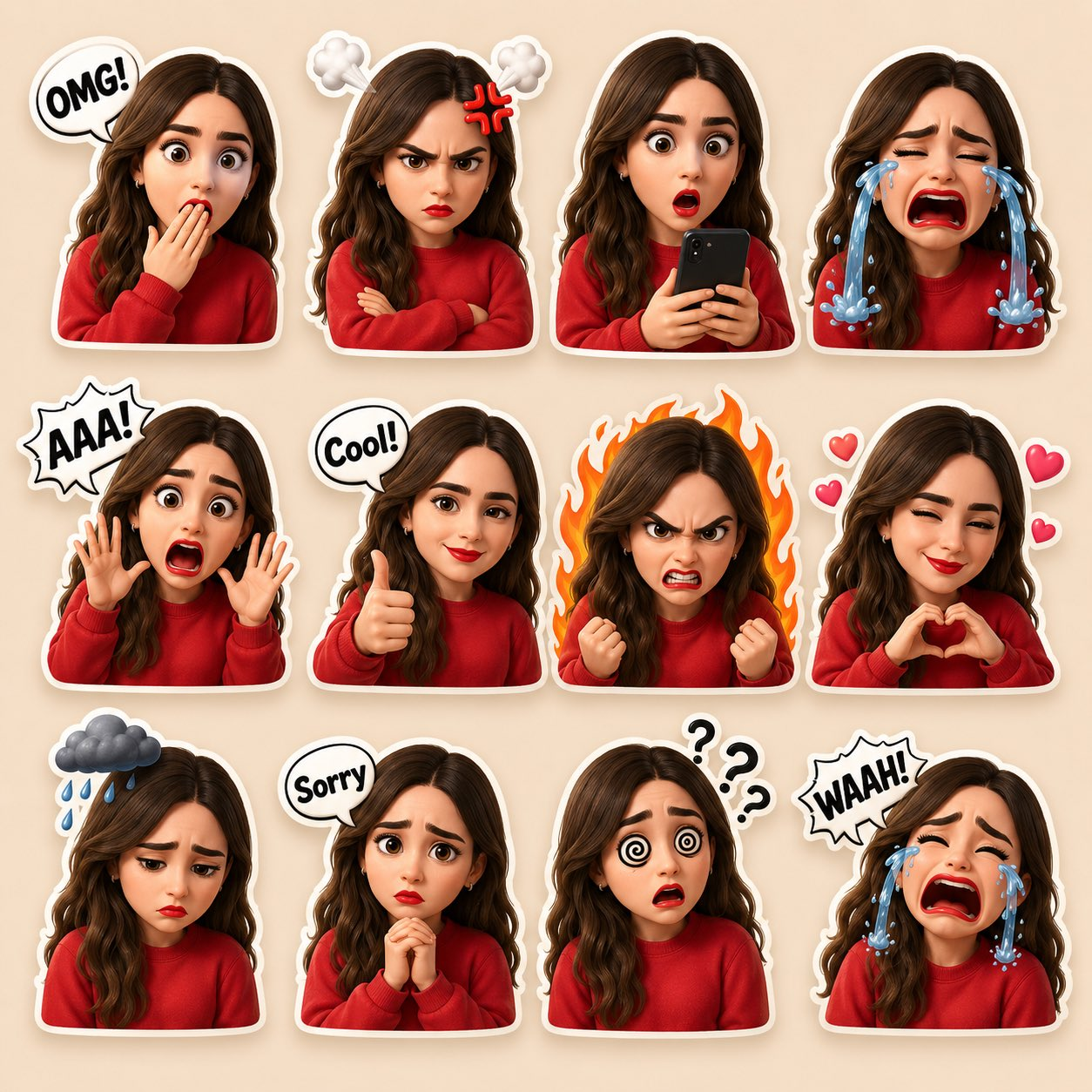
Creators and social media teams using a 3D cartoon sticker pack prompt need it to solve two jobs at once: preserve one recognizable character and make every reaction feel visually distinct. The template below controls identity, expressions, grid layout, sticker outlines, and export requirements so the finished sheet is easier to refine into individual reaction stickers.
Image Examples


Strategic Deployment Guide
Model fit: Upload one clear, approved reference image before generation; use it to lock facial structure, skin tone, hairstyle, hair color, and overall likeness across every sticker panel. Use GPT Image 2 first because it is the closest fit for reference-photo following, glossy 3D character rendering, and compact sticker-grid layout. If identity consistency is weak, use a fallback model only for comparison, keep the same reference image and expression list, and preserve the grid, white outlines, short labels, and consent check.
3D Cartoon Sticker Pack Prompt Code
SUBJECT AND REFERENCE:
Create a high-quality 3D cartoon sticker pack of [reference person or original character] from [your approved reference image]. Preserve the recognizable facial structure, skin tone, hairstyle, hair color, face shape, eye shape, and overall likeness shown in the reference photo. Render the character in a cute Pixar-style 3D cartoon aesthetic, wearing [outfit or color cue]. The same character must appear in every panel.

GRID STRUCTURE AND REACTION MATRIX:
Arrange multiple emotional reactions in a clean sticker-sheet grid with even spacing and separate panels. Include shocked, angry, surprised, crying loudly, screaming, thumbs up, furious, winking, sad, shy, confused, and loudly crying. Each panel should read as a different reaction while preserving the same face, hair, outfit cue, and character consistency. Add cute emoji-style speech bubbles and icons such as [short reaction text], hearts, question marks, anger marks, rain cloud, phone prop, tears, or fire background where appropriate.

STYLE DIRECTION AND VISUAL CONTROLS:
Use a soft warm beige background, white sticker-style outlines, glossy 3D finish, soft shadows, clean studio lighting, centered composition, vibrant colors, rounded cartoon proportions, and polished character-toy materials. Keep the sticker edges readable, keep the grid balanced, and maintain the same gender presentation, facial identity, hairstyle, and eye shape across all panels.

PRODUCTION FORMAT:
Output one high-resolution square sticker-sheet image suitable for cropping into individual reaction stickers, social posts, creator community replies, or merchandise mockups. Keep enough clean space around each sticker for later transparent-background cutting, print review, or export in a design tool. Use a single consistent camera distance, one unified lighting setup, and a production-ready layout that can be separated into individual PNG stickers without rebuilding the character.

NEGATIVE PROMPT:
Avoid random extra faces, identity drift between panels, inconsistent hair color, mismatched outfit colors, distorted hands, broken speech-bubble text, messy grid spacing, harsh background clutter, duplicate reactions, realistic photo skin, low-resolution details, and any panel where the character no longer resembles the approved reference.
Why This Framework Functions
The framework works because it separates identity control from expression variation. The reference image anchors face shape, skin tone, hair, and gender presentation, while the grid section gives the model a controlled list of reactions. The sticker-outline, beige-background, and glossy-render instructions then make the sheet feel like one coherent asset instead of twelve unrelated cartoon heads.
Implementation Steps
- Upload an approved reference image: Provide one clear self portrait, consenting client image, or original character sheet before pasting the prompt. Avoid using a private person, customer, or public figure without a clear usage right.
- Lock the identity fields first: Fill in the reference person, hairstyle, outfit cue, and must-preserve facial details before editing the expression list.
- Keep text short: Use one- or two-word speech bubbles such as OMG, Cool, Sorry, or WAAH because image models still struggle with longer text.
- Review panel consistency: Check whether the face, hair, outfit, and skin tone remain consistent across the whole sheet, not just in the strongest sticker.
- Finish in a design tool: Clean broken letters, crop individual stickers, and export transparent PNGs in Photoshop, Figma, Canva, or another editor if the sheet will be used commercially.
Application Scenarios
- Creator reaction packs: Turn a creator portrait into reusable stickers for community posts, Discord, Telegram, or YouTube thumbnails.
- Brand mascot sheets: Adapt an original mascot or spokesperson character into multiple emotions for launch graphics and social replies.
- Client mockups: Show a client how one approved character could become a full reaction system before commissioning final illustration work.
- Merchandise planning: Test sticker expressions, outlines, and color treatments before preparing print-ready files or product listings.
Why This Prompt Works
This prompt works because it asks for a sticker sheet, not a single portrait. That output format forces the model to repeat one identity under different emotional states, which is exactly the hard part of a 3D cartoon sticker pack prompt. The added negative constraints protect the grid from common failures: random bonus faces, inconsistent hair, unreadable text, and reactions that stop matching the reference.
Troubleshooting & Optimization
- The face changes between panels: Append same face in every sticker, identical hairstyle, same skin tone, one consistent character model sheet.
- The grid becomes messy: Append clean 3 by 4 sticker grid, equal spacing, no overlapping panels, each reaction inside its own sticker outline.
- The speech bubbles break: Replace long phrases with short labels, then fix final lettering manually in Figma or Photoshop.
- The output looks too realistic: Append cute 3D cartoon toy finish, rounded facial features, glossy sticker surface, soft studio lighting.
- The likeness feels uncomfortable: Stop and switch to an original character, mascot, or consented portrait instead of pushing the model closer to a real person.
Common Questions
- Q: What is a 3D cartoon sticker pack prompt?
A: It is a reusable image prompt that turns one approved reference portrait or character into a grid of cute 3D reaction stickers with consistent identity, sticker outlines, and short emotion labels. - Q: Can I use it with any face photo?
A: Use your own photo, a client-approved image, or an original character reference. For real people, especially public figures or private individuals, consent and usage rights matter more than prompt quality. - Q: Why do some panels lose the same identity?
A: Multi-expression grids ask the model to solve likeness, pose, text, and layout at once. Reduce extra props, repeat the same identity anchors, and regenerate until the full sheet stays coherent.
Use this prompt with an approved portrait or an original character, then compare identity consistency across the full sheet before exporting individual stickers.
Explore more reusable visual prompts in Image & Design or Fun & Creative.
Share what you build in the comments, and follow @bigprompt on X for more reusable visual systems.
Related Big Prompt Hub pages:
Real Object Cartoon Prompt: Photographed Props Meet Doodle Characters
Handcrafted Wool Miniature Prompt: Needle-Felted Portraits and Pets
TV Show Pixar-Style Poster Prompt: Animated One-Sheet Reimagining
Sketchbook Character Prompt Pages for City Personas
TV Show Miniature Diorama Prompt: Iconic Sets as Scale Models
Big Prompt Hub Review
This is a strong prompt for building a reaction-sticker system because it separates identity anchors, expression choices, grid structure, rendering style, and export requirements. Its weak point is generated lettering: short labels may still need manual cleanup, and a twelve-panel sheet can drift if too many props are added. Use an approved likeness or an original character, review every panel for consistency, and finish the final text and transparent cutouts in a design tool.