
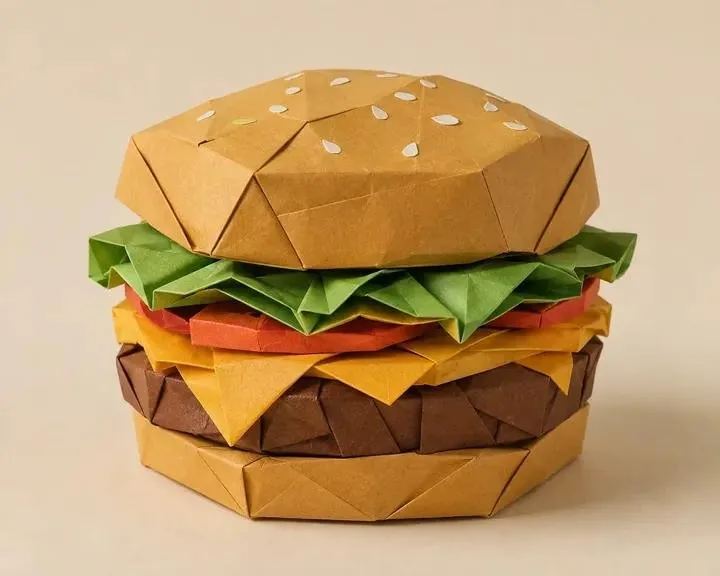
Product designers and visual creators need a 3D origami papercraft prompt that turns familiar subjects into tactile, folded studio assets. This reusable template controls the subject, two paper colors, decorative details, accessories, and backdrop while preserving crisp low-poly folds, layered construction, and realistic paper texture.
Image Examples


Strategic Deployment Guide
Model fit: Use ChatGPT image generation first because the prompt separates editable fields from fixed material and lighting instructions. A capable multimodal image model such as Gemini can serve as a fallback. Keep the seven variables intact when moving between models.
Best fit
Use this template for product concepts, food illustrations, mascots, collectible objects, and campaign props that should look assembled from folded paper rather than modeled in plastic or clay. It works especially well when the subject has a clear silhouette and several separable layers.
Control strategy
Change the seven highlighted variables first. Keep the paper construction, lighting, texture, and centered composition fixed until the subject reads correctly. This preserves a coherent visual system across a series while still allowing each asset to use a different object, palette, or accessory set.
3D Origami Papercraft Prompt Code
Create a minimalist 3D origami papercraft studio render of a [SUBJECT] in a [PRIMARY COLOR] and [SECONDARY COLOR] paper design, featuring clean geometric low-poly folds and layered paper construction. Include [TOPPING/DETAILS], [ACCESSORY 1], and [ACCESSORY 2] with matching papercraft styling. Place it against a seamless [BACKGROUND COLOR] studio backdrop with soft directional lighting, subtle shadows, crisp edges, and a premium handcrafted paper aesthetic. Highly detailed, realistic paper texture, centered composition, studio-quality render.Implementation Steps
- Choose a readable subject: Start with an object, character, or food form whose silhouette remains recognizable after it is reduced to folded planes. Lock the composition around that silhouette before adding secondary parts.
- Build a two-color palette: Assign the primary color to the largest paper surfaces and the secondary color to bands, trim, filling, or structural accents. Strong value separation helps adjacent folds stay visible.
- Describe details as paper parts: Fill the topping and accessory fields with concrete components that can be folded, rolled, cut, or layered. “Folded paper berries” is easier to interpret than “beautiful garnish.”
- Keep accessories subordinate: Use one or two supporting objects that reinforce the subject without competing with its silhouette. Place them with clear spacing so the studio layout remains centered and readable.
- Select a quiet backdrop: Choose a background color that separates the subject from its edges. Warm neutrals support handcrafted work, while a muted complementary color can add campaign contrast.
- Review material fidelity: Check that large surfaces show fibers, seams, creases, cut edges, and plausible layer thickness. Use Photoshop post-processing only for small edge cleanup or palette alteration; regenerate if the basic construction is wrong.
Application Scenarios
- Food and beverage campaigns: Convert drinks, desserts, burgers, or snack packaging into playful editorial key art with a consistent folded-paper finish.
- Product concept visuals: Render cameras, shoes, bottles, toys, or gadgets as tactile paper sculptures for moodboards, launch teasers, and social posts.
- Character and mascot campaign assets: Apply the same palette and construction language to animals or brand mascots so a campaign series feels related.
- Editorial art assets: Turn an everyday object into a clean isolated visual that can sit beside an article, slide, newsletter, or educational panel.
- Studio production direction: Give a physical paper artist a clear visual target, while treating the rendered folds as inspiration rather than a guaranteed buildable template.
Why This Prompt Works
The prompt separates variable creative decisions from a stable rendering system. Subject, palette, decorative details, accessories, and background can change, but every output keeps the same low-poly fold language, layered paper construction, studio light, centered framing, and tactile surface cues.
Its material instructions reinforce one another. “Origami,” “papercraft,” “geometric folds,” “layered paper,” “crisp edges,” and “realistic paper texture” all point toward a physical paper object. That repetition is useful because image models often interpret a single material word as a loose visual reference rather than a construction rule.
The studio backdrop and directional lighting also solve a practical problem: they reveal each folded plane without introducing environmental clutter. Subtle shadows describe layer depth, while the centered composition keeps the asset suitable for product cards, campaign crops, and presentation layouts.
Troubleshooting & Optimization
- If the result looks like plastic: Append “every visible component is cut, folded, rolled, or layered from matte paper with visible fibers.” Remove words that imply glossy, liquid, chrome, or molded surfaces.
- If folds become visual noise: Replace the detail field with “two large folded-paper accents” and add the phrase “larger geometric planes with clear separation between layers.”
- If the silhouette is unclear: Rewrite the subject as one unmistakable noun plus two defining parts, then append “accessories remain outside the main silhouette.”
- If accessories look realistic or the output becomes a flat template: Append “matching folded-paper construction with visible creases and cut edges; show a finished assembled studio sculpture, not a printable net.”
FAQ
- Q: What does this 3D origami papercraft prompt create?
A: It creates a studio render of a finished subject assembled from faceted, layered paper. It is designed for visual concepts and illustrations, not printable construction plans. - Q: Which variables should I change first?
A: Start with the subject and the two paper colors. Then add a defining topping or detail, two supporting accessories, and a background color that preserves edge contrast. - Q: Can I use the template for non-food subjects?
A: Yes. The milkshake and burger are examples only. The same structure can render products, characters, animals, toys, flowers, or household objects. - Q: How do I keep a series visually consistent?
A: Keep the paper construction, lighting, composition, and backdrop treatment fixed. Change only the subject, palette, and scene-specific details across the series.
Use this prompt to generate your version? Share the result in the comments.
Explore more? View Image & Design or Prompt Engineering Guides.
I hope you found this 3D origami papercraft AI prompt helpful.
Follow @bigprompt for more prompts and workflow systems.
Related Big Prompt Hub pages:
Turn travel photos into sparse editorial abstraction artwork
Run cross-platform username investigations with the Sherlock skill
Build detailed scientific botanical illustration study plates
Create layered paper postcard dioramas for travel scenes
Design fixed-layout bilingual English reading infographic worksheets
Big Prompt Hub Review
This is a compact, reusable visual prompt with unusually clear material controls. Its seven variables are enough to produce a broad series without weakening the folded-paper identity, and the supplied burger and milkshake demonstrate that it can handle both stacked and cylindrical forms. The main limitation is structural realism: convincing imagery does not guarantee that the object can be built from actual paper. Use it for art direction and studio-style assets, then involve a paper engineer if the result must become a physical model.