
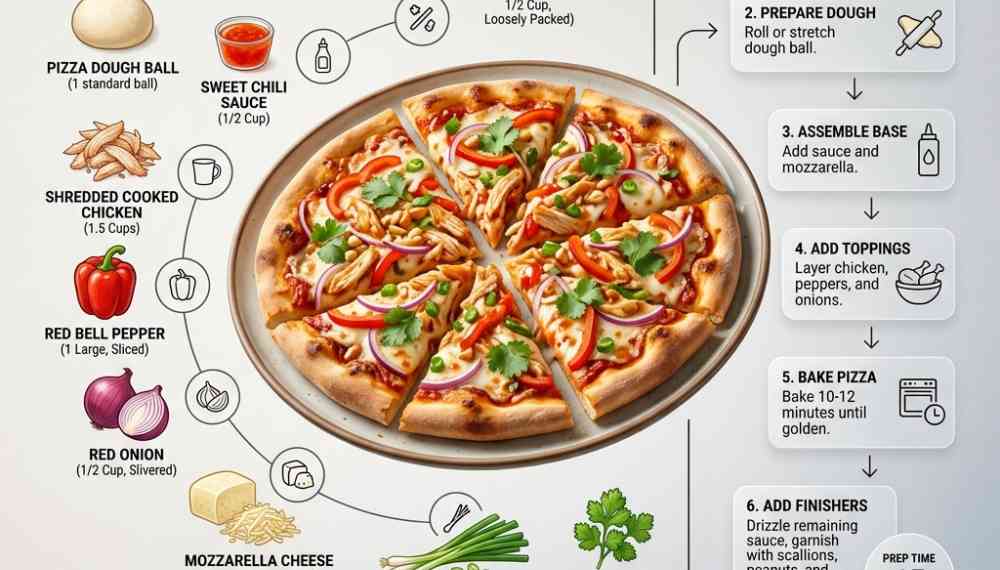
This recipe infographic template prompt organizes a finished dish, ingredient groups, and cooking steps into a structured editorial layout. Fixed visual roles, information badges, and negative space guidelines stabilize composition, helping image models generate consistent recipe graphics for publishing, restaurant marketing, and social media use.
Image Examples
Gemini vs ChatGPT
1. Generate using Gemini

2. Generate using ChatGPT

Quick Start
Model fit: ChatGPT, Gemini, Midjourney and similar models.
Replace “[Dish Name]” with the target recipe to generate a complete editorial recipe infographic.
Recipe Infographic Template Prompt Code
Ultra-clean modern recipe infographic.

Showcase "[Dish Name]" in a visually appealing finished form—sliced, plated, or portioned—floating slightly in perspective or angled view.

Arrange ingredients, steps, and tips around the dish in a dynamic editorial layout, not restricted to top-down.

Ingredients Section:
Include icons or mini illustrations for each ingredient with quantities.
Arrange them in clusters, lists, or circular flows connected visually to the dish.

Steps Section:
Show preparation steps with numbered panels, arrows, or lines, forming a logical flow around the main dish.
Include small cooking icons (knife, pan, oven, timer) where helpful.

Additional Info (optional):
Total calories, prep/cook time, servings, spice level—displayed as clean bubbles or badges near the dish.

Visual Style:
Editorial infographic meets lifestyle food photography.
Vibrant, natural food colors, subtle drop shadows, clean vector icons, modern typography, soft gradients or glassmorphism for step panels.
Accent colors can highlight key info, such as calories and prep time.

Composition Guidelines:
Finished meal as hero visual, in perspective or angled view.
Ingredients and steps flow dynamically around the dish.
Clear visual hierarchy:
dish > steps > ingredients > optional stats.
Enough negative space to keep the design airy and readable.

Lighting & Background:
Soft, natural studio lighting.
Minimal textured or gradient background for premium editorial feel.

Output:
1080×1080.
Ultra-crisp.
Social-feed optimized.
No watermark.
Why This Framework Functions
The hero dish instruction establishes a fixed visual anchor before secondary elements enter the composition. Ingredient clusters and numbered preparation panels organize supporting information into predictable regions, while information badges isolate recipe data from the food subject. Negative space guidelines bypass crowded layouts, and the square output specification stabilizes visual balance, helping the same framework adapt to different recipes without losing editorial consistency.
How to Use
- Replace “[Dish Name]” with the target recipe.
- Keep one finished dish as the hero subject.
- Group ingredients around the main composition.
- Arrange cooking steps in numbered panels.
- Export the final layout at 1080×1080.
Use Cases
Social media recipe graphics
- Instagram recipe carousel graphics
- Pinterest cooking guide layouts
Food publishing layouts
- Digital cookbook page designs
- Editorial food magazine features
Restaurant marketing visuals
- Menu promotion graphics
- Signature dish presentation boards
Why This Prompt Works
This prompt assigns fixed roles to every major visual element instead of leaving composition to random generation. The hero dish controls focal priority, ingredient clusters control supporting information, and numbered panels control action order.
The layout combines structural constraints with semantic grouping, reducing visual drift across different recipes. Few-shot design patterns emerge from repeated layout relationships, while constraint satisfaction keeps badges, icons, and text blocks from competing with the food subject.
Common Mistakes & Fix
- Too many ingredient icons → Keep supporting elements secondary to the hero dish.
- Step panels overlap the food subject → Increase negative space around the composition.
- Information badges dominate the layout → Reduce badge size and visual weight.
- Multiple focal points compete → Maintain a single hero subject.
FAQ
- Q: What is a recipe infographic template prompt?
A: A recipe infographic template prompt provides a reusable layout structure that combines a finished dish, ingredient groups, cooking steps, and optional recipe statistics inside one editorial graphic.
- Q: How do I customize this template?
A: Replace “[Dish Name]” with the target recipe, adjust ingredient quantities, modify the number of cooking steps, and update optional badges such as calories or preparation time.
- Q: Which AI models support this layout?
A: ChatGPT, Gemini, Midjourney, and similar image models can use this structure because it clearly defines subject hierarchy, composition rules, visual style, and output specifications.
Use this prompt to generate your version? Share in the comments or on Twitter!
Explore more? View the Image & Design or Fun & Creative category.
I hope you found this recipe infographic template AI prompt helpful.
Follow me @bigprompt for more.
Like/Repost if you can this prompt.
Internal link:
Everyday Props Become the Punchline in a Real Object Cartoon Prompt
Run a Frontend UI Workflow with AI Prompts
AI Web Design Skills for Homepages, Navigation, and CTA Flow
AI Design Skills Guide for Research, Critique, and Systems Thinking
Create TV Show Miniature Diorama Prompt Scenes
Big Prompt Hub Review
This prompt demonstrates strong structural discipline by assigning fixed responsibilities to the hero dish, ingredient groups, cooking workflow, and optional statistics. Its parameter design supports reliable variation without changing the underlying layout logic, allowing the same framework to scale across restaurant marketing, cookbook publishing, food blogs, and social media graphics with minimal adjustment.